Claude.ai MCP Server (Self-hosted)
Servidor MCP autoalojado para Claude.ai. Dale a Claude acceso directo a tu AWS, SSH, shell local, GitHub, PostgreSQL y PM2 — sin Claude Code. Tus claves nunca salen de tu máquina.
Documentación
mcp-server
Servidor MCP autoalojado para Claude.ai
Dale a Claude acceso directo a tu cuenta de AWS, conéctate por SSH a tus servidores, ejecuta comandos de shell en tu laptop, consulta tus bases de datos y gestiona procesos PM2 — todo desde un chat de Claude. No necesitas suscripción a Claude Code. Tus claves nunca salen de tu máquina.
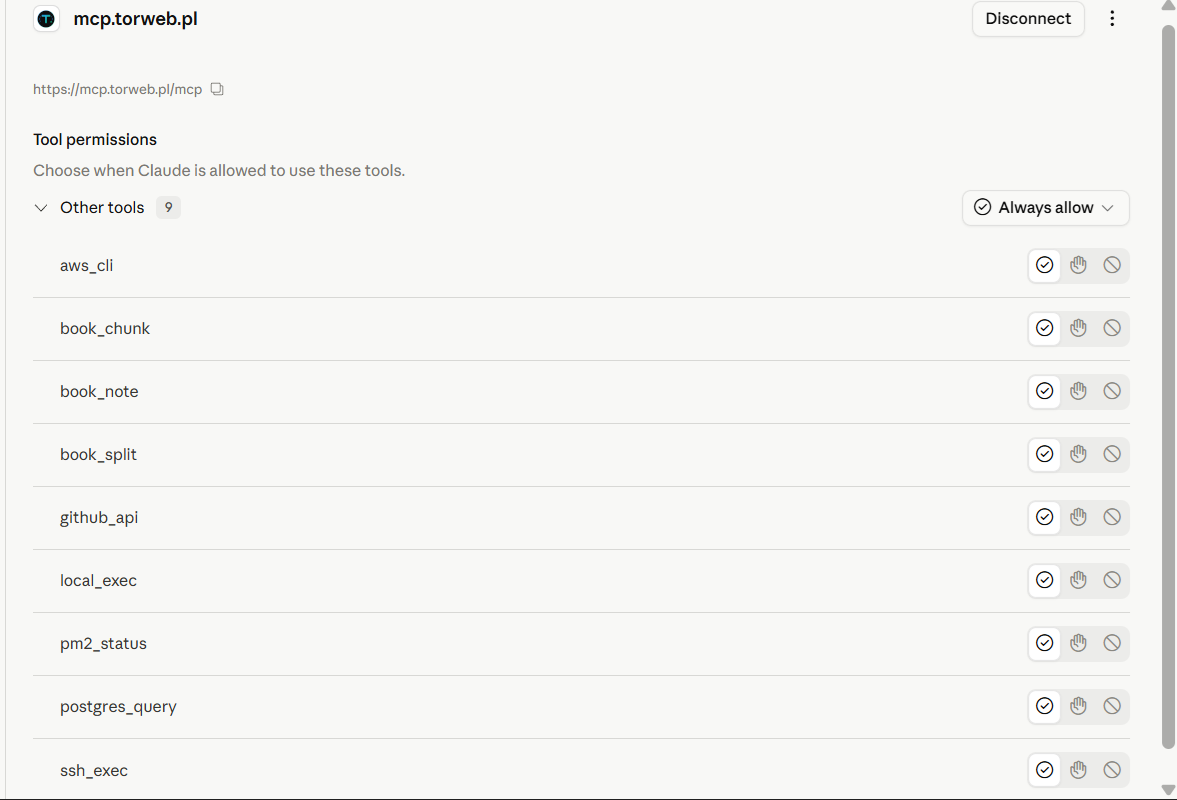
Las 10 herramientas viven en la barra lateral de Claude.ai — sin instalación de Desktop, sin cliente separado, solo un conector personalizado.


¿Qué es esto?
Un pequeño servidor MCP de Node.js que ejecutas en tu propia máquina (laptop, escritorio, VPS) y conectas a Claude.ai (o cualquier cliente MCP) como Conector Personalizado. Expone un conjunto configurable de herramientas que permiten a Claude hacer trabajo real en tu infraestructura:
- Ejecutar comandos de AWS CLI usando tu perfil local
- Conectarte por SSH a tus servidores usando tus claves
.pem - Ejecutar comandos de shell en tu máquina local
- Escribir archivos directamente en tu disco local (UTF-8 completo, sin problemas de comillas de shell)
- Usar la API REST de GitHub con tu Token de Acceso Personal
- Consultar bases de datos PostgreSQL en hosts remotos vía SSH
- Inspeccionar procesos PM2 en servidores remotos
- Iterar sobre documentos muy largos (edición de libros) que exceden la ventana de contexto
Arquitectura:
  Claude.ai  ──HTTPS──►  nginx + cert  ──HTTP──►  frps  ──tunnel──►  frpc + node
   (cloud)               on a VPS         :8080    (vhost)            (your PC)
                                                                          │
                                ┌───────────────┬───────────────┬─────────┼─────────┐
                                ▼               ▼               ▼         ▼         ▼
                            AWS CLI       ssh -i *.pem      cmd.exe    psql via   pm2 list
                            (local)       user@host         git/npm      SSH      (remote)
Las claves SSH, el PAT de GitHub y las credenciales de AWS nunca salen de tu máquina local. El túnel solo transporta solicitudes MCP y sus resultados.
¿Por qué autoalojar esto?
El ecosistema MCP hoy hace principalmente dos cosas:
- Servidores MCP como paquetes npm que se ejecutan vía
stdioy requieren Claude Desktop. - Servicios MCP alojados detrás de la autenticación y límites de API de otra persona.
Este proyecto es la tercera opción: tu propio servidor MCP, tus claves, tus servidores, accesible desde Claude.ai web (donde ya trabajas). Es un único archivo server.js de ~1000 líneas que puedes leer completo en 20 minutos y extender en 5.
Características destacadas:
- ✅ No necesitas suscripción a Claude Code — funciona con Claude.ai regular (web)
- ✅ OAuth 2.1 con PKCE — integración adecuada con Claude.ai, no un truco improvisado
- ✅ Tus claves siguen siendo tuyas — claves SSH, PATs de GitHub, credenciales de AWS nunca salen de tu máquina
- ✅ Autoalojable — Windows, Linux, Mac, cualquier cosa que ejecute Node 18+
- ✅ Configurable vía JSON — agrega un nuevo servidor o nueva clave sin tocar código
- ✅ Un solo archivo para leer — sin magia de frameworks, sin configuración oculta
- ✅ OAuth reforzado — PKCE S256, aplicación de
client_secret, rotación de tokens de refresco, revocación RFC 7009, lista de permisos de IP dinámica con auto-inscripción, anti-clickjacking
Herramientas
| Herramienta | Qué hace |
|---|---|
aws_cli | Ejecuta cualquier aws <command> usando tu perfil local de AWS CLI |
ssh_exec | Conéctate por SSH a cualquier host usando una clave definida en hosts.json |
local_exec | Ejecuta cualquier comando de shell en la máquina local (cmd.exe en Windows, /bin/sh en otros) |
write_file | Escribe contenido de texto en un archivo local (sobrescribir o añadir). UTF-8 completo, sin problemas de comillas de shell — preferido sobre local_exec para cualquier escritura de archivo no trivial |
github_api | Haz solicitudes de API REST a GitHub usando tu Token de Acceso Personal |
postgres_query | Ejecuta consultas psql vía SSH (sudo -u postgres) en un host desde hosts.json |
pm2_status | Muestra pm2 list y registros opcionales en un servidor remoto |
sftp_download | Transmite un archivo desde un host remoto al sistema de archivos local (usa el pool SSH persistente). Esencial cuando trabajas desde Claude.ai web — el sandbox en la nube no tiene scp nativo |
sftp_upload | Transmite un archivo local a un host remoto. Bandera opcional de modo POSIX (ej. 0755). El directorio padre debe existir en el remoto |
book_split | Divide un archivo de texto grande en fragmentos de ~3000 palabras |
book_chunk | Lee un fragmento de un directorio creado por book_split |
book_note | Gestiona notas JSON para trabajo iterativo en documentos largos |
Vélo en acción
Ejemplos reales de un chat real de Claude.ai usando este servidor MCP.
Instantánea de salud del servidor vía SSH
"Conéctate por SSH a mi servidor matury y muéstrame: uso de disco (df -h), uso de memoria (free -h) y tiempo de actividad. Usa un solo comando y presenta la salida de forma ordenada."
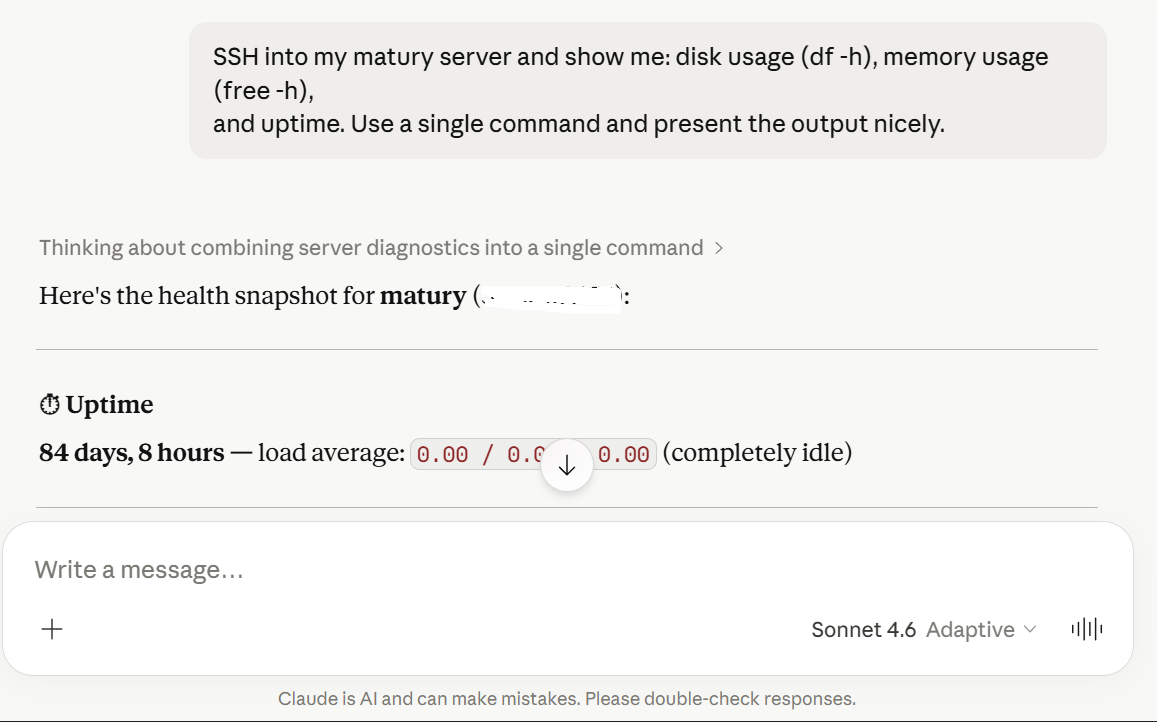
Claude compone un solo comando SSH, analiza la salida de múltiples secciones y muestra disco, memoria y tiempo de actividad como una instantánea limpia con los números clave resaltados.
Listar instancias EC2 en cualquier región
"Usando AWS CLI, lista todas mis instancias EC2 en eu-central-1 con sus IDs, tipos y estado. Formatea el resultado como una tabla limpia."
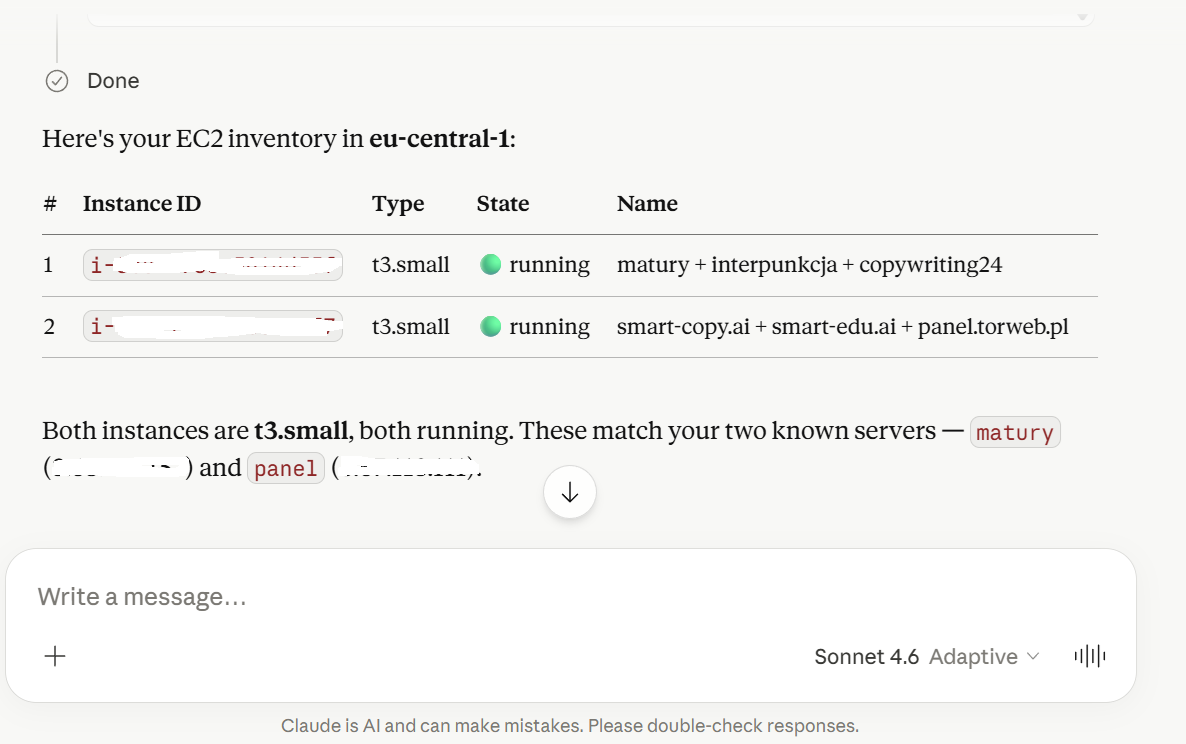
Claude llama a aws_cli con un filtro describe-instances --query ..., luego analiza el JSON y lo muestra como una tabla markdown con indicadores de estado en ejecución/detenido.
Consultar bases de datos PostgreSQL vía SSH
"Ejecuta una consulta SQL en mi base de datos PostgreSQL 'panel' para contar el total de usuarios, luego en la base de datos 'smart_edu' cuenta las filas en la tabla de usuarios, y dime cómo está mi sistema."
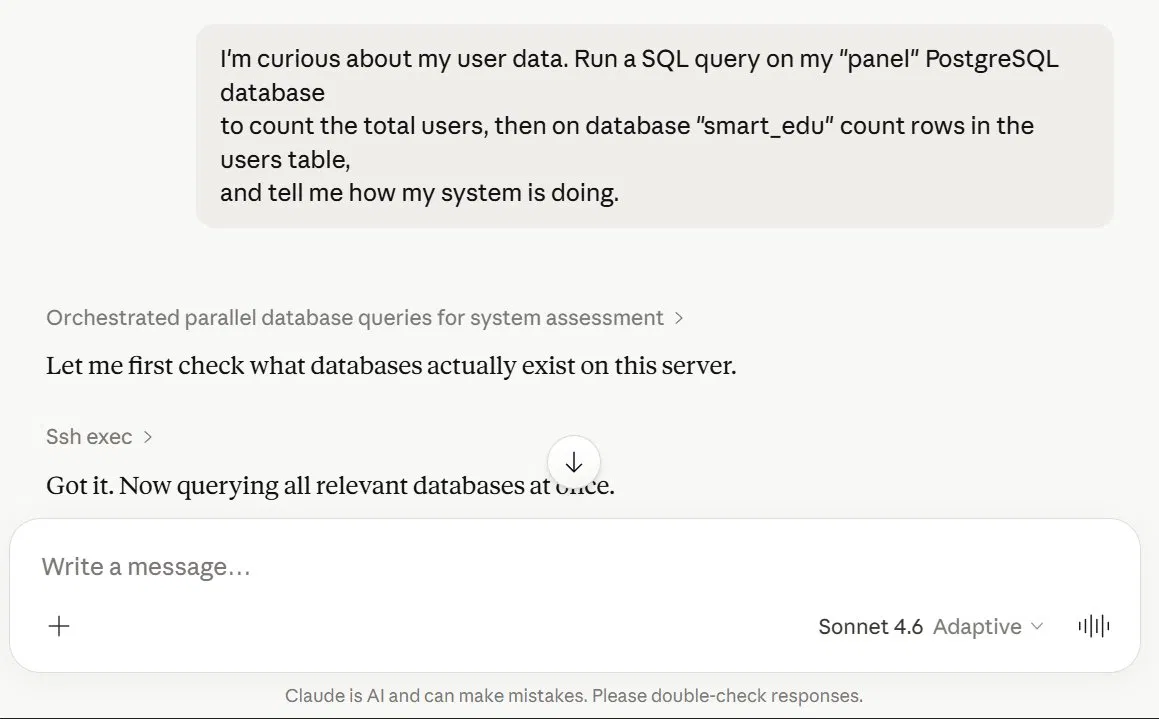
Dos herramientas trabajan juntas aquí: ssh_exec para enumerar bases de datos cuando la primera suposición falla, luego postgres_query contra la correcta.
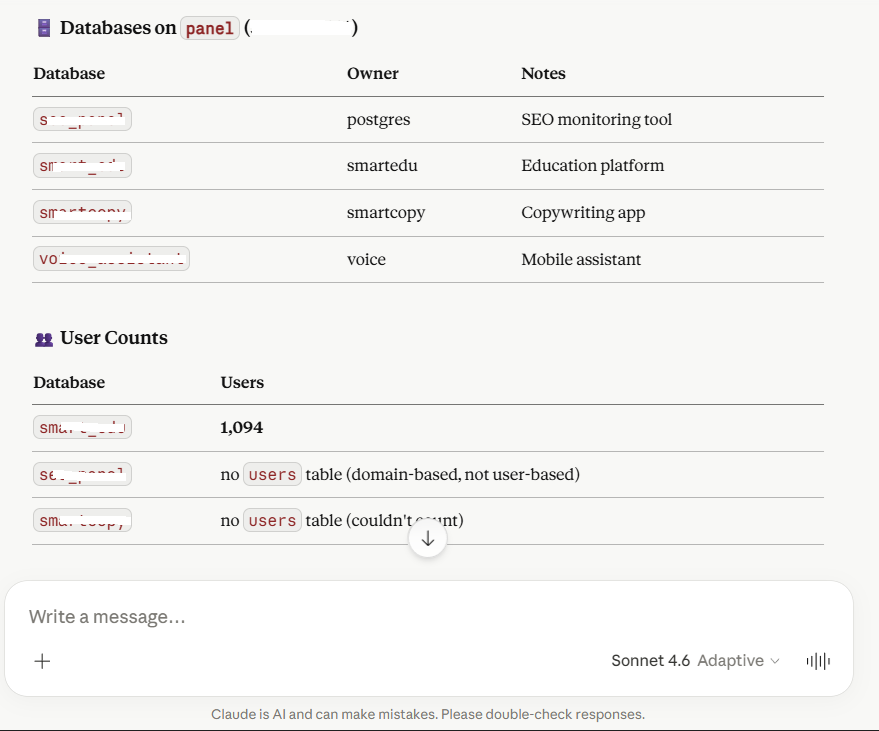
Claude lista cada base de datos en el host, identifica las que tienen una tabla users, y ejecuta consultas COUNT(*) en paralelo.
Requisitos
- Node.js 18+ (probado en 22, 24, 25)
- Claves SSH
.pemlocalmente (para los hosts que quieras controlar) - AWS CLI configurado localmente (
aws configure) — solo si usas la herramientaaws_cli - Un endpoint HTTPS público — solo si quieres exponer esto a Claude.ai
Inicio rápido
git clone https://github.com/LeszczynskiKarol/mcp-server.git
cd mcp-server
npm install
cp .env.example .env                # fill in MCP_PASS and MCP_BASE_URL
cp hosts.example.json hosts.json    # add your servers
node server.js
Deberías ver:
Loaded N hosts and M keys from ./hosts.json
MCP server: my-mcp-server
Port: 4500
Static IP allowlist: (none)
Auto-enroll: enabled (TTL 30 days)
Trust proxy: false
MCP listening on :4500
Eso es todo para local. Para usarlo desde Claude.ai (web), necesitas exponerlo vía HTTPS — consulta Exposición pública abajo.
Configuración
.env (secretos — nunca los confirmes)
# REQUIRED
MCP_USER=admin
MCP_PASS=<long password, min 20 chars>
MCP_BASE_URL=https://your-domain.com

# OPTIONAL — GitHub integration
GITHUB_TOKEN=github_pat_xxxxxxxxxxxxxxxx
GITHUB_OWNER=YourGitHubUsername

# OPTIONAL — server tuning
PORT=4500
TOKEN_TTL_SECONDS=2592000      # 30 days
AUTH_CODE_TTL_SECONDS=600      # 10 minutes
CLIENT_TTL_SECONDS=7776000     # 90 days (unused-client cleanup)
EXEC_BUFFER_MB=10
EXEC_TIMEOUT_SECONDS=120       # per-command timeout
MCP_SERVER_NAME=my-mcp-server
HOSTS_CONFIG=./hosts.json
OAUTH_STATE_FILE=./oauth-state.json

# OPTIONAL — IP allowlist (security)
# Comma-separated static IPs/CIDRs that are always allowed.
# Leave empty if you only want auto-enroll via OAuth login.
MCP_ALLOWED_IPS=
# Trust X-Forwarded-For — use "loopback" when behind FRP/nginx on the same box.
# Other valid values: comma-separated list of trusted proxy IPs/CIDRs, "false"
# (default), or "true" (rejected in production — would let any client spoof XFF).
MCP_TRUST_PROXY=loopback
# Auto-enroll the requesting /24 subnet to allowlist after a successful OAuth login
MCP_AUTO_ENROLL=true
# How long an auto-enrolled subnet stays on the allowlist (default 30 days)
MCP_ENROLL_TTL_SECONDS=2592000
hosts.json (lista de servidores — nunca la confirmes)
{
  "hosts": {
    "production": {
      "ip": "1.2.3.4",
      "user": "ubuntu",
      "key": "main",
      "description": "Main production server"
    },
    "staging": {
      "ip": "5.6.7.8",
      "user": "ubuntu",
      "key": "main",
      "description": "Staging environment"
    }
  },
  "keys": {
    "main": "/path/to/main.pem"
  }
}
Las rutas clave pueden usar:
- Rutas absolutas:
D:/keys/server.pemoD:\\keys\\server.pem - Expansión de tilde:
~/keys/server.pem(resuelto a$HOME/%USERPROFILE%) - Las barras diagonales funcionan en Windows también
Exposición pública (Claude.ai)
Claude.ai requiere HTTPS. La configuración recomendada usa FRP (Fast Reverse Proxy) + nginx + Let's Encrypt en un VPS pequeño.
1. Registro DNS
mcp.your-domain.com A <VPS_IP> TTL 300
2. Vhost de nginx en el VPS
/etc/nginx/sites-available/mcp.your-domain.com:
server {
    server_name mcp.your-domain.com;
    location / {
        proxy_pass http://127.0.0.1:8080;
        proxy_set_header Host $host;
        proxy_set_header X-Real-IP $remote_addr;
        proxy_set_header X-Forwarded-For $proxy_add_x_forwarded_for;
        proxy_set_header X-Forwarded-Proto $scheme;

        # SSE / long-lived MCP connections
        proxy_http_version 1.1;
        proxy_set_header Connection "";
        proxy_buffering off;
        proxy_read_timeout 3600s;
        proxy_send_timeout 3600s;
    }
    listen 80;
}
sudo ln -s /etc/nginx/sites-available/mcp.your-domain.com /etc/nginx/sites-enabled/
sudo nginx -t && sudo systemctl reload nginx
sudo certbot --nginx -d mcp.your-domain.com
3. Servidor FRP (frps) en el VPS
/etc/frp/frps.toml:
bindPort = 7000
vhostHTTPPort = 8080
auth.method = "token"
auth.token = "<shared token>"
4. Cliente FRP (frpc) en tu máquina local
frpc-mcp.toml:
serverAddr = "<VPS_IP>"
serverPort = 7000
auth.method = "token"
auth.token = "<shared token from frps>"

[[proxies]]
name = "mcp"
type = "http"
localPort = 4500
customDomains = ["mcp.your-domain.com"]
5. Agrega el conector en Claude.ai
- Abre Configuración → Conectores → Agregar conector personalizado
- URL:
https://mcp.your-domain.com/mcp(¡con el sufijo/mcp!) - ID de Cliente OAuth/Secreto: déjalo vacío
- Haz clic en Conectar → aparece un formulario de inicio de sesión → ingresa
MCP_USERyMCP_PASSde tu.env - En un chat:
+→ Conectores → activa este MCP → inicia una nueva conversación (las herramientas se adjuntan al inicio del chat)
La primera solicitud desde una nueva IP activará un re-inicio de sesión OAuth, que agrega tu subred /24 a la lista de permisos por 30 días. Esto es intencional — consulta Seguridad.
Preferencias recomendadas de Claude.ai
Incluso con las herramientas correctas instaladas, Claude a veces desperdicia tokens en modos de falla comunes: releer archivos después de escribirlos, copiar archivos al sandbox "para editarlos", mentir diciendo que un archivo está en disco cuando solo se creó un artefacto.
CLAUDE_PREFERENCES.md es un conjunto curado de preferencias de usuario que cierra esos vacíos. Pégalas en Configuración -> Perfil -> Preferencias personales en Claude.ai. Están probadas en batalla contra los modos de falla exactos que motivaron escribir algunas de las herramientas en este servidor (especialmente write_file).
Cubre, entre otras cosas:
- Jerarquía de herramientas de archivo: siempre
write_filepara archivos nuevos, PowerShell para ediciones quirúrgicas, nunca fragmentos base64 a través de cmd.exe - "Confía en la escritura" — no releas un archivo solo para confirmar que se guardó
- Aislamiento del sandbox — el sandbox de bash no tiene acceso a tu disco local; no lo puentees vía hosts de archivos públicos (uguu.se, transfer.sh, etc.)
- Artefactos vs. escrituras de archivos MCP — los mosaicos "Archivo creado" en la interfaz del chat NO se guardan en tu disco
- Regla de contenido crudo — el contenido
write_filedebe ser crudo, no escapado como JSON - Límites anti-bucle — detente después de 3 fallas en el mismo problema
- Manejo de caracteres no ASCII en Windows (problema de página de códigos
cmd.exe)
Ejecución en Windows
El autoinicio recomendado en Windows usa Programador de tareas + un pequeño .bat con un bucle de reinicio. PM2 solía ser la recomendación pero actualmente es incompatible con el manejo de named-pipes de Node 25 (EPERM \\.\pipe\rpc.sock), por lo que el proyecto ha cambiado al Programador de tareas simple.
Instalación de una sola vez
Después de que .env y hosts.json estén en su lugar, ejecuta como administrador:
install-task.bat
Este es un pequeño envoltorio por lotes alrededor de install-task.ps1. El script de PowerShell:
- Genera
start-mcp-hidden.vbs(para que la ventanacmd.exepermanezca oculta). - Genera
mcp-task.generated.xmlcon%USERDOMAIN%\%USERNAME%completado — nada codificado. - Registra una entrada del Programador de tareas llamada MCP Server que se ejecuta en cada inicio de sesión con privilegio
HighestAvailable.
La acción de la tarea es wscript.exe "...\start-mcp-hidden.vbs", que lanza silenciosamente start-mcp.bat. Ese lote mantiene node vivo con un bucle de reinicio:
@echo off
cd /d D:\mcp-server
if not exist logs mkdir logs
:loop
node server.js >> logs\mcp.log 2>&1
echo [%date% %time%] node exited, restarting in 5s >> logs\mcp.log
timeout /t 5 /nobreak >nul
goto loop
Comandos útiles:
schtasks /run /tn "MCP Server"            :: start now
schtasks /query /tn "MCP Server" /v /fo LIST  :: status
schtasks /delete /tn "MCP Server" /f      :: uninstall
tasklist | findstr node.exe               :: check that node is alive
type D:\mcp-server\logs\mcp.log           :: read the log
Para reiniciar después de editar server.js:
taskkill /F /IM node.exe /T
El :loop en start-mcp.bat reiniciará node dentro de 5 segundos.
Autoinicio del túnel FRP
El túnel es separado del servidor MCP. La configuración más simple es un start-mcp.bat (archivo diferente en un directorio diferente) que solo lanza frpc:
@echo off
cd /d C:\Users\YourUser\frp\frp_0.61.1_windows_amd64
start "FRP tunnel mcp" /min frpc.exe -c frpc-mcp.toml
Agrégalo al Programador de tareas de la misma manera (Al iniciar sesión, privilegios más altos), o colócalo en shell:startup.
Sin autoinicio
Si solo quieres ejecutar node manualmente para desarrollo:
cd /d D:\mcp-server
node server.js
Ctrl+C para detener.
Extensión
Agregar un nuevo host
Edita hosts.json:
{
  "hosts": {
    "production": {},
    "new-server": {
      "ip": "5.6.7.8",
      "user": "ubuntu",
      "key": "main",
      "description": "New server"
    }
  }
}
El servidor lee hosts.json al arrancar, así que mata node (taskkill /F /IM node.exe /T) y el bucle de reinicio tomará la nueva configuración en 5 segundos. En Claude.ai, desconecta y reconecta el conector para que vea el nuevo host en el menú desplegable del parámetro host.
Agregar una nueva clave SSH
{
  "keys": {
    "main": "/path/to/main.pem",
    "client-x": "~/keys/client-x.pem"
  }
}
Agregar una nueva herramienta
En server.js:
server.tool(
  "your_tool_name",
  "Clear description of when Claude should use this tool",
  {
    param: z.string().describe("what this parameter does"),
  },
  async ({ param }) => {
    // your logic here
    return { content: [{ type: "text", text: "result" }] };
  },
);
Después de guardar, taskkill /F /IM node.exe /T para que el bucle de reinicio detecte el cambio. Desconecta y reconecta el conector en Claude.ai para ver la nueva herramienta.
Seguridad
Para ver la lista completa de lo que el servidor aplica, consulta SECURITY.md. Las características principales:
- OAuth 2.1 con PKCE (solo S256) y registro dinámico de clientes
- Coincidencia de
client_iden/oauth/token— el código solo puede ser canjeado por el cliente que lo emitió (RFC 6749 §4.1.3) - Aplicación de
client_secreten/oauth/tokeny/oauth/revoke— los secretos emitidos en el registro se verifican realmente - Validación y rotación de tokens de actualización — el token de actualización anterior se invalida en cada uso, se emite un par nuevo y solo el cliente propietario puede rotarlo
- Estado OAuth persistente en
oauth-state.json— reiniciar el nodo ya no obliga a reautorizar en Claude.ai - Endpoint de revocación de tokens en
/oauth/revoke(RFC 7009) - Lista de permitidos IP dinámica con autoinscripción — la subred
/24de cada inicio de sesión OAuth exitoso se agrega a la lista de permitidos durante 30 días. Las IP desconocidas reciben 401 +WWW-Authenticate, por lo que Claude.ai vuelve a ejecutar OAuth silenciosamente y se agrega la nueva subred. Las IP estáticas/CIDR se pueden configurar medianteMCP_ALLOWED_IPS - Protección anti-clickjacking en el formulario de inicio de sesión OAuth mediante
helmet:X-Frame-Options: DENYyContent-Security-Policy: frame-ancestors 'none' - Límite de velocidad en
/oauth/*: 30 solicitudes / 15 minutos / IP - Prevención de contaminación de prototipos en
book_note(claves__proto__,constructor,prototyperechazadas) - Valores de tokens redactados en registros — solo se escriben
client_idy los primeros 8 caracteres de cualquier token
Para asistentes de IA (Claude, Cursor, Cline, Aider, etc.)
Este repositorio incluye CLAUDE.md con instrucciones críticas para cualquier asistente de IA que trabaje en este código. Léelo primero. Documenta:
- La única forma correcta de editar archivos en el host de Windows (herramienta
write_file) - Antipatrones que han desperdiciado tokens reales (sandbox como puente, fragmentos base64, subir archivos a hosts públicos para transferirlos de vuelta al disco del propietario)
- Reglas anti-bucle: 3 fallos → detente y propón alternativas
- Flujo de trabajo de reinicio del servidor que rompe sesiones MCP
Si eres un humano que despliega este servidor MCP para tu propia cuenta de Claude.ai:
- Copia las reglas de
CLAUDE.mden Configuración → Perfil → Preferencias personales en Claude.ai. Ese es el único mecanismo en la interfaz web que carga instrucciones al inicio de la sesión. - (Opcional) Copia
CLAUDE.mden cada repositorio que edites mediante este servidor. Las herramientas de IA que se ejecutan fuera de claude.ai (Claude Code, Cursor, Cline) lo leerán automáticamente. - El soporte futuro de Agent Skills de Anthropic en claude.ai web podría cargar
~/.claude/skills/*.mdautomáticamente. Hasta entonces, preferencias + CLAUDE.md por repositorio es el patrón que funciona.
Postura de despliegue recomendada
Detrás de la topología FRP + nginx descrita anteriormente:
MCP_TRUST_PROXY=loopback   # frpc connects to node over 127.0.0.1
MCP_AUTO_ENROLL=true       # let Claude.ai's egress IP enroll itself on first login
MCP_ALLOWED_IPS=           # leave empty unless you have a fixed office/VPN IP
MCP_PASS=<random 20+ chars>
MCP_TRUST_PROXY=true es permisivo y será rechazado por express-rate-limit porque permitiría que cualquier cliente suplante X-Forwarded-For y evite el límite de velocidad. Usa loopback (o una lista separada por comas de IPs de proxy de confianza) en su lugar.
Endurecimiento adicional que puedes aplicar
- Perfil AWS de solo lectura para
aws_clisi no necesitas mutaciones — crea credenciales IAM dedicadas conReadOnlyAccess - Lista blanca de comandos para
aws_cli/local_exec/ssh_execsi confías menos en Claude que en la consola de AWS - Fijar claves de host SSH — elimina
StrictHostKeyChecking=nodessh_execy precarga~/.ssh/known_hosts - Registro de auditoría a un archivo — la configuración del Programador de tareas escribe en
logs/mcp.log; la rotación persistente depende de ti - ACL por herramienta — restringe qué cliente (por ejemplo, cuenta de trabajo vs. personal de Claude.ai) puede llamar a qué herramienta con un despachador personalizado frente a
server.tool - Verifica
.gitignore— debe incluir.env,hosts.json,oauth-state.json,logs/,mcp-task.generated.xml,start-mcp-hidden.vbs
Solución de problemas
| Síntoma | Causa | Solución |
|---|---|---|
Couldn't reach the MCP server en Claude.ai | URL sin /mcp | Usa https://domain/mcp (con sufijo) |
Couldn't reach the MCP server a pesar de la URL correcta | Node no está ejecutándose, el túnel FRP está caído o tu IP no está en la lista de permitidos | Verifica tasklist | findstr node.exe, el proceso frpc y el registro para [allowlist] BLOCKED /mcp from X.X.X.X |
404 Not Found de nginx | No hay vhost para el subdominio | Crea vhost + ejecuta certbot |
502 Bad Gateway | frpc no está ejecutándose o node se bloqueó | Verifica tasklist y el proceso frpc |
[allowlist] BLOCKED /mcp from X.X.X.X | IP nueva, aún no inscrita | Debería auto-repararse — Claude.ai volverá a ejecutar OAuth y agregará el /24. Solo inicia sesión una vez e inténtalo de nuevo |
ValidationError: The Express 'trust proxy' setting is true | MCP_TRUST_PROXY=true es demasiado permisivo para express-rate-limit | Cambia .env a MCP_TRUST_PROXY=loopback |
EADDRINUSE :4500 | Otro nodo ejecutándose en el puerto 4500 | taskkill /F /IM node.exe /T en cmd como administrador |
MCP_PASS - OAuth login password al inicio | Falta .env | cp .env.example .env y completa |
hosts.json not loaded | Falta hosts.json | cp hosts.example.json hosts.json y completa |
Unknown key 'xxx' en SSH | Clave no definida en hosts.json | Agrégala a la sección keys |
ssh_exec devuelve "Permission denied (publickey)" | Usuario incorrecto para el host | En hosts.json establece el usuario correcto (generalmente ubuntu para AMIs de Ubuntu, ec2-user para Amazon Linux) |
pm2: command not found mediante pm2_status | NVM en el host remoto — el shell no interactivo no carga nvm.sh | La herramienta lo maneja automáticamente (base64 + carga de nvm.sh). Asegúrate de que NVM esté en $HOME/.nvm en el remoto |
| Claude ve el conector pero no hay herramientas | El interruptor está apagado o la sesión de chat es antigua | + → Conectores → activar → inicia una conversación nueva |
| Herramientas cambiadas, Claude muestra las antiguas | Caché de esquema MCP | Configuración → Conectores → Desconectar → Conectar |
El Programador de tareas muestra Last Result: 267009 y node no está ejecutándose | La tarea en sí es Running pero el lote subyacente aún no ha iniciado node, o se bloqueó | Espera 5 segundos (bucle de reinicio), o ejecuta tasklist | findstr node.exe y type logs\mcp.log |
Archivos del proyecto
mcp-server/
├── server.js              # MCP server (Express + StreamableHTTP + OAuth)
├── package.json
├── .env                   # (gitignored) secrets
├── .env.example
├── hosts.json             # (gitignored) server list
├── hosts.example.json
├── oauth-state.json       # (gitignored) persisted OAuth state
├── .gitignore
├── README.md              # English (this file)
├── README.pl.md           # Polish translation
├── LICENSE
├── CHANGELOG.md
├── CONTRIBUTING.md
├── SECURITY.md
├── setup.bat              # quick start for Windows
├── setup.sh               # quick start for Linux/Mac
├── start-mcp.bat          # node restart loop (Windows autostart)
├── install-task.bat       # wrapper that runs install-task.ps1
├── install-task.ps1       # registers the "MCP Server" scheduled task
└── logs/                  # (gitignored) mcp.log
Compatibilidad
| Cliente MCP | Estado |
|---|---|
| Claude.ai (web) | ✅ Objetivo principal — probado completamente |
| Claude Desktop | ✅ Probado — la misma URL de conector funciona (conectores personalizados con OAuth) |
| Cliente MCP personalizado (con OAuth 2.1) | ✅ Implementación estándar |
| Cliente MCP personalizado (sin OAuth) | ❌ Requiere modificación — OAuth es obligatorio en el código actual |
Hoja de ruta
Ideas para versiones futuras (se aceptan PRs):
-
Estado OAuth persistente para que reiniciar el nodo no corte conexiones(hecho en 1.1.0) -
Límite de velocidad en(hecho en 1.1.0)/oauth/* -
Endpoint de revocación de tokens(hecho en 1.1.0) - Registro de auditoría a archivo (
audit.logcon rotación) - ACL por herramienta (qué cliente puede usar qué herramienta)
- Modo de solo lectura para AWS / SSH (lista blanca de comandos seguros)
- Docker Compose para despliegue con un comando
- Más herramientas: subida a S3, registros de CloudWatch, Sentry, Stripe
- Autenticación multiusuario (integración OIDC: inicio de sesión con Google / GitHub)
Licencia
MIT © 2026 Karol Leszczynski
Contribuciones
¡Se aceptan pull requests! Consulta CONTRIBUTING.md para las pautas.
Para preguntas o ideas, usa GitHub Discussions en lugar de issues.
🇵🇱 README en polaco: README.pl.md