Google Stitch MCP
Servidor MCP universal para Google Stitch. Conecta agentes de IA a tus diseños de interfaz de usuario.
Documentación
Stitch MCP



Servidor MCP universal para Google Stitch
Crea diseños de UI/UX impresionantes al instante con IA. Funciona perfectamente con Cursor, Claude, Antigravity y cualquier editor compatible con MCP.
Creado por Aakash Kargathara.
🚀 Cómo funciona
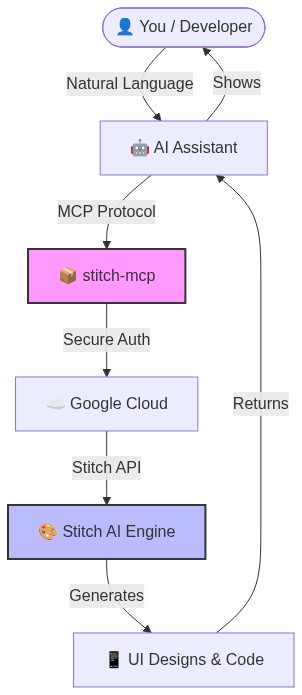
✨ Por qué es genial
- Cero configuración: Inicia sesión una vez y funciona en todas partes.
- Universal: Funciona en Windows, Mac y Linux.
- Gratis: La API de Google Stitch es gratuita.
️ Configuración rápida (2 minutos)
1. Requisito previo: Google Cloud
Necesitas un proyecto de Google Cloud con la API de Stitch habilitada.
# Login to your Google Cloud
gcloud auth login

# Set your project (replace with your actual project ID)
gcloud config set project YOUR_PROJECT_ID
gcloud auth application-default set-quota-project YOUR_PROJECT_ID

# Enable the magic
gcloud beta services mcp enable stitch.googleapis.com
2. Instala las credenciales
Esto le da a stitch-mcp permiso para hablar con Google en tu nombre.
gcloud auth application-default login
3. Añádelo a tu editor de IA
Copia y pega esto en tu archivo de configuración MCP:
Para Claude Desktop:
~/Library/Application Support/Claude/claude_desktop_config.json
Para Cursor: Configuración > MCP > Añadir nuevo servidor
{
  "mcpServers": {
    "stitch": {
      "command": "npx",
      "args": ["-y", "stitch-mcp"],
      "env": {
         "GOOGLE_CLOUD_PROJECT": "YOUR_PROJECT_ID"
      }
    }
  }
}
🛠️ Herramientas disponibles
| Nombre de la herramienta | Qué hace |
|---|---|
extract_design_context | 🧠 Escanea una pantalla para extraer el "ADN de diseño" (Fuentes, Colores, Diseños). Úsalo para mantener un estilo coherente. |
fetch_screen_code | 💾 Descarga el código HTML/Frontend sin procesar de una pantalla. |
fetch_screen_image | 🖼️ Descarga la captura de pantalla en alta resolución de una pantalla. |
generate_screen_from_text | ✨ Genera una NUEVA pantalla basada en tu indicación (y contexto). |
create_project | 📁 Crea una nueva carpeta de espacio de trabajo/proyecto. |
list_projects | 📋 Lista todos tus proyectos Stitch disponibles. |
list_screens | 📱 Lista todas las pantallas dentro de un proyecto específico. |
get_project | 🔍 Recupera los detalles de un proyecto específico. |
get_screen | ℹ️ Obtiene metadatos de una pantalla específica. |
💡 Consejo profesional: El "Flujo de diseñador"
Para generar una interfaz coherente, usa este flujo de 2 pasos:
- Extraer: "Obtén el contexto de diseño desde la pantalla de inicio..."
- Generar: "Usando ese contexto, genera una pantalla de chat..."
Esto asegura que tu nueva pantalla coincida perfectamente con tu sistema de diseño existente.
📄 Licencia
Apache 2.0 - Código abierto y gratuito.
Historial de estrellas
Construido con ❤️ por Aakash Kargathara