Splunk
Un servidor MCP para Splunk que permite buscar, analizar y visualizar datos generados por máquinas desde tu instancia de Splunk.
Documentación
Servidor MCP para Splunk
Una implementación en Go del servidor MCP para Splunk. Soporta STDIO y SSE (API HTTP de Server-Sent Events). Utiliza el SDK github.com/mark3labs/mcp-go.
Inicio rápido - Integración con Cursor
Al configurar los ajustes de MCP en Cursor, puedes incluir datos remotos directamente en el contexto del LLM.
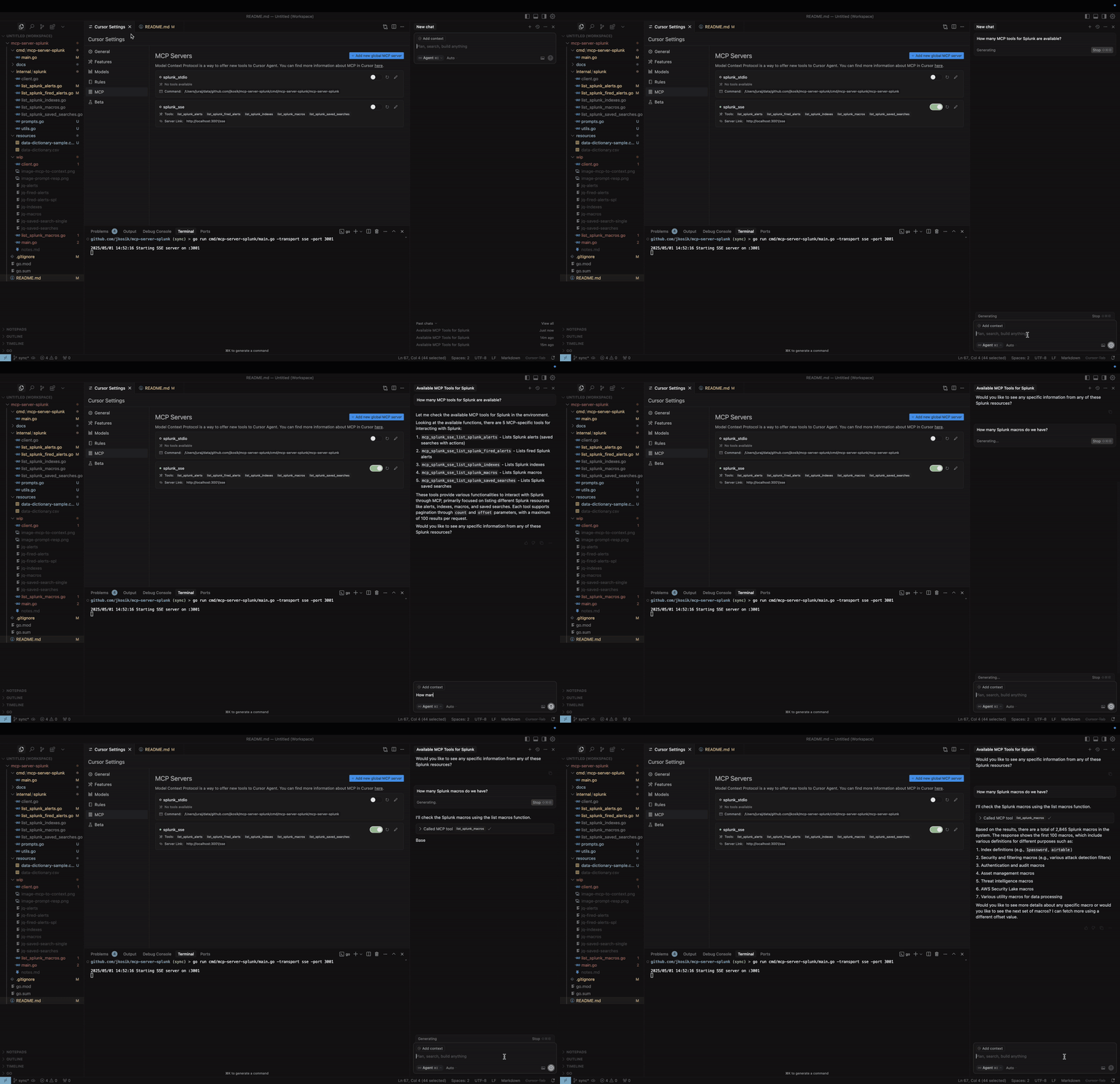
Modo STDIO
cd /tmp # CHANGE ME
git clone https://github.com/jkosik/mcp-server-splunk.git
cd mcp-server-splunk/cmd/mcp-server-splunk/
Actualiza los ajustes de Cursor en ~/.cursor/mcp.json:
{
  "mcpServers": {
    "splunk_stdio": {
      "name": "Splunk MCP Server",
      "description": "Splunk MCP server",
      "type": "stdio",
      "command": "/tmp/mcp-server-splunk/cmd/mcp-server-splunk/mcp-server-splunk", # CHANGE ME
      "env": {
        "SPLUNK_URL": "https://changeme.splunkcloud.com:8089", # CHANGE ME
        "SPLUNK_TOKEN": "abcdef" # CHANGE ME
      }
    }
  }
}
Alternativamente, reconstruye el servidor primero:
go build -o cmd/mcp-server-splunk/mcp-server-splunk cmd/mcp-server-splunk/main.go
Modo SSE
Inicia el servidor:
export SPLUNK_URL=https://your-splunk-instance:8089
export SPLUNK_TOKEN=your-splunk-token

# Start the server
go run cmd/mcp-server-splunk/main.go -transport sse -port 3001
Actualiza los ajustes de Cursor en ~/.cursor/mcp.json:
{
  "mcpServers": {
    "splunk_sse": {
      "name": "Splunk MCP Server (SSE)",
      "description": "MCP server for Splunk integration (SSE mode)",
      "type": "sse",
      "url": "http://localhost:3001/sse"
    }
  }
}
Herramientas y Prompts de MCP
-
list_splunk_saved_searches- Parámetros:
count(número, opcional): Número de resultados a devolver (máx. 100, por defecto 100)offset(número, opcional): Desplazamiento para paginación (por defecto 0)
- Parámetros:
-
list_splunk_alerts- Parámetros:
count(número, opcional): Número de resultados a devolver (máx. 100, por defecto 10)offset(número, opcional): Desplazamiento para paginación (por defecto 0)title(cadena, opcional): Subcadena insensible a mayúsculas para filtrar títulos de alertas
- Parámetros:
-
list_splunk_fired_alerts- Parámetros:
count(número, opcional): Número de resultados a devolver (máx. 100, por defecto 10)offset(número, opcional): Desplazamiento para paginación (por defecto 0)ss_name(cadena, opcional): Patrón de nombre de búsqueda para filtrar alertas (por defecto "*")earliest(cadena, opcional): Rango de tiempo para mirar hacia atrás (por defecto "-24h")
- Parámetros:
-
list_splunk_indexes- Parámetros:
count(número, opcional): Número de resultados a devolver (máx. 100, por defecto 10)offset(número, opcional): Desplazamiento para paginación (por defecto 0)
- Parámetros:
-
list_splunk_macros- Parámetros:
count(número, opcional): Número de resultados a devolver (máx. 100, por defecto 10)offset(número, opcional): Desplazamiento para paginación (por defecto 0)
- Parámetros:
-
internal/splunk/prompt.goimplementa un Prompt de MCP para encontrar alertas de Splunk para una palabra clave específica (por ejemplo, GitHub u OKTA) e instruye a Cursor para utilizar múltiples herramientas de MCP para revisar todas las alertas, índices y macros de Splunk primero para proporcionar la mejor respuesta. -
cmd/mcp/server/main.goimplementa un Recurso de MCP en forma de archivo CSV local con contenido relacionado con Splunk, proporcionando contexto adicional al chat.
Uso local y pruebas
Modo STDIO (por defecto)
export SPLUNK_URL=https://your-splunk-instance:8089
export SPLUNK_TOKEN=your-splunk-token

# List available tools
echo '{"jsonrpc":"2.0","id":1,"method":"tools/list","params":{}}' | go run cmd/mcp-server-splunk/main.go | jq

# Call list_splunk_saved_searches tool
echo '{"jsonrpc":"2.0","id":1,"method":"tools/call","params":{"name":"list_splunk_saved_searches","arguments":{}}}' | go run cmd/mcp-server-splunk/main.go | jq
Modo SSE (API HTTP de Server-Sent Events)
export SPLUNK_URL=https://your-splunk-instance:8089
export SPLUNK_TOKEN=your-splunk-token

# Start the server
go run cmd/mcp-server-splunk/main.go -transport sse -port 3001

# Call the server and get Session ID from the output. Do not terminate the session.
curl http://localhost:3001/sse

# Keep session running and and use different terminal window for the final MCP call
curl -X POST "http://localhost:3001/message?sessionId=YOUR_SESSION_ID" \
  -H "Content-Type: application/json" \
  -d '{"jsonrpc":"2.0","id":1,"method":"tools/list","params":{}}' | jq
Instalación mediante Smithery
Dockerfile y smithery.yaml se utilizan para soportar el alojamiento de este servidor MCP en [Smithery](https://smithery.ai/server/@jkosik/.
Certificado por Revisión de MCP: https://mcpreview.com/mcp-servers/jkosik/mcp-server-splunk