iFlytek Workflow MCP Server
Un servidor MCP para ejecutar flujos de trabajo de iFlytek a través de herramientas MCP.
Documentación

¡La forma más rápida de crear flujos de trabajo con una plataforma de agentes de IA!

iFlytek Workflow MCP Server
El Protocolo de Contexto de Modelo (MCP) es un protocolo abierto diseñado para una integración sin esfuerzo entre aplicaciones LLM y fuentes de datos o herramientas externas, ofreciendo un marco estandarizado para proporcionar de manera fluida a los LLM el contexto que necesitan.
Esta es una implementación simple de un servidor MCP utilizando iFlytek. Permite invocar flujos de trabajo de iFlytek a través de herramientas MCP.
Características
Resumen Funcional
Este sistema está construido sobre el servidor MCP de iFlytek y permite la programación inteligente de flujos de trabajo, lo que lo hace adecuado para diversos escenarios empresariales.
- Estructura del Flujo de Trabajo: Compuesta por múltiples nodos, con soporte para 14 tipos de nodos (incluyendo tipos básicos, de herramientas, lógicos y de transformación).
- Componentes Principales: Por defecto, el flujo de trabajo incluye un Nodo de Inicio (entrada del usuario) y un Nodo de Fin (resultado de salida).
- Modo de Ejecución: Una vez activado, el flujo de trabajo se ejecuta automáticamente según secuencias y reglas predefinidas, sin requerir intervención manual.
Capacidades Principales
Soporte Robusto de Nodos
- 14 tipos de nodos de flujo de trabajo para satisfacer diversos requisitos empresariales.
- Soporta E/S de variables complejas, permitiendo una transmisión de datos flexible.
Modos Avanzados de Orquestación
- Ejecución Secuencial: Las tareas se ejecutan una tras otra en orden.
- Ejecución en Paralelo: Múltiples tareas se ejecutan simultáneamente para mejorar la eficiencia.
- Ejecución en Bucle: Soporta bucles iterativos para manejar tareas repetitivas.
- Ejecución Anidada: Permite incrustar sub-flujos de trabajo dentro de flujos de trabajo, mejorando la reutilización.
- Utiliza el Mecanismo de Gancho para habilitar la salida en streaming, garantizando el procesamiento en tiempo real.
Múltiples Paradigmas de Desarrollo
- Un solo turno, una sola rama: Ejecución lineal de tareas simples.
- Un solo turno, múltiples ramas: Soporta lógica de ramificación para manejar procesos complejos.
- Bucle de un solo turno: Gestiona tareas en bucle para mejorar la automatización.
- Interacción de múltiples turnos: Soporta memoria de contexto para conversaciones dinámicas.
Expansión de Capacidades
- Soporte Multi-Modelo: Basado en la arquitectura de aplicación híbrida Modelo de Modelos (MoM), que proporciona múltiples opciones de modelo en etapas críticas del flujo de trabajo. Esto permite combinaciones flexibles de modelos, mejorando la adaptabilidad de las tareas.
Uso con el cliente MCP
Preparar config.yaml
Antes de usar el servidor MCP, debe preparar un config.yaml para guardar la información de su flujo de trabajo. El ejemplo de configuración es el siguiente:
- flow_id: 'flow id'              # required
  name: 'flow name'               # optional, if not set, obtain the name from the cloud.
  description: 'flow description' # optional, if not set, obtain the description from the cloud.
  api_key: 'API Key:API Secret'   # required
Obtener información de autenticación del flujo de trabajo
-
Publicar un flujo de trabajo
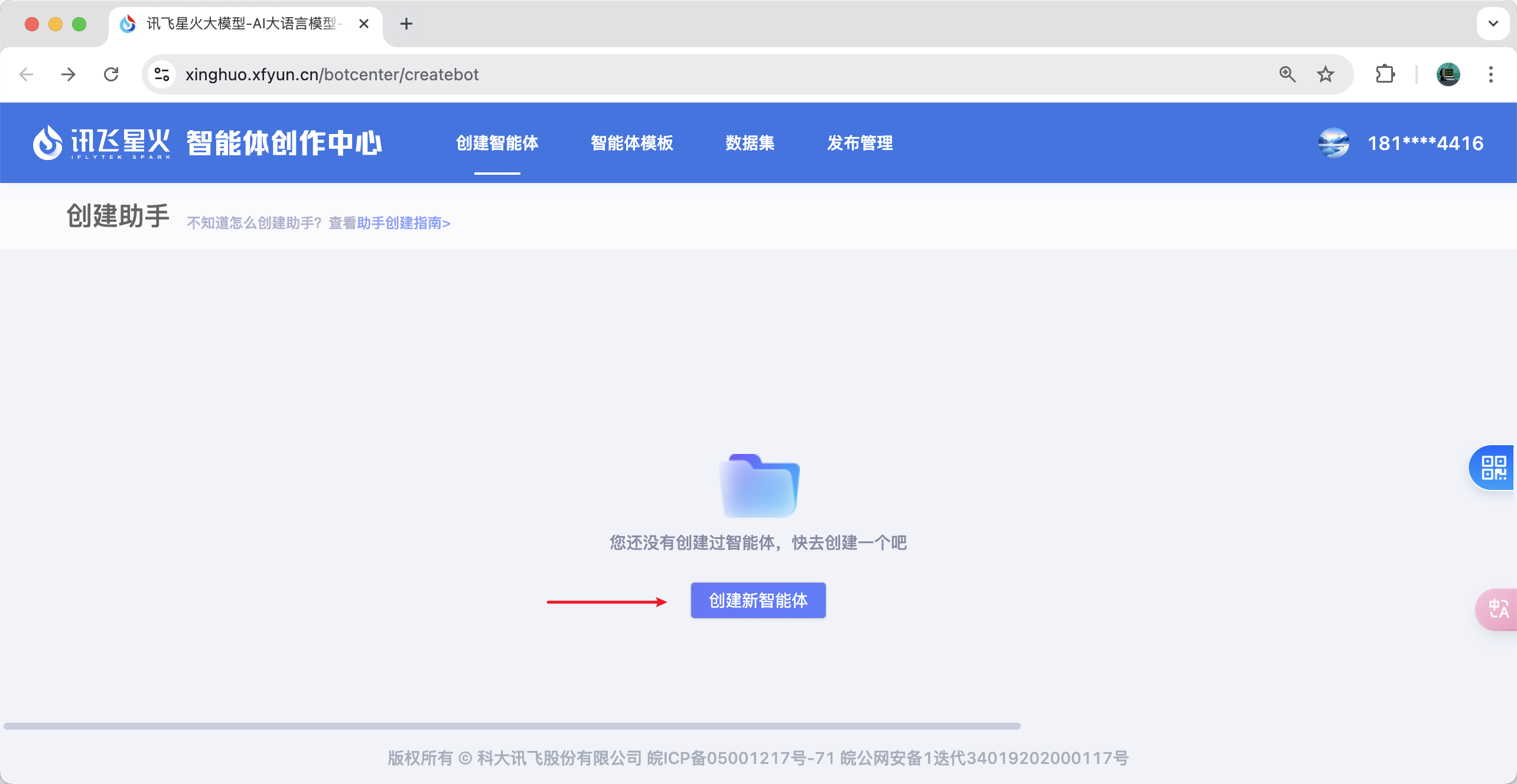
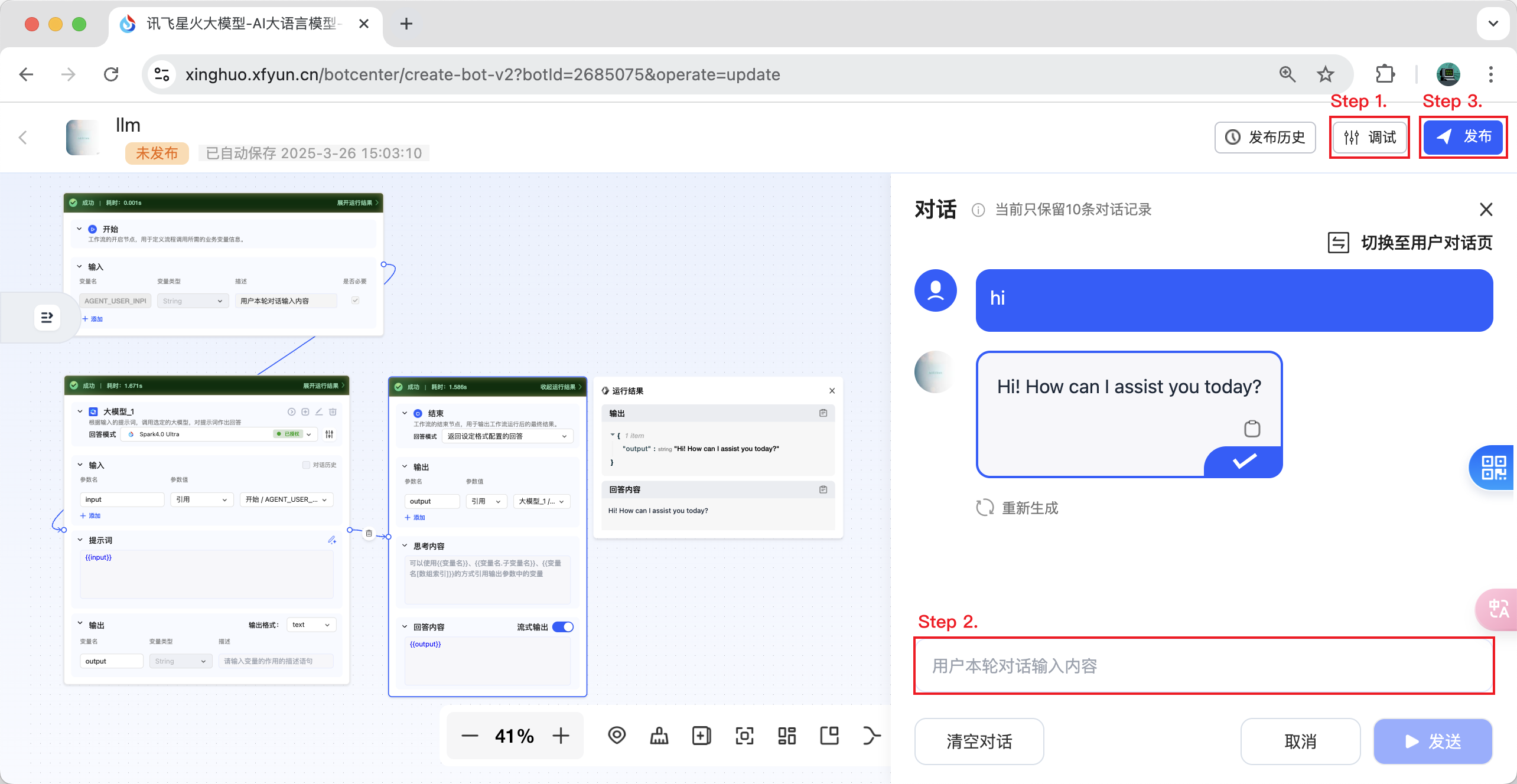
- Paso 1. Depure el flujo de trabajo que acaba de crear.
- Paso 2. Mantenga una conversación con su flujo de trabajo y asegúrese de que la conversación sea exitosa.
- Paso 3. Ahora puede hacer clic en el botón de publicar.
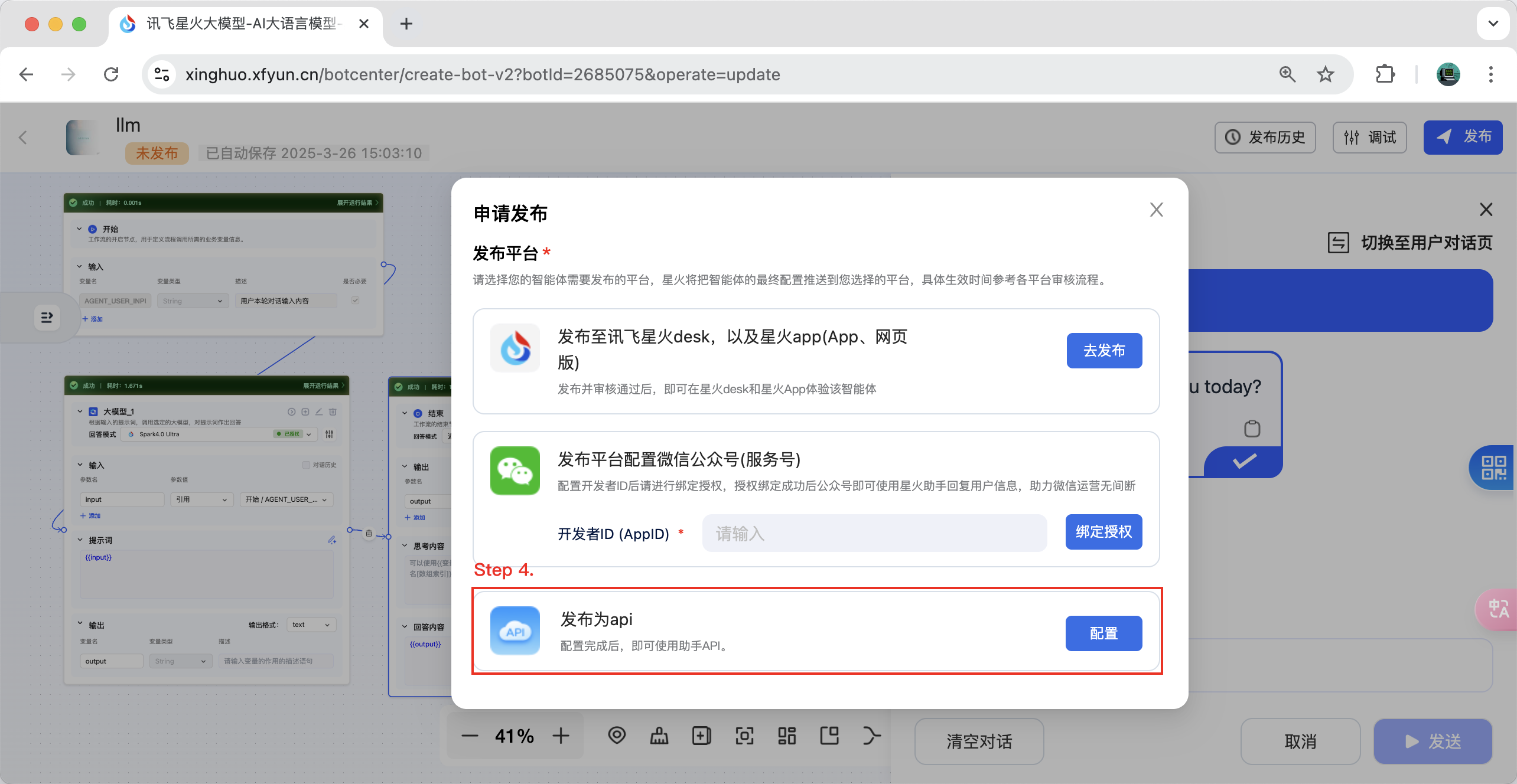
- Paso 4. Seleccione "Publicar como API" y haga clic en el botón "Configurar".
- Paso 5. Seleccione la aplicación que necesita vincular y vincúlela. Ahora puede recuperar el ID de flujo de trabajo correspondiente y la información de autenticación. ¡Disfrute!
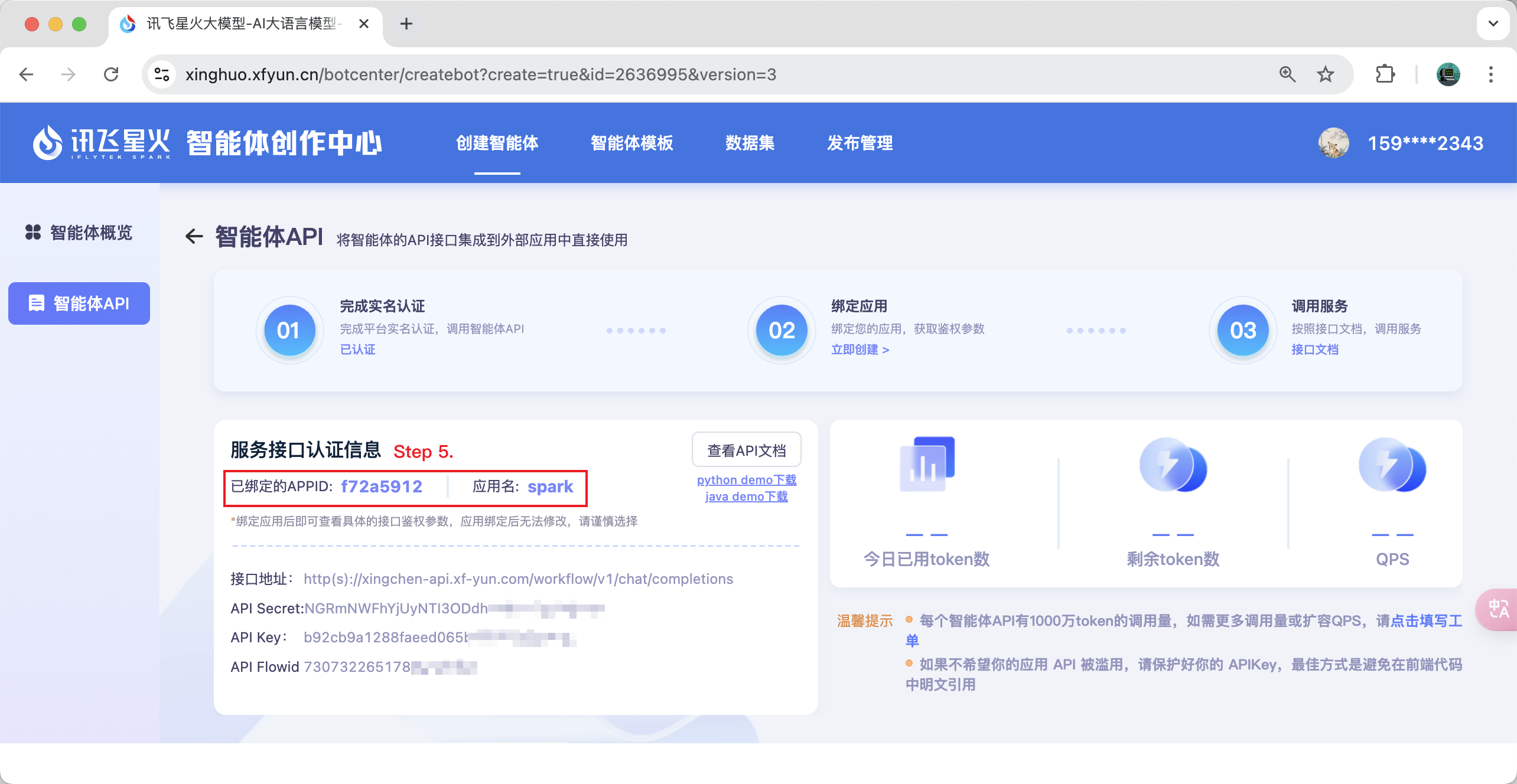
Nota: Si descubre que no puede seleccionar una aplicación, puede ir a https://www.xfyun.cn para solicitarlo.
Instalación Manual
Para agregar un cliente persistente, agregue lo siguiente a su archivo claude_desktop_config.json o mcp.json:
{
    "mcpServers": {
        "ifly-workflow-mcp-server": {
            "command": "uvx",
            "args": [
                "--from",
                "git+https://github.com/iflytek/ifly-workflow-mcp-server",
                "ifly_workflow_mcp_server"
            ],
            "env": {
                "CONFIG_PATH": "$CONFIG_PATH"
            }
        }
    }
}
Ejemplo de configuración:
{
    "mcpServers": {
        "ifly-workflow-mcp-server": {
            "command": "uvx",
            "args": [
                "--from",
                "git+https://github.com/iflytek/ifly-workflow-mcp-server",
                "ifly_workflow_mcp_server"
            ],
            "env": {
                "CONFIG_PATH": "/Users/hygao1024/Projects/config.yaml"
            }
        }
    }
}