VNC
Controla de forma remota cualquier sistema que ejecute un servidor VNC, incluyendo Windows, Linux y macOS, a través de un agente de IA.
Documentación
💻 mcp-vnc



Un servidor de Model Context Protocol (MCP) que permite a los agentes de IA controlar de forma remota Windows, Linux, macOS o cualquier otro sistema que pueda ejecutar un servidor VNC (no te preocupes, probablemente esté bien).
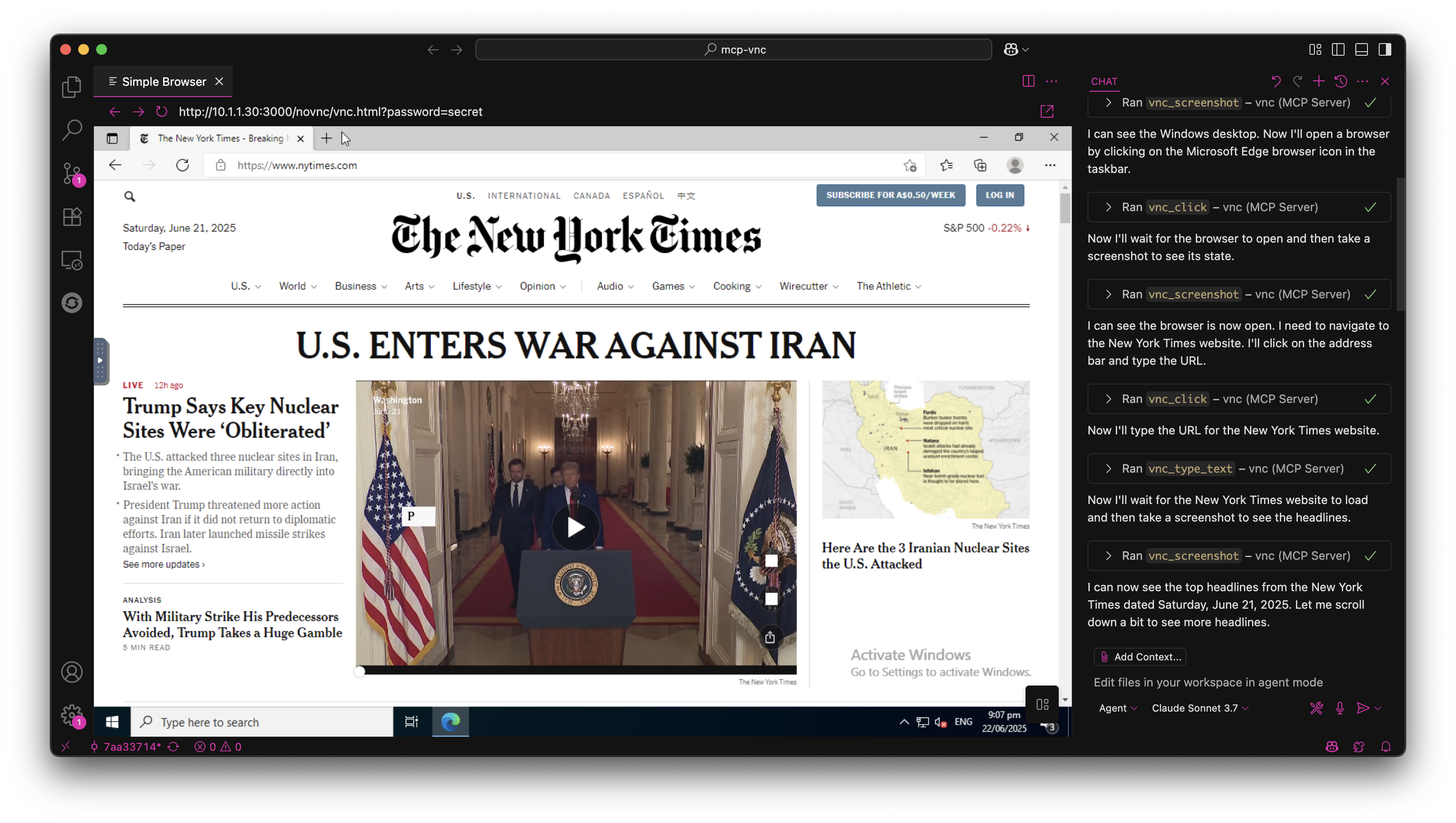
🚀 Inicio Rápido
Instalar desde NPM
npm install -g @hrrrsn/mcp-vnc
Instalar desde el Código Fuente
git clone https://github.com/hrrrsn/mcp-vnc
cd mcp-vnc
npm install
npm run build
⚙️ Configuración
Claude Desktop
-
Localiza y abre tu archivo de configuración de Claude Desktop:
- macOS:
~/Library/Application Support/Claude/claude_desktop_config.json - Windows:
%APPDATA%\Claude\claude_desktop_config.json - Linux:
~/.config/Claude/claude_desktop_config.json
- macOS:
-
Añade la siguiente configuración:
Usando instalación desde NPM:
{
  "mcpServers": {
    "vnc-controller": {
      "type": "stdio",
      "command": "mcp-vnc",
      "env": {
        "VNC_HOST": "192.168.1.100",
        "VNC_PORT": "5900",
        "VNC_PASSWORD": "your-vnc-password"
      }
    }
  }
}
Compilado desde el Código Fuente:
{
  "mcpServers": {
    "vnc-controller": {
      "type": "stdio",
      "command": "node",
      "args": ["dist/index.js"],
      "cwd": "/path/to/mcp-vnc",
      "env": {
        "VNC_HOST": "192.168.1.100",
        "VNC_PORT": "5900",
        "VNC_PASSWORD": "your-vnc-password"
      }
    }
  }
}
VS Code
Consulta la documentación de VS Code
🛠️ Herramientas Disponibles
El servidor MCP proporciona las siguientes herramientas para el control remoto del escritorio:
🖱️ Control del Ratón
vnc_click - Hacer clic en coordenadas específicas
| Parámetro | Obligatorio | Tipo | Descripción | Valor por defecto |
|---|---|---|---|---|
x | ✅ | number | Coordenada X | - |
y | ✅ | number | Coordenada Y | - |
button | ❌ | string | Botón del ratón (left, right, middle) | left |
double | ❌ | boolean | Doble clic en lugar de clic simple | false |
Ejemplo: vnc_click(x=100, y=200, button="right", double=true)
vnc_move_mouse - Mover el cursor del ratón
| Parámetro | Obligatorio | Tipo | Descripción |
|---|---|---|---|
x | ✅ | number | Coordenada X |
y | ✅ | number | Coordenada Y |
Ejemplo: vnc_move_mouse(x=500, y=300)
⌨️ Control del Teclado
vnc_key_press - Enviar teclas y combinaciones de teclas
| Parámetro | Obligatorio | Tipo | Descripción |
|---|---|---|---|
key | ✅ | string | Tecla o combinación de teclas a pulsar |
Teclas admitidas:
- Teclas individuales:
a,Enter,F1,Escape,Up,Down,Tab,Space - Combinaciones de teclas:
Ctrl+c,Alt+F4,Ctrl+Alt+Delete,Shift+Tab - Modificadores:
Ctrl,Alt,Shift,Super/Win,Meta/Cmd
Ejemplos:
vnc_key_press(key="Enter")vnc_key_press(key="Ctrl+Alt+Delete")
📝 Entrada de Texto
vnc_type_text - Escribir texto de una sola línea
| Parámetro | Obligatorio | Tipo | Descripción | Valor por defecto |
|---|---|---|---|---|
text | ✅ | string | Texto a escribir | - |
enter | ❌ | boolean | Pulsar Enter después de escribir | false |
Ejemplo: vnc_type_text(text="Hello World!", enter=true)
vnc_type_multiline - Escribir múltiples líneas
| Parámetro | Obligatorio | Tipo | Descripción |
|---|---|---|---|
lines | ✅ | string[] | Matriz de líneas a escribir |
Ejemplo: vnc_type_multiline(lines=["Line 1", "Line 2", "Line 3"])
📸 Captura de Pantalla
vnc_screenshot - Capturar pantalla
| Parámetro | Obligatorio | Tipo | Descripción | Valor por defecto |
|---|---|---|---|---|
delay | ❌ | number | Retraso antes de la captura (0-300000ms) | 0 |
Ejemplo: vnc_screenshot(delay=1000) - Esperar 1 segundo antes de capturar
🤝 Contribuciones
¡Las contribuciones son bienvenidas! No dudes en enviar una Solicitud de Extracción (Pull Request).
📄 Licencia
Este proyecto está licenciado bajo la Licencia MIT - consulta el archivo LICENSE para más detalles.