Roblox MCP
Conecta agentes de codificación de IA a una sesión en vivo de Roblox Studio.
Documentación
WEPPY Roblox AI Toolkit — Desarrollo de juegos con IA para Roblox Studio
WEPPY Roblox AI Toolkit es un producto de desarrollo con IA para Roblox Studio. Incluye el WEPPY MCP Server para conexiones de aplicaciones de IA y el WEPPY Roblox Studio Plugin para el control en vivo de Studio. Claude Code, Codex y Antigravity también pueden instalar el WEPPY AI Agent Plugin opcional para la configuración nativa del cliente y la guía de flujo de trabajo.
Trabajo multi-Place en Studio · Activos generados a Roblox · Sincronización bidireccional · Pruebas de juego automatizadas · UI Studio
English | 한국어 | 日本語 | Español | Português | Bahasa Indonesia | Deutsch
¿Por qué WEPPY Roblox AI Toolkit?
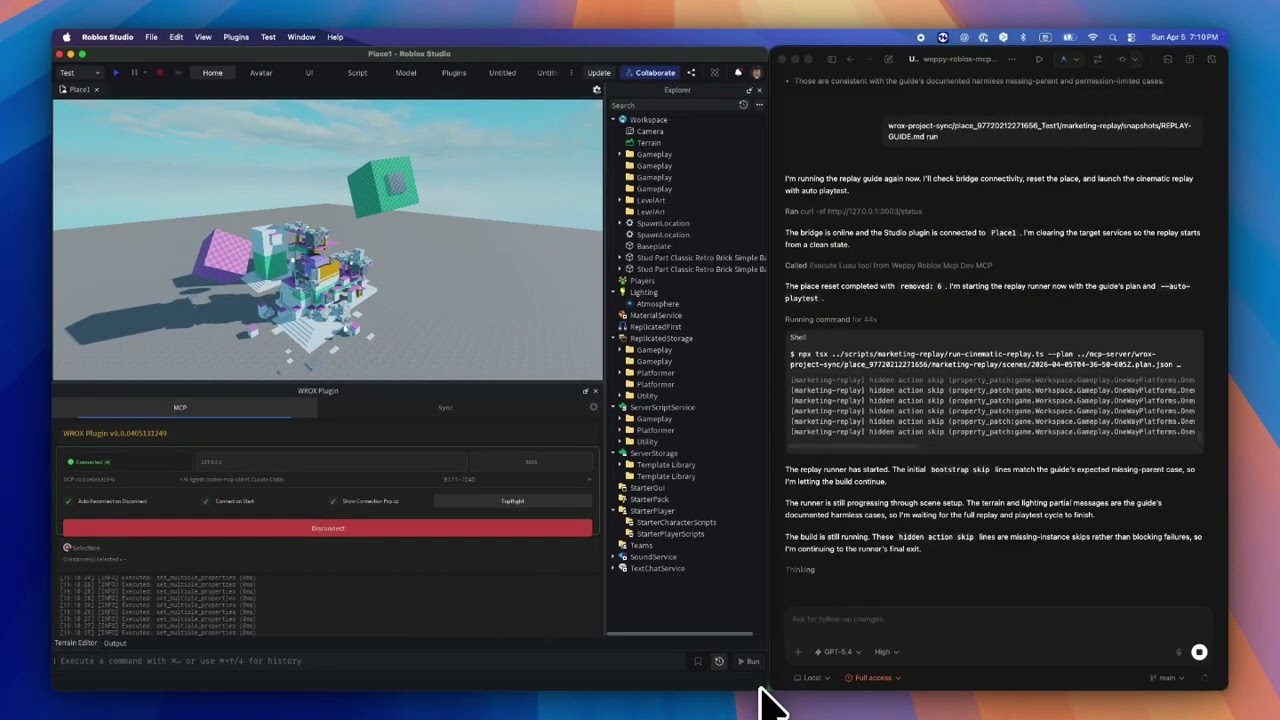
Los agentes de codificación con IA como Claude, Codex y Gemini son potentes, pero no pueden ver ni modificar nada dentro de Roblox Studio. El DataModel, los scripts, el terreno y la iluminación son invisibles para las herramientas externas. Sin un puente, la IA solo puede generar fragmentos de código que debes pegar manualmente.
El WEPPY MCP Server conecta agentes de IA al WEPPY Roblox Studio Plugin. La IA crea y modifica directamente instancias, scripts, propiedades, terreno y más dentro de Studio, y los cambios se reflejan inmediatamente en Studio y en el panel de control para que puedas ver exactamente qué cambió.
WEPPY también está diseñado para experiencias de Roblox divididas en varios Places. Abre hasta cinco ventanas de Studio para Lobby, Game, Shop, Tutorial u otros Places, y luego indícale al agente qué Studio ID usar. Una sola solicitud puede actualizar varios Places sin reexplicar el contexto ni copiar cambios manualmente.
Para los activos, un agente puede crear o preparar una imagen, guardarla en la Asset Library, subirla a través de Roblox Open Cloud y aplicar el URI del activo devuelto a un Place. El resultado es un camino más corto desde "haz este ícono/decal" hasta "es visible en Studio".
Sin copiar y pegar código ni IDs de activos. La IA hace el trabajo, tú revisas los resultados.
Instalación rápida
Comienza desde la página de instalación web. Muestra el script de una línea recomendado para tu plataforma primero.
Instalación recomendada de una línea
En la página de instalación, copia el script de una línea y ejecútalo en Terminal o PowerShell.
macOS / Linux
curl -fsSL https://raw.githubusercontent.com/hope1026/weppy-roblox-mcp/main/install.sh | bash
Windows (PowerShell)
irm https://raw.githubusercontent.com/hope1026/weppy-roblox-mcp/main/install.ps1 | iex
Luego reinicia tu aplicación de IA y reinicia Roblox Studio.
El registro automático del WEPPY MCP Server es compatible con Claude Code, Claude Desktop, Cursor, Codex CLI/App, Gemini CLI y Antigravity / Antigravity IDE / Antigravity CLI.
Para Claude Code, el instalador también instala el WEPPY AI Agent Plugin. Para Codex, agrega el marketplace de plugins y luego te pide instalar WEPPY AI Agent Plugin desde Plugin Directory. Para Antigravity, el plugin de agente de IA se instala solo cuando Antigravity CLI y agy plugin están disponibles; de lo contrario, el instalador conserva la conexión MCP directa.
Instalación web en navegador
Si Terminal o PowerShell no te resultan cómodos, usa el instalador web sin terminal en la misma página de instalación.
Instalación manual
Si la instalación de una línea o el instalador web sin terminal no funcionan, registra el WEPPY MCP Server manualmente con tu aplicación de IA.
Usa este comando de servidor:
npx -y @weppy/roblox-mcp@latest
El registro automático es compatible con Claude Code, Claude Desktop, Cursor, Codex CLI, Codex App, Gemini CLI y Antigravity / Antigravity IDE / Antigravity CLI.
Cualquier cliente de IA compatible con MCP funciona. El comando del servidor es
npx -y @weppy/roblox-mcp@latest.
Dola Desktop se conecta a través de un Custom Connector STDIO local. Requiere el modo Pro de Dola y una computadora local. Sigue la guía de configuración manual de Dola; el instalador de una línea y el plugin del marketplace de GitHub no configuran Dola.
WEPPY AI Agent Plugin opcional
El WEPPY Roblox AI Toolkit se conecta a cada aplicación de IA compatible a través del WEPPY MCP Server. Claude Code, Codex y Antigravity pueden instalar adicionalmente el WEPPY AI Agent Plugin para la configuración nativa del cliente y la guía de flujo de trabajo para el control de Studio, sincronización y activos.
Claude Code
claude plugin marketplace add hope1026/weppy-roblox-mcp --scope user
claude plugin install weppy-roblox-ai-toolkit@hope1026-roblox-mcp --scope user
Codex
codex plugin marketplace add hope1026/weppy-roblox-mcp
Después de agregar el marketplace de Codex, reinicia Codex, abre Plugin Directory e instala WEPPY AI Agent Plugin.
Antigravity
Se requiere Antigravity CLI para instalar el WEPPY AI Agent Plugin. El instalador de una línea usa agy plugin install con la última versión pública de GitHub, la verifica con agy plugin list y publica el payload verificado solo de skills en las superficies de IDE compatibles. Las instalaciones existentes se reemplazan en cada ejecución para que puedan converger en la última versión.
El instalador informa los resultados como instalado, actualizado, reinstalado, reparado, fallback, fallido u omitido. Una CLI faltante mantiene la conexión MCP compartida en ~/.gemini/config/mcp_config.json funcionando e informa fallback; un plugin existente nunca se trata como omitido. En un perfil solo-CLI, el MCP de plugin nativo verificado reemplaza la entrada directa compartida de WEPPY. Cuando Antigravity IDE y CLI coexisten, ambas vistas de plugin permanecen solo-skills y una definición directa compartida de weppy-roblox-mcp sirve a ambas. Fuera de la matriz verificada de SO y versiones, el descubrimiento nativo usa el fallback de MCP.
En Antigravity para Windows, se ha verificado que la instalación CLI expone skills y MCP. El descubrimiento de plugins de Antigravity IDE para Windows no está verificado porque el entorno verificado no tiene UI de inspección de plugins ni skills, por lo que se conserva el fallback MCP compartido. Las URLs de GitHub no se pasan directamente a agy plugin install; el instalador descarga la última versión pública e instala desde una ruta local preparada.
Compatibilidad
| Claude Code | Claude Desktop | Cursor | Codex CLI | Gemini CLI | Antigravity / Antigravity IDE / Antigravity CLI | Dola Desktop |
|---|---|---|---|---|---|---|
| ✅ | ✅ | ✅ | ✅ | ✅ | ✅ | Configuración manual |
Requisitos: Node.js 22+, Roblox Studio, Windows 10+ o macOS 12+
Qué hace
1) Herramientas MCP: Ejecución directa en Studio desde lenguaje natural
La IA puede manejar directamente scripts, instancias, propiedades, terreno, iluminación, activos, audio y animación dentro de Studio.
- "Agrega partículas + sonido + enfriamiento cuando el jugador salta."
- "Construye una arena de jefe en el centro del mapa y coloca puntos de aparición seguros contra colisiones."
- "Cambia esta interfaz de módulo y actualiza cada script dependiente."
- "Genera terreno con montañas y ríos, luego coloca puntos de aparición en áreas planas."
- "Busca un modelo de espada en Creator Store e insértalo en StarterPack."
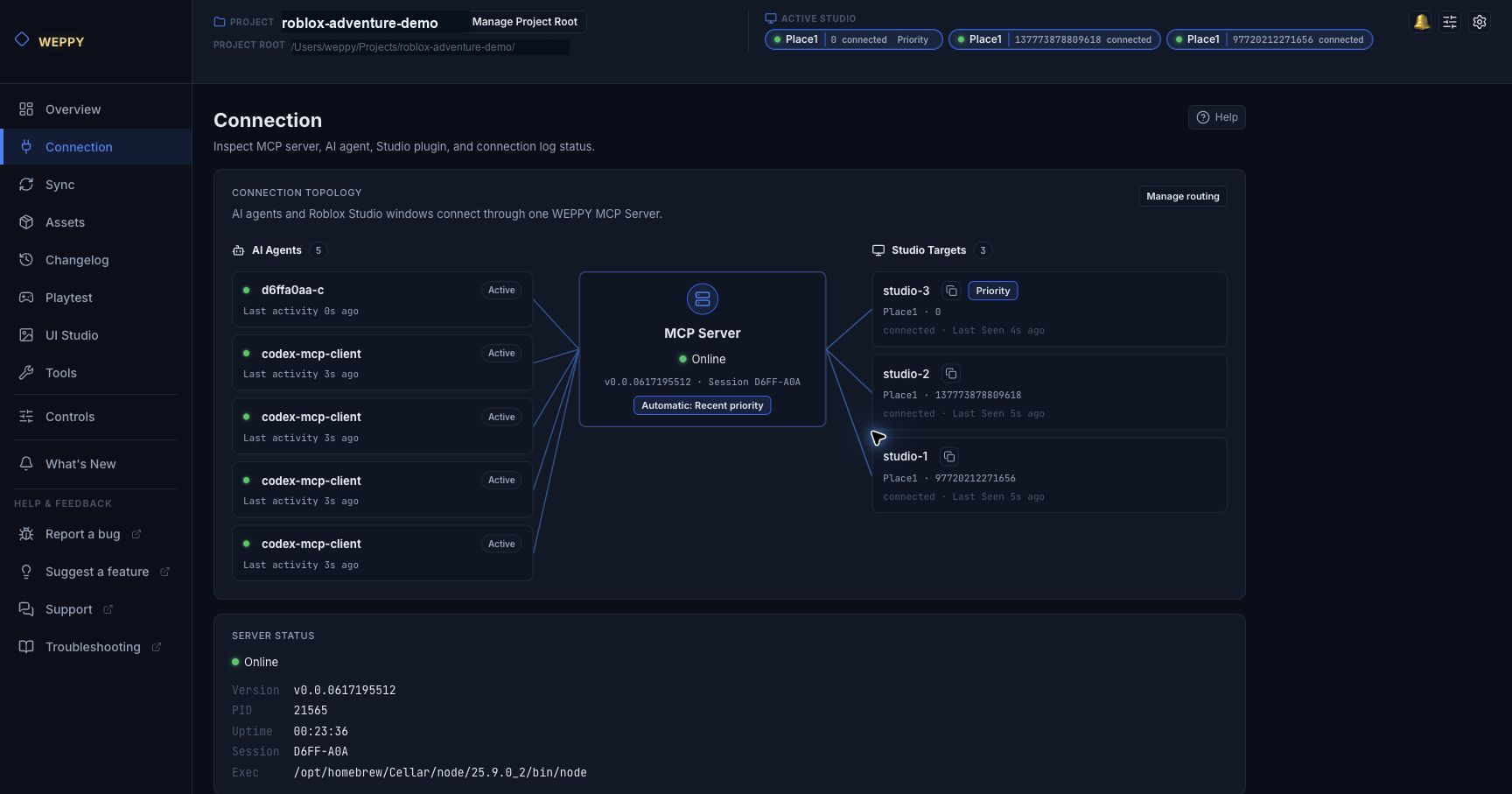
2) Trabajo multi-Place: Divide una solicitud entre varias ventanas de Studio
Muchas experiencias de Roblox no son un solo Place. WEPPY te permite mantener hasta cinco ventanas de Studio conectadas a un servidor MCP, y luego enrutar el trabajo por Studio ID.
- Abre hasta cinco ventanas de Roblox Studio, como Lobby, Game, Shop o Tutorial
- Pide una vez: "En studio-1, agrega el portal de eventos a Lobby. En studio-2, agrega el punto de llegada y la UI de guía a Game."
- Usa Dashboard Connection para ver cada agente de IA, Studio Target, Studio ID copiable y estado de enrutamiento
- Trabaja con el flujo multi-Studio también documentado por la guía oficial de Studio MCP de Roblox, con la visibilidad del panel de WEPPY encima
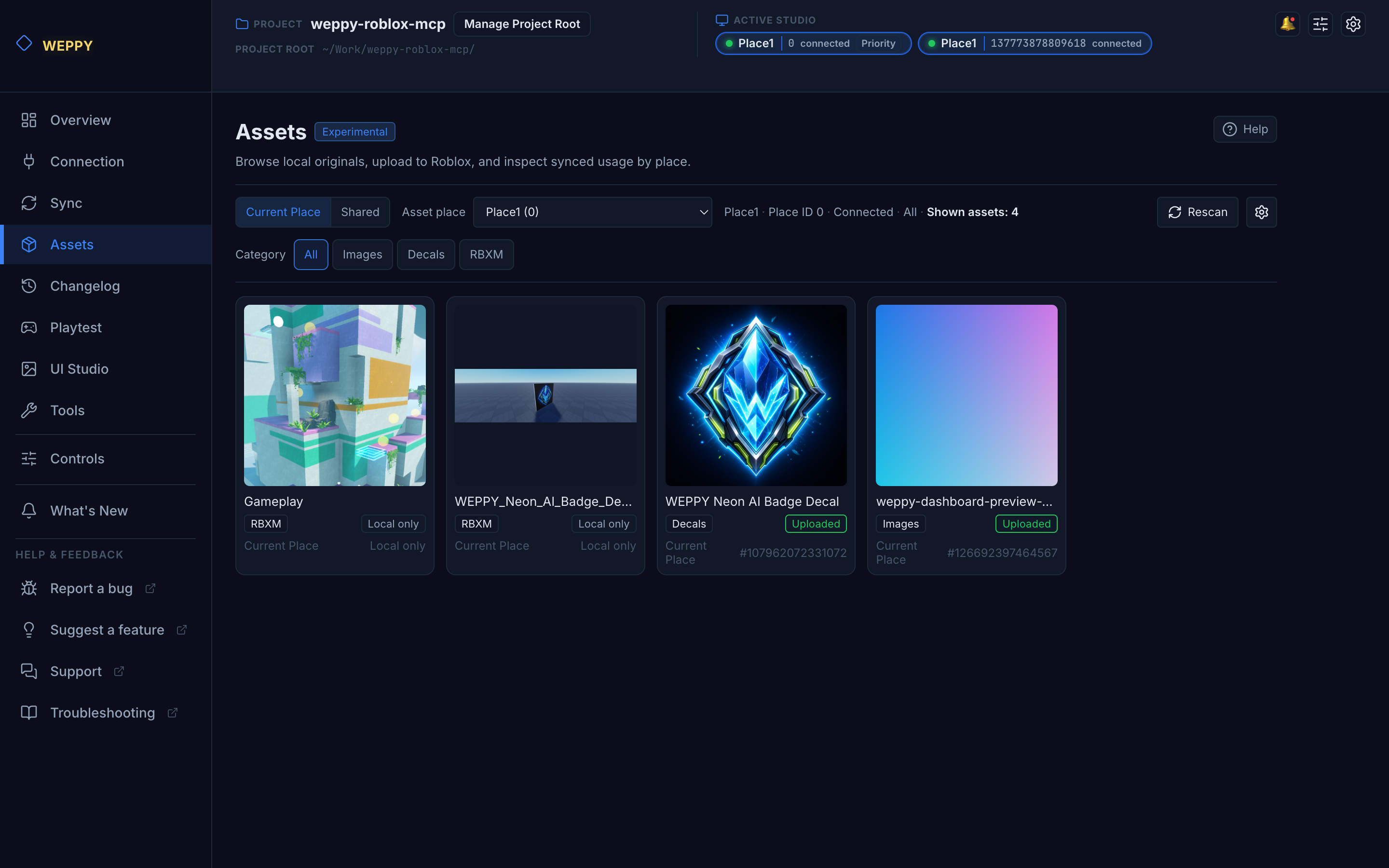
3) Activos: Genera, sube y aplica imágenes en Studio
Si tu aplicación de IA puede crear archivos PNG o JPG, puede hacer una nueva imagen para este flujo de trabajo. De lo contrario, comienza con una imagen que ya tengas y regístrala en Asset Library antes de subirla.
WEPPY Assets convierte una solicitud de activos en lenguaje natural en un resultado listo para Studio.
- "Crea un ícono de gema para el botón de la tienda, súbelo a Roblox y luego aplícalo a la imagen ShopButton en el Place Lobby."
- Guarda imágenes generadas, Decals y archivos RBXM en la Asset Library local
- Sube imágenes a través de Roblox Open Cloud y reutiliza activos específicos de Place o compartidos
- Aplica el URI del activo devuelto a ImageLabel, Decal, Texture u otras propiedades de Studio
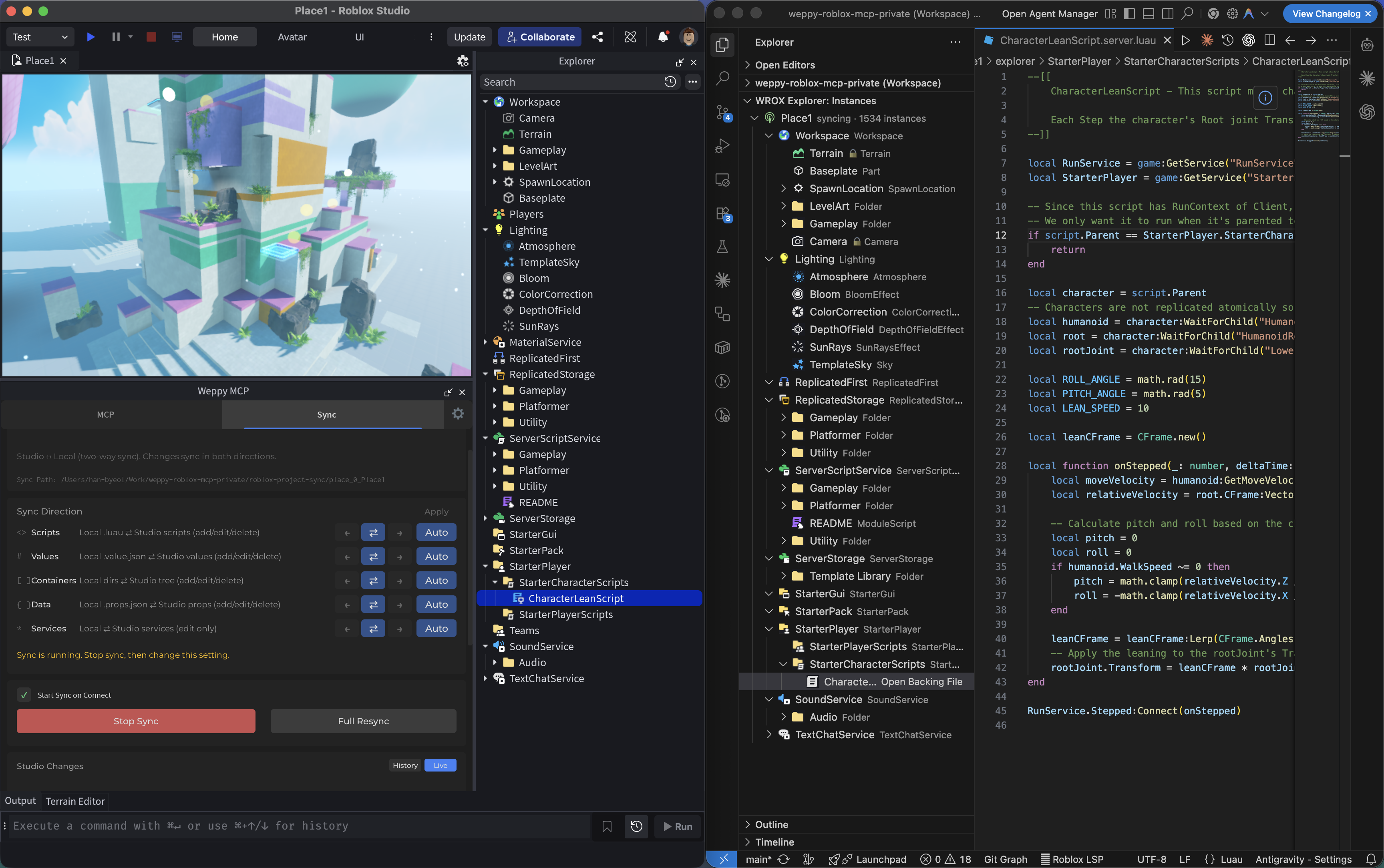
4) Sincronización: Mantén el contexto completo del proyecto estable para la IA
La IA lee un espejo local de tu proyecto de Studio. Revisa los cambios locales pendientes antes de aplicarlos a Studio.
- La sincronización comienza en Off en el primer uso. Iniciar al conectar también está en Off. La configuración guardada siempre tiene prioridad, incluido un valor Off guardado. El flujo de primer uso es Studio First, por lo que la primera sincronización trata a Studio como la fuente.
- Elige Studio First, Bidirectional Review, Local Code, Studio World o Custom. Custom agrupa los cambios en cuatro ámbitos semánticos: Script Source, Properties, Structure y Service Properties.
- Los modos de aplicación de Content Changes y Structure Changes se muestran por separado de la dirección del ámbito. La eliminación de archivos locales no elimina una instancia de Studio por defecto; aplicar una eliminación a Studio requiere una aceptación adicional y es independiente de la limpieza del historial de la UI de Studio.
- Review Changes lista las ediciones locales que esperan aplicación manual. Review Conflicts lista archivos cambiados de manera diferente en Studio y localmente; compara ambas versiones antes de elegir una.
- Basic usa sincronización Studio-to-local. Pro agrega las direcciones de flujo de trabajo más ricas, historial y soporte para hasta cinco Places.
- El WEPPY MCP Server y el WEPPY Roblox Studio Plugin deben provenir de la misma versión. Actualiza ambos juntos y luego reinicia Roblox Studio antes de reconectarte si sus versiones no coinciden.
5) Validación de sintaxis Luau: Detecta scripts rotos antes del Playtest
La IA puede verificar el código fuente Luau crudo o un Script existente para detectar errores de sintaxis sin iniciar el juego. La validación independiente está disponible en Basic y Pro.
- Pide a la IA validar el código fuente o una ruta de Script para recibir todos los diagnósticos de sintaxis en una sola respuesta
- Activa Controls → Luau Syntax Validation para verificar el código fuente guardado real después de escrituras de scripts compatibles; el valor predeterminado es Off
- La configuración del Dashboard se aplica. Si una llamada de herramienta solicita un valor diferente de
validate, la escritura sigue la política del Dashboard y devuelve una advertencia con la ruta de configuración - Las verificaciones automáticas válidas mantienen la respuesta de escritura normal sin cambios. Las verificaciones inválidas o no disponibles agregan detalles, mientras que un
validate=trueexplícito coincidente también devuelve detalles válidos completos - Un error de sintaxis o un analizador no disponible nunca revierte una escritura de script exitosa
La primera validación que necesita el analizador complementario descarga la versión WASM exacta de luau-parser-v1.0.0 y la almacena en caché localmente. Un luau-compile local compatible se puede usar como respaldo. El código fuente del script se analiza en tu computadora y no se envía a un servicio de validación remoto; la solicitud de descarga obtiene solo el artefacto del analizador. Los scripts muy grandes pueden agregar algo de tiempo de lectura y análisis.
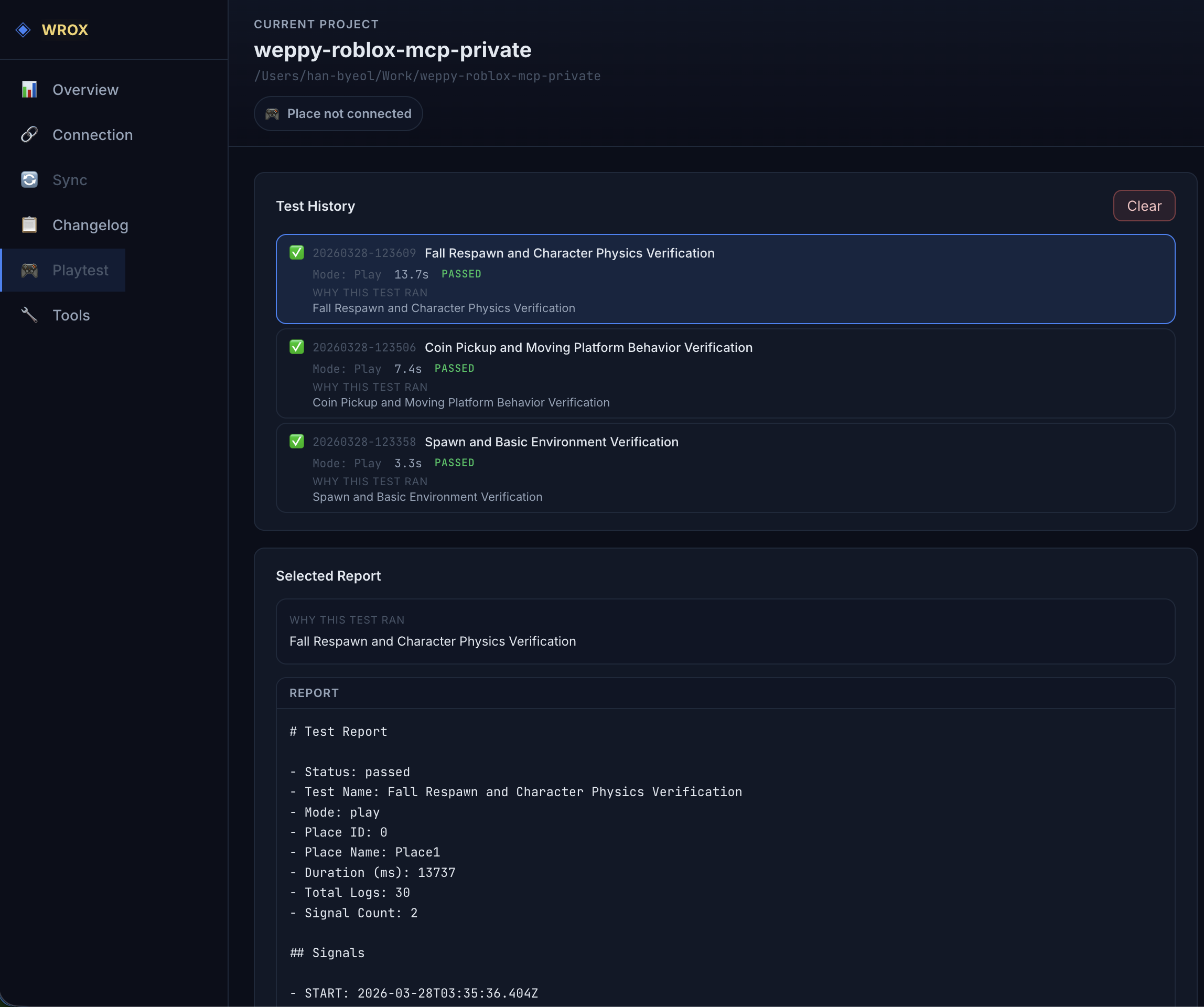
6) Playtest: Deja que la IA ejecute y verifique pruebas automáticamente
Las verificaciones de tiempo de ejecución ordinarias usan una sesión de Play estructurada. La IA puede esperar la UI del juego, inspeccionar su estructura semántica y geometría, entregar entrada virtual, observar la respuesta de la UI y verificar el estado del servidor resultante en pasos de evidencia separados. El Dashboard local agrupa el resultado guardado por servidor, UI del cliente, interacción y evidencia visual para que puedas revisar qué pasó y por qué.
La misma página de Playtest también incluye un espacio de trabajo Test Values para valores solo de desarrollo. Crea múltiples perfiles específicos de Place para diferentes configuraciones de prueba; el Dashboard recuerda el último perfil seleccionado para cada Place. Mientras Play o Run permanezcan activos, puedes cambiar, crear, editar o eliminar perfiles sin reiniciar el juego. Cambiar mantiene los valores actuales del juego y cambia los controles, Watch Values y Actions mostrados para la misma sesión. Los controles y las observaciones de solo lectura aparecen en una lista paginada y buscable, por lo que los perfiles grandes siguen siendo fáciles de escanear. Usa Manage values para agregar entradas descubiertas desde Project Test Adapters, o usa una ruta de tiempo de ejecución y la selección actual de Studio para valores directos. Una observación obsoleta o desconectada se muestra como el último valor observado en lugar de presentarse como actual. En Pro, las Actions del perfil pueden ejecutar una operación de juego preparada durante Play, como cambiar un valor o llamar a un Test Adapter revisado. Las Actions informan su resultado por separado de los cambios de valor. Reset all restaura los cambios de valor reversibles; no puede deshacer datos de juego guardados, muertes, recompensas o solicitudes externas causadas por una Action.
Basic incluye la creación de perfiles y la observación del runtime en vivo. Pro añade cambios de valor tipados durante Play, rollback, Reset all y Resultados de Pruebas Automatizadas guardados reales. La página Playtest explica las adiciones de Pro y enlaza directamente a los planes disponibles y opciones de compra.
Studio Stop descarta los cambios de Play/Run Instance. Mientras el runtime permanece activo, Reset all restaura cada valor reversible cambiado a través de cualquier perfil en esa sesión, y una transacción parcialmente fallida se revierte. Los juegos que almacenan en caché valores al inicio o que necesitan operaciones de dominio pueden exponer métodos revisados de Project Test Adapter a través de metadatos opcionales del Dashboard. El Dashboard valida los metadatos, muestra la fuente de registro y enlaza un observador de solo lectura a cada control del adapter. Eliminar una referencia de perfil deja intacta la fuente del adapter.
Abre Before publishing desde el encabezado de la página Playtest para una referencia en lenguaje sencillo sobre qué vuelve a su valor original después de una prueba de Studio, qué mantiene WEPPY solo en tu computadora y qué verificar antes y después de publicar. Las comprobaciones comunes están separadas de los elementos que aplican solo cuando un juego tiene funciones solo de prueba o guarda datos de jugador. El código de conexión de prueba creado por WEPPY con configuración predeterminada no se ejecuta en el juego público. Si WEPPY tiene un registro local de que la protección solo de Studio fue eliminada explícitamente, el Dashboard muestra una nota adicional para ese Place. Rojo sigue siendo opcional cuando quieres omitir el código fuente de prueba de un proyecto de producción. La moneda o el progreso guardados por el código del juego pueden permanecer después de una prueba, y los Places en la misma Experience pueden compartir esos datos. La referencia está disponible en Basic y Pro; no inspecciona archivos, no elimina código de prueba, no crea archivos de implementación ni certifica una versión como segura.
- "Inicia un Playtest, presiona el botón Start y verifica que la ronda comience en el servidor."
- "Comprueba que el HUD aparezca y que la carta seleccionada se active después de la entrada."
- "Valida que el script que acabo de cambiar se ejecute sin errores en Playtest."
El modo Run está reservado para una verificación explícitamente solicitada solo de servidor. Luau sin procesar sigue disponible como una opción avanzada explícita para diagnósticos que no encajan en los pasos estructurados. La captura de pantalla en modo Play no es compatible; en su lugar se registran la estructura de la interfaz, la geometría, la entrega de entrada, la activación y las observaciones del servidor. Los informes permanecen locales, los informes existentes de Luau sin procesar siguen siendo legibles y no se requiere ningún cambio de configuración.
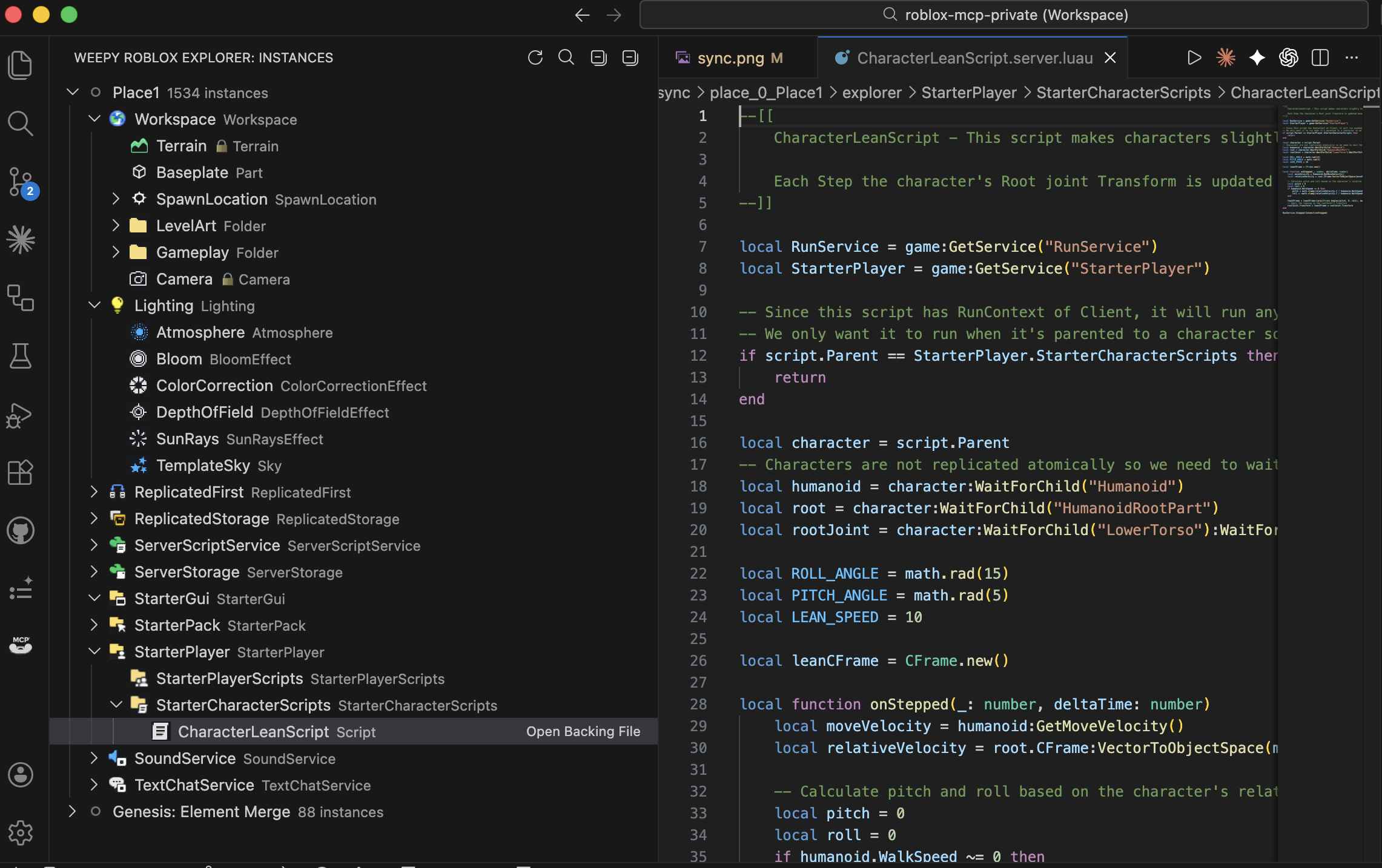
7) UI Studio: Crea e inspecciona UI en el juego
UI Studio permite a los agentes de IA crear UI en el juego que coincida con el estilo de tu juego, o analizar la UI que ya tienes y sugerir mejoras.
Las revisiones de UI distinguen superposición observada, guía de Roblox y sugerencias de IA. La geometría de controles no disponible permanece sin verificar. Las recomendaciones respetan el diseño que elegiste; los cambios siguen el alcance que solicitaste.
Para UI creada por LocalScripts, UI Studio distingue Editar StarterGui de una observación estructurada de Play Client PlayerGui. Si la UI del runtime no ha sido revisada, informa esa evidencia faltante en lugar de asumir que el juego no tiene UI. Las capturas de pantalla en modo Play siguen sin ser compatibles, por lo que las comprobaciones semánticas del runtime y la revisión visual de capturas permanecen separadas.
- Aclara el objetivo de la UI con preguntas guiadas sobre propósito, pantalla, dispositivos objetivo y dirección visual
- Crea o refina menús, HUDs, botones, etiquetas, paneles de imagen y otros elementos de UI de Roblox directamente en Studio
- Captura el resultado, compara cambios antes/después y sigue las sugerencias del dashboard para diseño, legibilidad, objetivos táctiles y áreas seguras
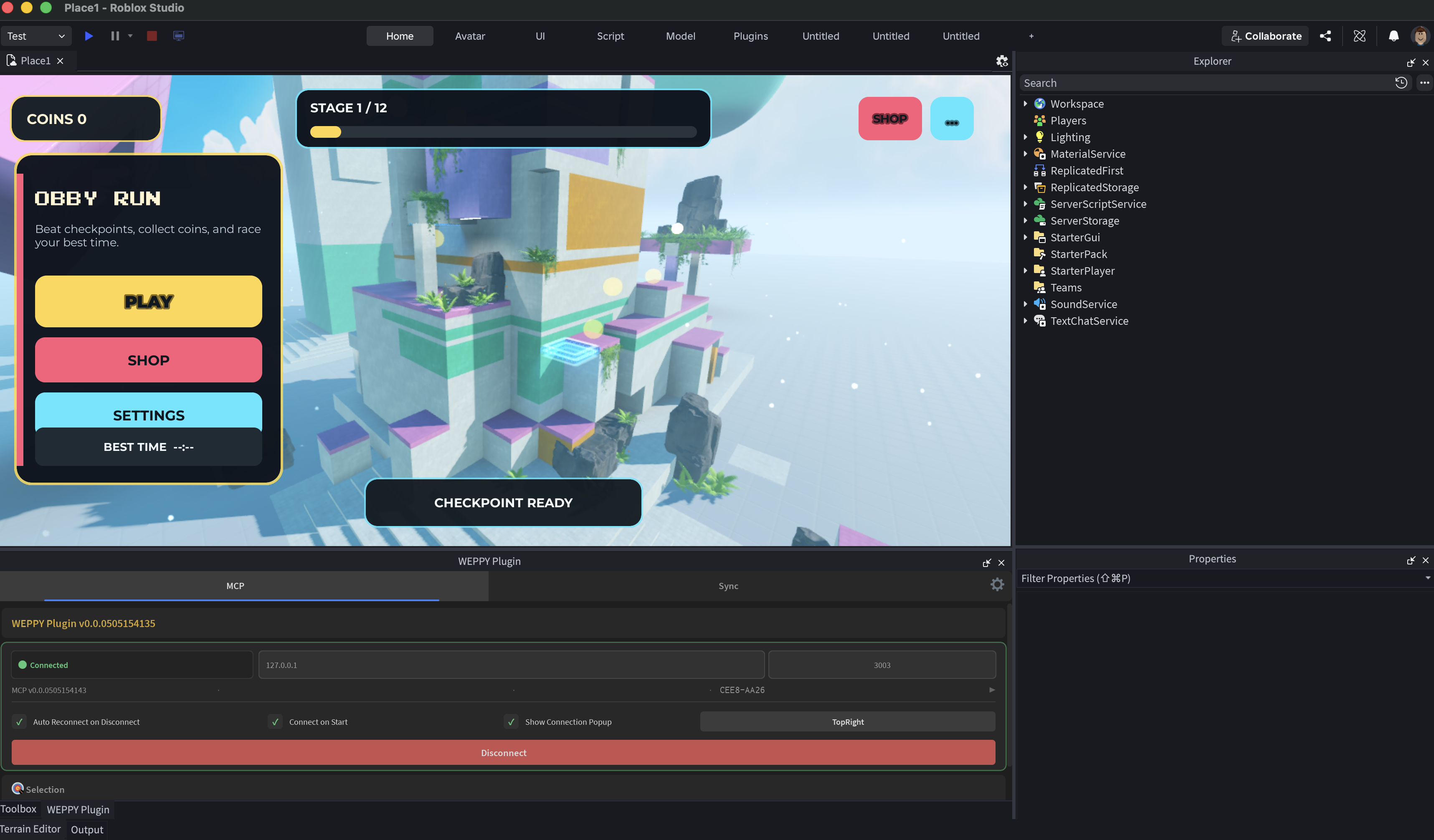
8) WEPPY Dashboard: Monitorea el trabajo de IA en tiempo real
El servidor MCP proporciona un dashboard web donde puedes verificar el estado de conexión, el historial de ejecución de herramientas, el estado de sincronización, el historial de UI Studio y los registros de cambios del juego en tiempo real.
- Topología de conexión para agentes de IA, el servidor MCP y ventanas de Roblox Studio conectadas
- Studio Targets con IDs de Studio copiables, insignias de Prioridad/Fijado y un enlace a los controles de enrutamiento
- Nombres de Places publicados y enlaces rápidos a la configuración del Place, gestión de Experience y la página de Roblox
- Carpetas de Place disponibles en Tools, Playtest, Changelog y Assets antes de la primera Sync; las carpetas duplicadas se identifican para revisión
- Flujos de trabajo multi-agente y multi-Studio: mantén varios agentes y hasta cinco ventanas de Studio visibles, luego dile al agente qué ID de Studio usar
- Página de Assets para elementos de biblioteca local, activos compartidos y estado de carga en Roblox
- Página de Controles para aplicar validación de sintaxis Luau posterior a la escritura, incluido un comportamiento claro de On y Off
- Compara cada cambio que hizo la IA mediante Before & After en Changelog
- Analiza el flujo de trabajo con historial de ejecución de herramientas, capturas de UI Studio y estadísticas
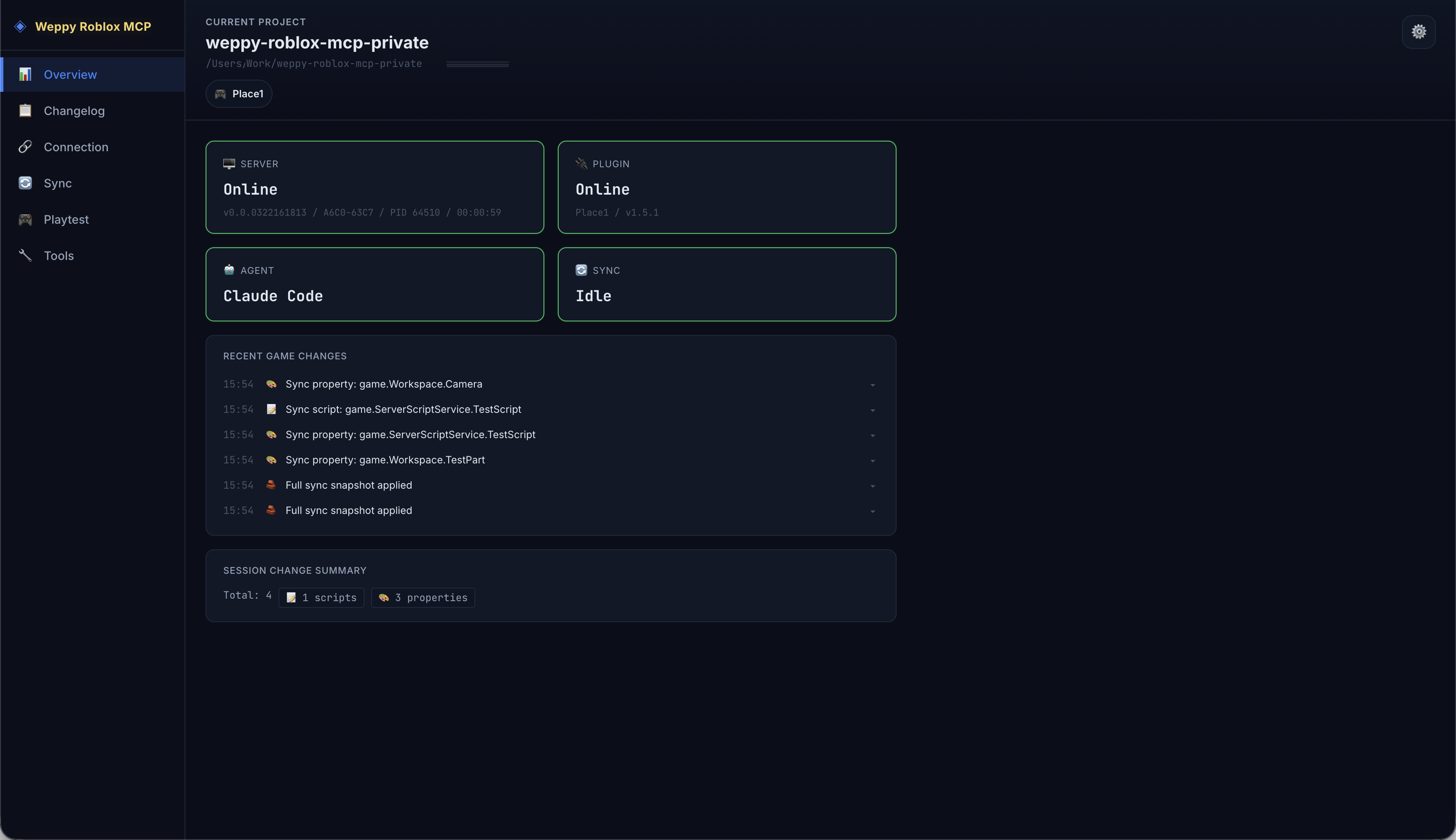
9) WEPPY Roblox Explorer: Explora la jerarquía de Studio en VSCode
Visualiza el árbol completo de instancias de tu Place de Roblox Studio directamente en VSCode. Navega por servicios, abre scripts sincronizados y archivos de propiedades, y rastrea el estado de sincronización, todo sin cambiar a Studio. WEPPY Roblox Explorer es una extensión complementaria de VSCode para los datos de sincronización generados por WEPPY. La navegación por árbol funciona desde archivos sincronizados, y el estado de sincronización en vivo o los indicadores de dirección se mejoran cuando el servidor MCP local está en ejecución. Instala desde VS Code Marketplace o Open VSX.
- Iconos de clase que coinciden con Studio para reconocimiento instantáneo
- Haz clic para abrir scripts sincronizados y archivos de propiedades
- Soporte multi-Place con indicadores de estado de sincronización para hasta cinco Places
Casos de Uso
- Prototipado rápido: Describe una mecánica de juego en lenguaje natural y observa cómo la IA la construye en Studio
- Producción multi-Place: Mantén Lobby y Game abiertos en ventanas separadas de Studio y actualiza ambos desde una sola solicitud
- Refactorización masiva: Renombra una interfaz de módulo y actualiza cada script dependiente en una sola solicitud
- Terreno y entorno: Genera terreno procedural, configura iluminación/atmósfera, coloca activos, todo desde un solo prompt
- Diseño de UI: Genera UI en el juego, captura vistas previas e itera sobre las sugerencias de Design Check
- Consistencia multi-archivo: La IA lee el proyecto completo mediante Sync y aplica cambios en scripts relacionados juntos
- Integración de activos generados: Crea un ícono o decal, súbelo a Roblox, aplícalo a una propiedad de UI o Decal y conserva el activo para reutilizarlo
Por Qué Importa
- Comprime el trabajo repetitivo: convierte muchas ediciones manuales en una sola solicitud
- Trabaja en hasta cinco Places sin reexplicar el contexto ni copiar cambios entre ventanas de Studio
- Convierte imágenes generadas en activos de Roblox aplicados sin mover archivos e IDs de activos manualmente
- Cambia archivos relacionados juntos: no solo un archivo objetivo
- Menor riesgo: confía en el estado de sincronización y el historial antes de aplicar cambios
- Mejor eficiencia de tokens (Pro): reduce los viajes de ida y vuelta con acciones masivas
Documentación
Las guías detalladas y la configuración específica de la aplicación ahora viven en la web.
Para detalles de configuración de la aplicación, abre el centro de documentación web y elige la guía del cliente de IA relevante.
Privacidad y Telemetría
WEPPY utiliza telemetría de Google Analytics 4 Measurement Protocol y una observación anónima de operaciones del dispositivo con el mejor esfuerzo para comprender el uso del producto, la confiabilidad, la cobertura de plataformas y la adopción de funciones. La telemetría se puede deshabilitar configurando ENABLE_TELEMETRY=false o ENABLE_TELEMETRY=0 en el entorno del servidor MCP.
WEPPY no recopila tu nombre, dirección de correo electrónico, clave de licencia sin procesar, rutas de archivos locales, código fuente de scripts ni contenido de proyectos de Roblox a través de la telemetría.
Consulta PRIVACY.md para el aviso completo de telemetría.
Preguntas Frecuentes
¿Cómo conecto Claude Code a Roblox Studio?
Instala desde la página de instalación web para registrar el WEPPY MCP Server e instalar el WEPPY Roblox Studio Plugin. También puedes agregar el WEPPY AI Agent Plugin para Claude Code con los comandos anteriores. Su comando MCP sigue siendo npx -y @weppy/roblox-mcp@latest.
¿Cómo uso Codex CLI con Roblox Studio?
Instala el WEPPY Roblox Studio Plugin, luego agrega la configuración del WEPPY MCP Server a Codex CLI. También puedes agregar el marketplace de plugins de Codex e instalar WEPPY AI Agent Plugin desde Plugin Directory.
¿Roblox MCP funciona con Cursor?
Sí. Cualquier cliente de IA compatible con MCP funciona.
¿Puede la IA construir juegos de Roblox con esto?
Sí. La IA puede crear instancias, escribir scripts, generar terreno, configurar iluminación, insertar activos, configurar física y más, todo dentro de una sesión en vivo de Roblox Studio. Va más allá de la generación de código hacia acciones ejecutables.
¿Cuál es la diferencia entre Basic y Pro?
Basic (Gratis) incluye ejecución de herramientas MCP y sincronización unidireccional (Studio -> Local). Pro añade trabajo multi-Place en hasta cinco Places, Asset Library con carga a Roblox, sincronización bidireccional, UI Studio, operaciones masivas, generación de terreno, análisis espacial y control de audio/animación. Consulta la página de actualización a Pro.
¿En qué se diferencia Weppy de otros servidores MCP de Roblox?
Weppy utiliza despacho basado en acciones en lugar de herramientas separadas para cada función. Esto reduce significativamente el consumo de tokens de IA. También combina trabajo multi-Place basado en ID de Studio, carga/aplicación de activos generados, sincronización bidireccional de proyectos y control de Playtest.
¿Es seguro? ¿Puede la IA romper mi juego?
El servidor se ejecuta solo en localhost (127.0.0.1:3002). Las rutas prohibidas (CoreGui, CorePackages) están bloqueadas. El límite de velocidad (450 req/min) y los tiempos de espera de 30 segundos previenen operaciones descontroladas. Todos los cambios son rastreables mediante el historial de sincronización.
Actualización a Pro
Trabajo multi-Place, activos generados a Roblox, Sync bidireccional, UI Studio, control de Playtest y eficiencia de tokens de IA, todo en una sola actualización.
Licencia
Este repositorio está licenciado bajo AGPL-3.0.
La licencia comercial está disponible por separado. Consulta COMMERCIAL-LICENSE.md.
El uso del nombre y los logotipos de Weppy se rige por TRADEMARKS.md.

