LINE Bot MCP Server
Conecta un agente de IA a una cuenta oficial de LINE mediante la API de Mensajería de LINE.
Documentación
La versión en japonés del README está aquí
LINE Bot MCP Server
Implementación de servidor Model Context Protocol (MCP) que integra la API de Mensajería de LINE para conectar un Agente de IA a la LINE Official Account.
[!NOTE] Este repositorio se proporciona como una versión preliminar. Aunque lo ofrecemos con fines experimentales, tenga en cuenta que puede no incluir funcionalidad completa o soporte integral.
Herramientas
- push_text_message
- Envía un mensaje de texto simple al usuario a través de LINE.
- Entradas:
user_id(string): El ID de usuario que recibirá el mensaje. Por defecto, DESTINATION_USER_ID.message.text(string): El contenido de texto plano que se enviará al usuario.
- push_flex_message
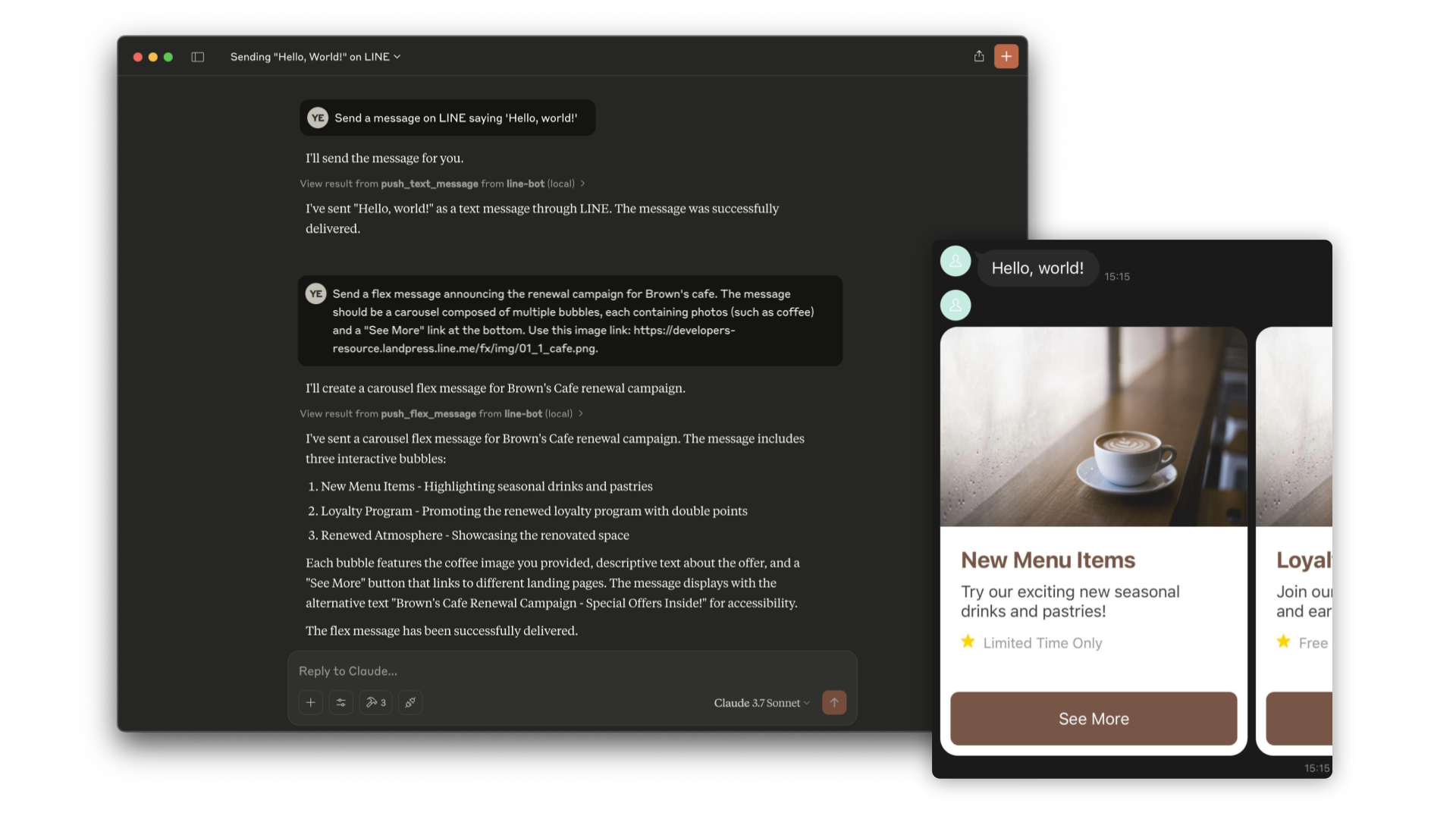
- Envía un mensaje flex altamente personalizable al usuario a través de LINE. Admite diseños de burbuja (contenedor único) y carrusel (múltiples burbujas deslizables).
- Entradas:
user_id(string): El ID de usuario que recibirá el mensaje. Por defecto, DESTINATION_USER_ID.message.altText(string): Texto alternativo que se muestra cuando el mensaje flex no se puede mostrar.message.content(any): El contenido del mensaje flex. Es un objeto JSON que define el diseño y los componentes del mensaje.message.contents.type(enum): Tipo de contenedor. 'bubble' para contenedor único, 'carousel' para múltiples burbujas deslizables.
- get_profile
- Obtiene información detallada del perfil de un usuario de LINE, incluyendo nombre para mostrar, URL de foto de perfil, mensaje de estado e idioma.
- Entradas:
user_id(string): El ID del usuario cuyo perfil desea recuperar. Por defecto, DESTINATION_USER_ID.
Instalación
Paso 1: Instalar line-bot-mcp-server
Requisitos:
- Node.js v20 o posterior
Clone este repositorio:
git clone git@github.com/line/line-bot-mcp-server.git
Instale las dependencias necesarias y compile line-bot-mcp-server cuando use Node.js. Este paso no es necesario cuando se usa Docker:
cd line-bot-mcp-server && npm install && npm run build
Paso 2: Obtener un token de acceso al canal
Este servidor MCP utiliza una LINE Official Account. Si no tiene una, créela siguiendo estas instrucciones.
Para conectarse a la API de Mensajería, necesita tener un token de acceso al canal. Puede confirmarlo siguiendo estas instrucciones.
Además, necesitará el ID de usuario del destinatario de los mensajes. Puede confirmarlo siguiendo estas instrucciones.
Paso 3: Configurar el Agente de IA
Agregue la siguiente configuración para un Agente de IA como Claude Desktop o Cline.
Inserte el token de acceso al canal y el ID de usuario que obtuvo anteriormente en CHANNEL_ACCESS_TOKEN y DESTINATION_USER_ID, respectivamente.
Además, actualice la ruta a line-bot-mcp-server en mcpServers.args.
Opción 1: Usar Node
{
  "mcpServers": {
    "line-bot": {
      "command": "node",
      "args": [
        "PATH/TO/line-bot-mcp-server/dist/index.js"
      ],
      "env": {
        "CHANNEL_ACCESS_TOKEN" : "FILL_HERE",
        "DESTINATION_USER_ID" : "FILL_HERE"
      }
    }
  }
}
Opción 2: Usar Docker
Primero compile la imagen de Docker:
docker build -t line/line-bot-mcp-server .
{
  "mcpServers": {
    "line-bot": {
      "command": "docker",
      "args": [
        "run",
        "-i",
        "--rm",
        "-e",
        "CHANNEL_ACCESS_TOKEN",
        "-e",
        "DESTINATION_USER_ID",
        "line/line-bot-mcp-server"
      ],
      "env": {
        "CHANNEL_ACCESS_TOKEN" : "FILL_HERE",
        "DESTINATION_USER_ID" : "FILL_HERE"
      }
    }
  }
}