Azure Resource Graph MCP Server
Consulta y recupera información de recursos de Azure a través de suscripciones usando Azure Resource Graph.
Documentación
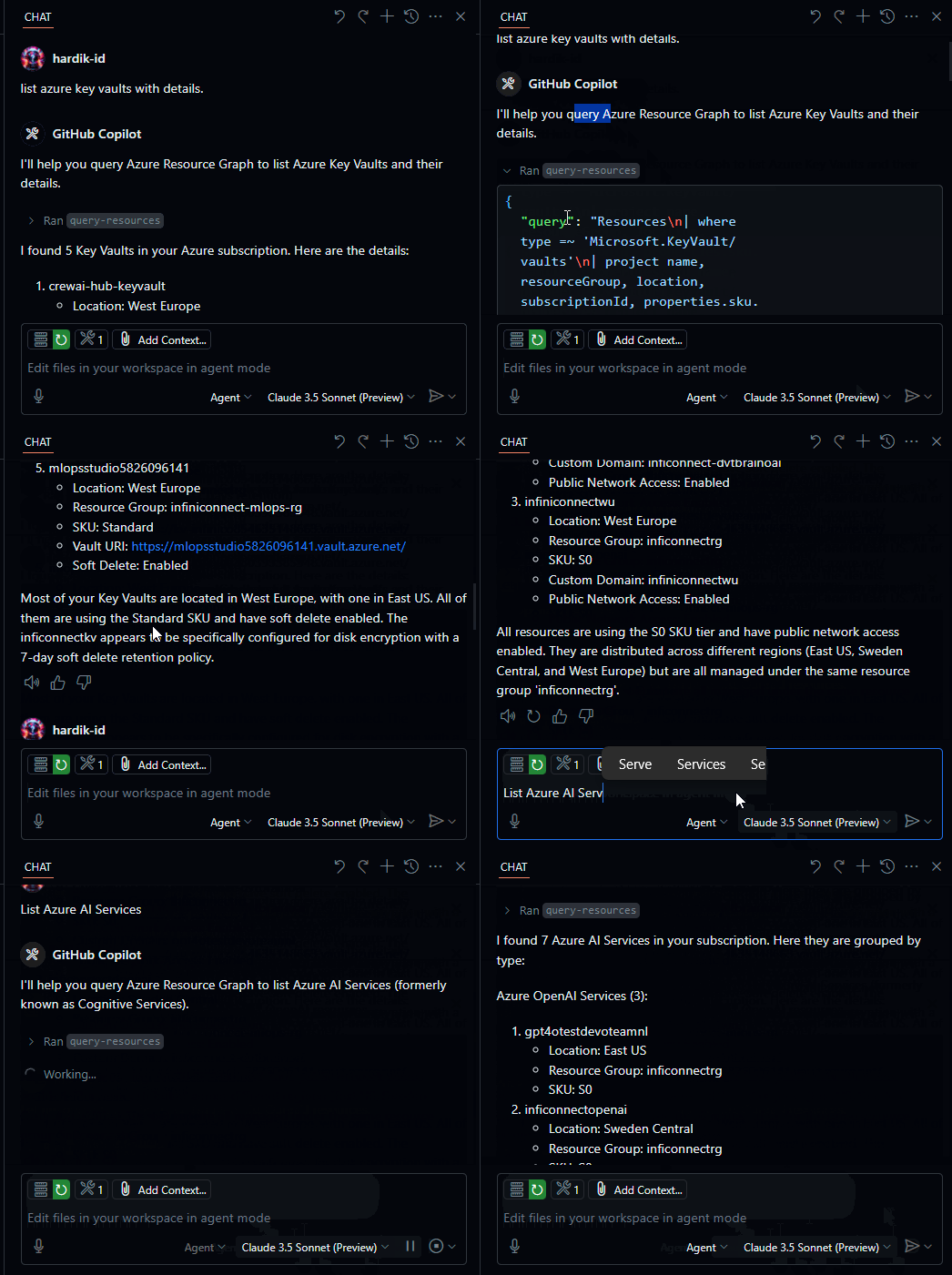
Demo
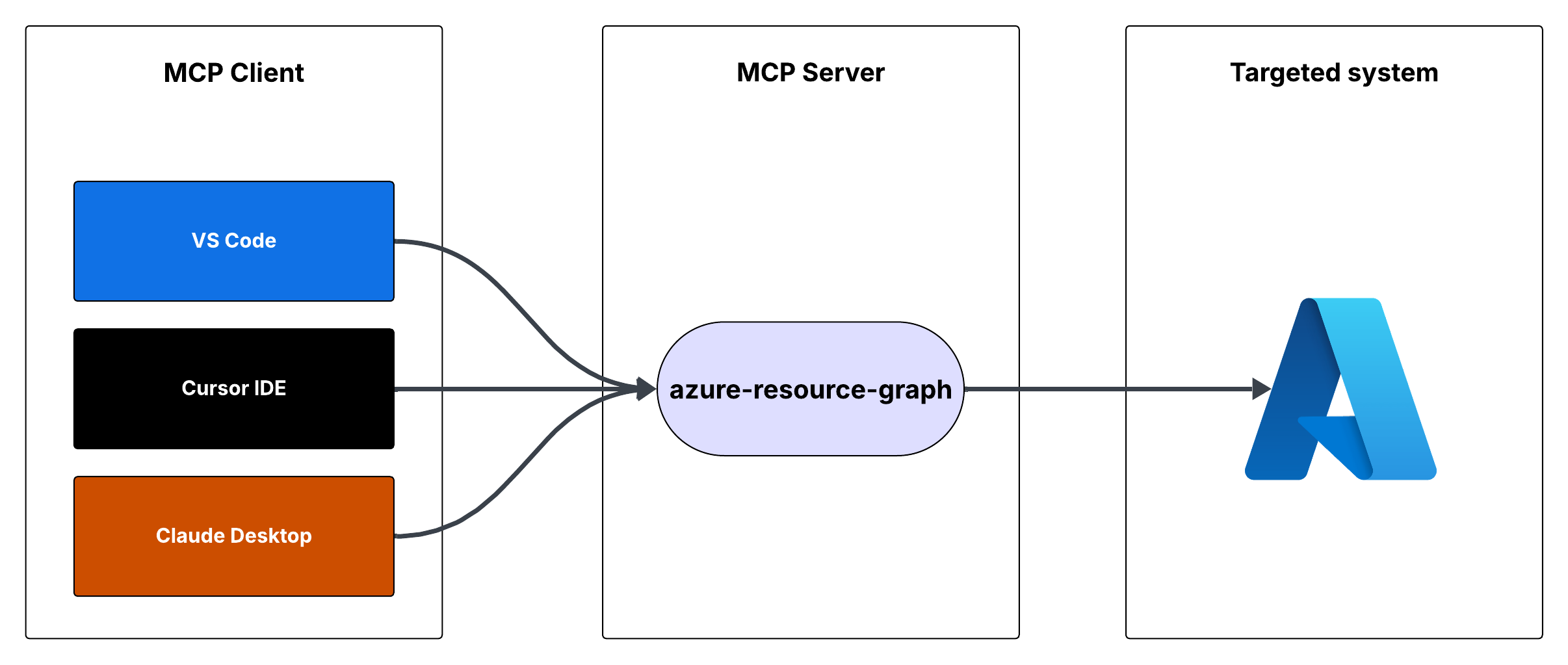
Flujo
Azure Resource Graph MCP Server
Este es un servidor de Model Context Protocol (MCP) que proporciona acceso a consultas de Azure Resource Graph. Permite recuperar información sobre los recursos de Azure en tus suscripciones mediante consultas de Resource Graph.
Características
- Consulta recursos de Azure mediante consultas de Resource Graph
- La consulta predeterminada devuelve el ID del recurso, nombre, tipo y ubicación
- Admite consultas personalizadas de Resource Graph
- Utiliza Azure DefaultAzureCredential para la autenticación
Requisitos previos
- Node.js instalado
- Suscripción de Azure
- Azure CLI instalado e iniciado sesión, u otras credenciales de Azure configuradas
Ejecución del servidor MCP
Puedes ejecutar el servidor MCP usando Cursor IDE o Visual Studio Code.
Opción 1: Integración con Cursor IDE
Para integrar el servidor MCP con Cursor IDE:
- Clona este repositorio en tu máquina local (por ejemplo,
C:\YOUR_WORKSPACE\azure-resource-graph-mcp-server) - Compila el proyecto:
npm install
npm run build
- Abre la Configuración de Cursor (JSON) y agrega la siguiente configuración:
{
  "mcpServers": {
    "azure-resource-graph-mcp-server": {
      "command": "node",
      "args": [
        "C:\\YOUR_WORKSPACE\\azure-resource-graph-mcp-server\\build\\index.js"
      ],
      "env": {
        "SUBSCRIPTION_ID": "xxxxxx-xx-xx-xx-xxxxxx"
      },
    }
  }
}
Nota: Asegúrate de actualizar la ruta para que coincida con la ubicación de tu repositorio local.
- Reinicia Cursor IDE para aplicar los cambios
Opción 2: Integración con VS Code
Para integrar el servidor MCP con Visual Studio Code:
- Clona este repositorio en tu máquina local
- Compila el proyecto:
npm install
npm run build
- Abre la Configuración de VS Code (JSON) presionando
Ctrl+Shift+P, escribe "Configuración (JSON)" y selecciona "Preferencias: Abrir configuración de usuario (JSON)" - Agrega la siguiente configuración:
{
    "mcp": {
        "servers": {
            "azure-resource-graph": {
                "type": "stdio",
                "command": "node",
                "args": [
                    "C:\\YOUR_WORKSPACE\\azure-resource-graph-mcp-server\\build\\index.js"
                ],
                "env": {
                  "SUBSCRIPTION_ID": "xxxxxx-xx-xx-xx-xxxxxx"
                },
            }
        }
    }
}
Nota: Asegúrate de actualizar la ruta para que coincida con la ubicación de tu repositorio local.
- Guarda el archivo settings.json
- Reinicia VS Code para aplicar los cambios
El servidor MCP ahora estará disponible para usar dentro de VS Code con integración de cursor.
Uso
El servidor proporciona la siguiente herramienta:
query-resources
Recupera recursos y sus detalles de Azure Resource Graph.
Parámetros:
subscriptionId(opcional): ID de suscripción de Azure (por defecto usa el ID configurado)query(opcional): Consulta personalizada de Resource Graph (por defecto "Resources | project id, name, type, location")
Configuración del entorno
-
Primero, asegúrate de haber iniciado sesión en Azure CLI ejecutando:
az loginEste paso es crucial para el desarrollo local, ya que DefaultAzureCredential usará automáticamente tus credenciales de Azure CLI.
-
Configura tus variables de entorno:
- Copia
.env.examplea.env - Actualiza
AZURE_SUBSCRIPTION_IDen.envcon tu ID de suscripción real - Otras variables (
AZURE_TENANT_ID,AZURE_CLIENT_ID,AZURE_CLIENT_SECRET) son opcionales cuando se usa la autenticación de Azure CLI
- Copia
-
Asegúrate de tener credenciales de Azure configuradas correctamente. El servidor usa DefaultAzureCredential que admite:
- Azure CLI
- Managed Identity
- Credenciales de Visual Studio Code
- Variables de entorno
-
Si usas variables de entorno, configura:
- AZURE_SUBSCRIPTION_ID
- AZURE_TENANT_ID
- AZURE_CLIENT_ID
- AZURE_CLIENT_SECRET
Manejo de errores
El servidor incluye un manejo robusto de errores para:
- Fallos de inicialización del cliente de Azure
- Errores de ejecución de consultas
- Consultas o parámetros no válidos
Desarrollo
Para trabajar en este proyecto:
- Realiza cambios en el directorio
src - Compila usando
npm run build - Prueba tus cambios ejecutando el servidor
Licencia
Este proyecto está licenciado bajo la Licencia MIT. Consulta el archivo LICENSE para más detalles.