Imagen3-MCP
Genera imágenes usando el modelo Imagen 3.0 de Google a través de la API de Gemini.
GitHub
71
Prueba este MCPPatrocinadoDocumentación
Imagen3-MCP
Herramienta de generación de imágenes basada en Google Imagen 3.0, que ofrece servicios a través de MCP (Model Control Protocol).
Ejemplos
Dibuja un Jack Russell Terrier corriendo, lente teleobjetivo, luz solar filtrándose a través del pelaje del perro, calidad fotorrealista
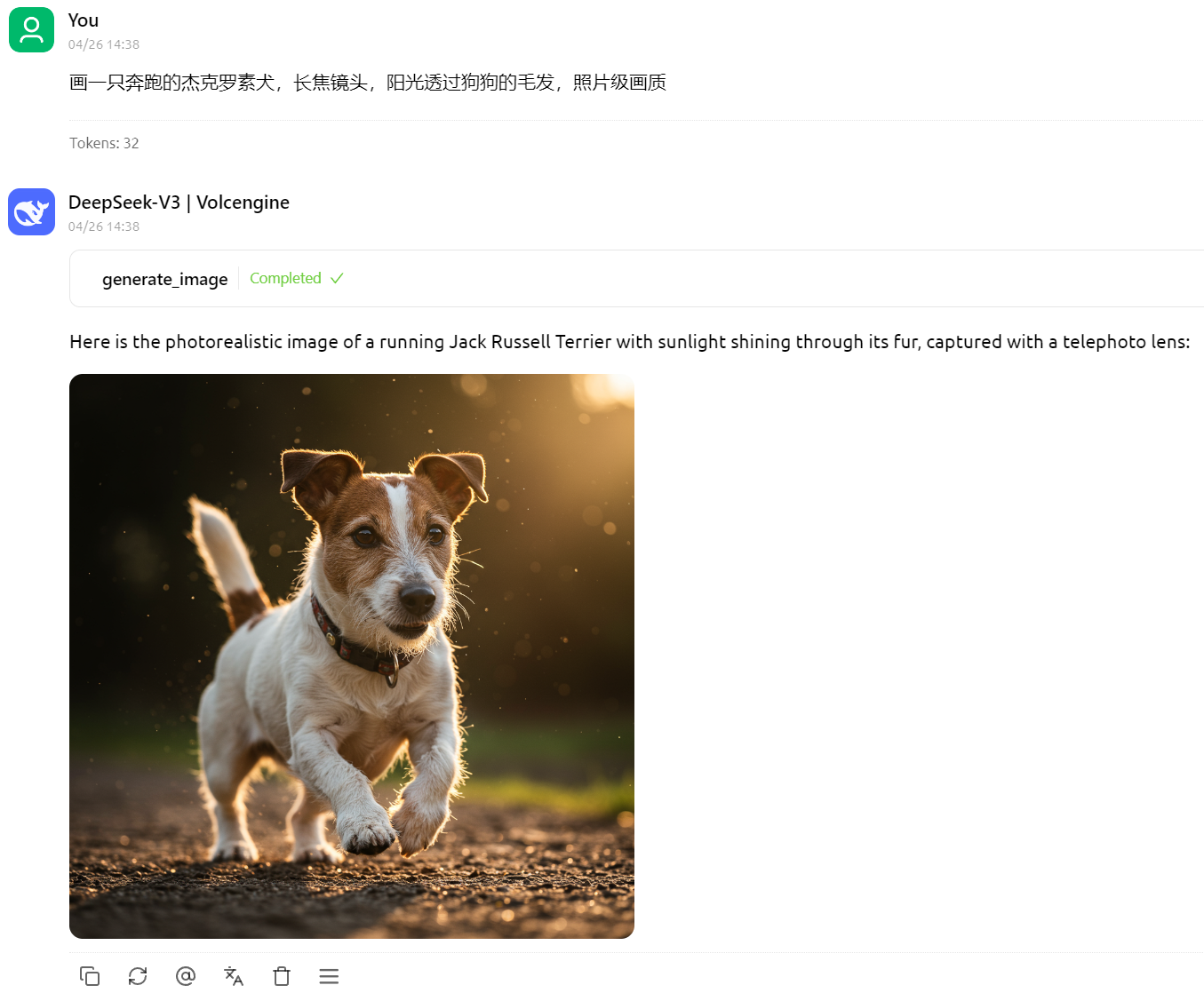
Dibuja una manzana con aspecto tecnológico

Requisitos de instalación
- Clave válida de Google Gemini API
Pasos de instalación — Cherry Studio
- Descarga el ejecutable más reciente desde GitHub Releases
- Coloca el ejecutable descargado en cualquier ubicación de tu sistema, por ejemplo
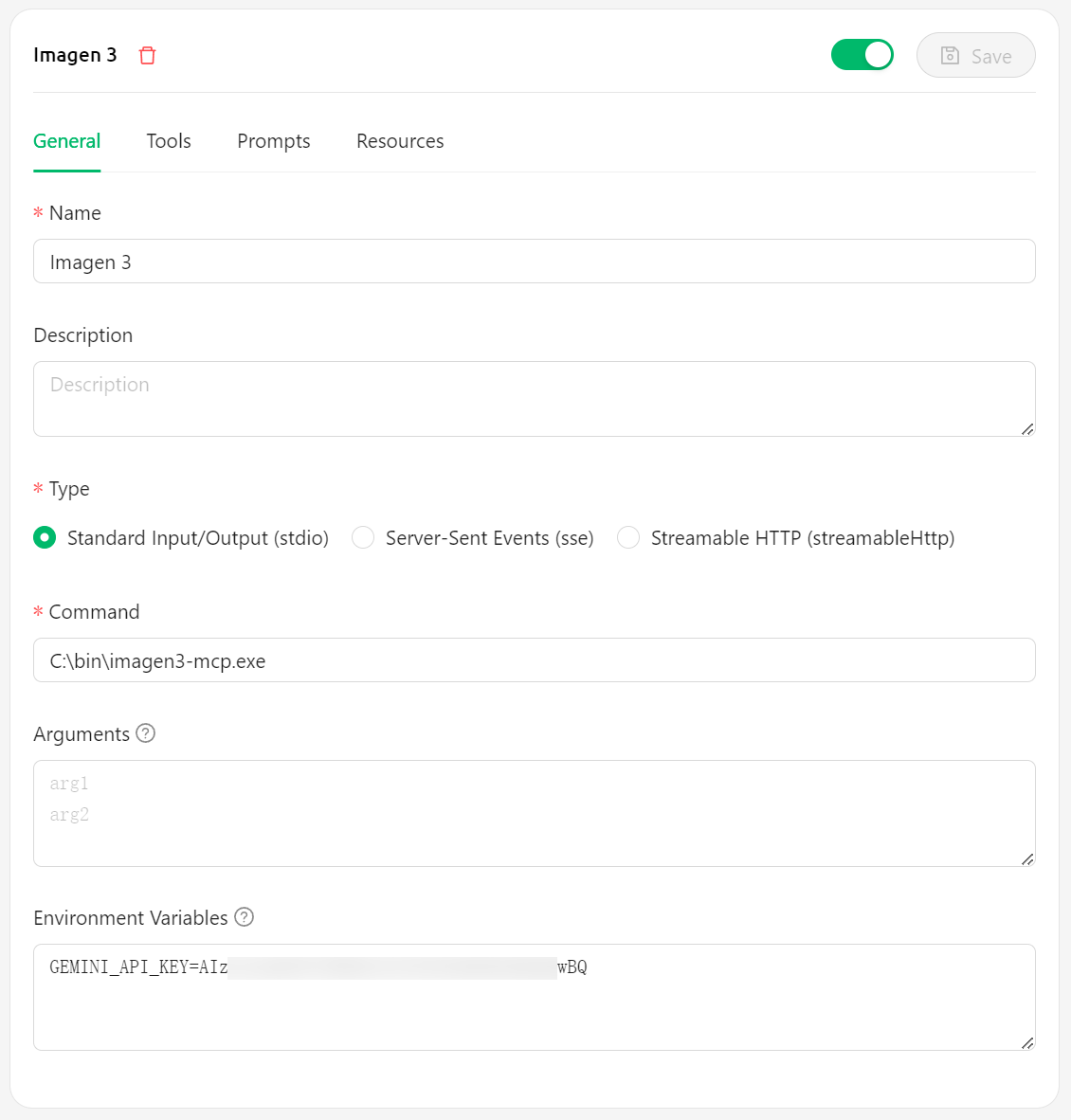
C:\bin\imagen3-mcp.exe - Configura en Cherry Studio:
- En el campo Command, escribe la ruta del ejecutable, por ejemplo
C:\bin\imagen3-mcp.exe - En la variable de entorno
GEMINI_API_KEY, escribe tu clave de Gemini API - [Opcional] En la variable de entorno
BASE_URL, escribe la dirección del proxy, por ejemplohttps://lingxi-proxy.hamflx.dev/api/provider/google(esta dirección puede resolver el problema del GFW, pero no resuelve la restricción de IP de Google, por lo que aún necesitas una VPN). - [Opcional] Variable de entorno
SERVER_LISTEN_ADDR: establece la dirección IP en la que escucha el servidor (por defecto127.0.0.1). - [Opcional] Variable de entorno
SERVER_PORT: establece el puerto en el que escucha el servidor y el puerto utilizado para las URL de imágenes (por defecto9981). - [Opcional] Variable de entorno
IMAGE_RESOURCE_SERVER_ADDR: establece la dirección del servidor utilizada en las URL de imágenes (por defecto127.0.0.1). Esto es útil cuando el servidor se ejecuta en un contenedor o en una máquina remota.
- En el campo Command, escribe la ruta del ejecutable, por ejemplo
Pasos de instalación — Cursor
{
  "mcpServers": {
    "imagen3": {
      "command": "C:\\bin\\imagen3-mcp.exe",
      "env": {
        "GEMINI_API_KEY": "<GEMINI_API_KEY>"
        // Optional environment variables:
        // "BASE_URL": "<PROXY_URL>",
        // "SERVER_LISTEN_ADDR": "0.0.0.0", // Example: Listen on all interfaces
        // "SERVER_PORT": "9981",
        // "IMAGE_RESOURCE_SERVER_ADDR": "your.domain.com" // Example: Use a domain name for image URLs
      }
    }
  }
}
Licencia
MIT
Imagen3-MCP (Inglés)
Una herramienta de generación de imágenes basada en Google Imagen 3.0, que ofrece servicios a través de MCP (Model Control Protocol).
Ejemplos
Un Jack Russell Terrier corriendo, lente teleobjetivo, luz solar filtrándose a través del pelaje del perro, calidad fotorrealista
Una manzana de alta tecnología
Requisitos
- Clave válida de Google Gemini API
Pasos de instalación — Cherry Studio
- Descarga el ejecutable más reciente desde GitHub Releases
- Coloca el ejecutable descargado en cualquier ubicación de tu sistema, por ejemplo
C:\bin\imagen3-mcp.exe - Configura en Cherry Studio:
- En el campo Command, escribe la ruta del ejecutable, por ejemplo
C:\bin\imagen3-mcp.exe - Escribe tu clave de Gemini API en la variable de entorno
GEMINI_API_KEY - [Opcional] Escribe una URL de proxy en la variable de entorno
BASE_URL, por ejemplohttps://your-proxy.com. - [Opcional] Establece la variable de entorno
SERVER_LISTEN_ADDR: La dirección IP en la que escucha el servidor (por defecto127.0.0.1). - [Opcional] Establece la variable de entorno
SERVER_PORT: El puerto en el que escucha el servidor y que se utiliza para las URL de imágenes (por defecto9981). - [Opcional] Establece la variable de entorno
IMAGE_RESOURCE_SERVER_ADDR: La dirección del servidor utilizada en las URL de imágenes (por defecto127.0.0.1). Útil si el servidor se ejecuta en un contenedor o en una máquina remota.
- En el campo Command, escribe la ruta del ejecutable, por ejemplo
Pasos de instalación — Cursor
{
  "mcpServers": {
    "imagen3": {
      "command": "C:\\bin\\imagen3-mcp.exe",
      "env": {
        "GEMINI_API_KEY": "<GEMINI_API_KEY>"
        // Optional environment variables:
        // "BASE_URL": "<PROXY_URL>",
        // "SERVER_LISTEN_ADDR": "0.0.0.0", // Example: Listen on all interfaces
        // "SERVER_PORT": "9981",
        // "IMAGE_RESOURCE_SERVER_ADDR": "your.domain.com" // Example: Use a domain name for image URLs
      }
    }
  }
}
Licencia
MIT