DreamFactory MCP
Un servidor MCP para integrarse con la API de DreamFactory y gestionar y acceder a fuentes de datos.
Documentación
DreamFactory MCP
Un servidor de Model Context Protocol (MCP) para la integración de DreamFactory con Claude.
Resumen
DreamFactory es una plataforma segura de acceso a datos empresariales autoalojada que proporciona acceso API gobernado a cualquier fuente de datos, conectando aplicaciones empresariales y LLMs locales con control de acceso basado en roles y transferencia de identidad.
Instalación de Extensión de Escritorio (Solo Claude Desktop)
La forma más fácil de comenzar a usar el Servidor MCP de DreamFactory es yendo a los lanzamientos de este repositorio y descargando el archivo de Extensión de Escritorio más reciente. Las Extensiones de Escritorio son un nuevo formato de archivo creado por Anthropic (la empresa detrás de Claude.ai). Una vez descargado, haga doble clic en el archivo DXT para iniciar la instalación. Tenga en cuenta que necesitará instalar Claude Desktop antes de hacerlo. Después de iniciar la instalación, verá este mensaje:
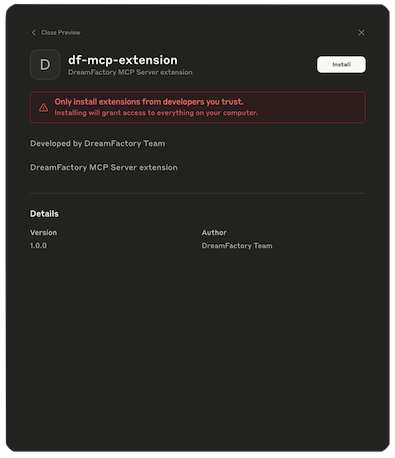
Haga clic en el botón Install y verá:
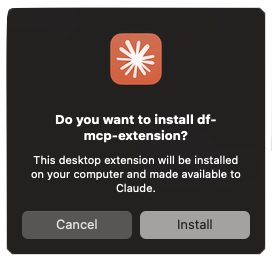
Haga clic en Install y si todo va bien, se le pedirá que ingrese una clave API de DreamFactory y la URL del servicio:
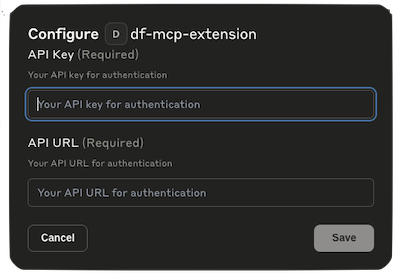
Si no tiene esta información disponible, simplemente haga clic en Cancel. Puede agregarla más tarde haciendo clic en la pestaña Extensiones dentro de Configuración y luego haciendo clic en Configure:

En cualquier caso, antes de poder usar el Servidor MCP de DreamFactory, deberá habilitarlo manualmente cambiando el interruptor Deshabilitado a Habilitado:

Instalación Manual
-
Clone este repositorio y luego instale las dependencias:
cd df-mcp npm install -
Compile el proyecto:
npm run build
Configuración de Claude Desktop
-
Instale Claude Desktop desde https://claude.ai/download.
-
Abra Claude Desktop y navegue a Configuración.
-
En el menú de Configuración, vaya a la sección "Developer".
-
Haga clic en "Edit Config" para modificar la configuración de Claude.
-
Agregue la siguiente configuración para habilitar el servidor MCP de DreamFactory:
{ "mcpServers": { "add": { "command": "node", "args": [ "/Users/dreamfactory/Documents/df-mcp/build/index.js" ], "env": { "DREAMFACTORY_URL": "https://example.dreamfactory.com/api/v2/<service-name>", "DREAMFACTORY_API_KEY": "" } } } } -
Importante: Modifique la ruta en el arreglo
argspara que coincida con su ruta de instalación local si es diferente de/Users/dreamfactory/Documents/df-mcp/. -
Agregue su URL de DreamFactory y clave API a las variables de entorno
DREAMFACTORY_URLDREAMFACTORY_API_KEYsegún sea necesario. -
Guarde la configuración y reinicie Claude Desktop.
Nota sobre Claude Desktop, NodeJS y NVM
DreamFactory MCP requiere Node 22.10.0 o más reciente. Incluso si está ejecutando Node 22.10 o más reciente, puede encontrar un problema confuso si está usando NVM (Node Version Manager) que dificulta la instalación. A veces estos problemas se complican aún más si además usa otras herramientas de desarrollo como Laravel Herd que hacen cambios adicionales en las rutas de Node.
Si el registro del servidor MCP indica que Claude Desktop está usando la versión incorrecta de Node, puede forzarlo fácilmente a usar la versión deseada creando un script de shell que se vea así:
#!/bin/zsh
source ~/.zshrc
exec /Applications/Herd/config/nvm/versions/node/v22.17.1/bin/node
Llame al script node-for-claude.sh o similar, y colóquelo en /usr/local/bin. Luego hágalo ejecutable:
$ chmod +x node-for-claude.sh
Finalmente, actualice el archivo claude_desktop_config.json para que apunte a este script:
{
  "mcpServers": {
        "df-mcp": {
            "command": "/usr/local/bin/node-for-claude.sh",
            "args": [
                "/Users/wjgilmore/Software/df-mcp/build/index.js"
            ],
            "env": {
               "DREAMFACTORY_URL": "<URL>",
                "DREAMFACTORY_API_KEY": "<API_KEY>"
            }
        }
  }
}
Uso
Una vez configurado, el servidor MCP de DreamFactory estará disponible para Claude Desktop. Puede usar las capacidades de DreamFactory a través de la interfaz de Claude.
Configuración de Docker MCP para Claude Desktop
Construyendo la Imagen Docker
docker build -t df-mcp .
Configurar Claude Desktop
Agregue esta configuración a su archivo de configuración de Claude Desktop:
Ubicación:
- macOS: ~/Library/Application Support/Claude/claude_desktop_config.json
- Windows: %APPDATA%\Claude\claude_desktop_config.json
- Linux: ~/.config/Claude/claude_desktop_config.json
Configuración
{
  "mcpServers": {
    "dreamfactory-mcp": {
      "command": "docker",
      "args": [
        "run",
        "--rm",
        "-i",
        "--env", "DREAMFACTORY_URL=https://your-dreamfactory-instance.com/api/v2/<service-name>",
        "--env", "DREAMFACTORY_API_KEY=your-api-key-here",
        "dreamfactory-mcp:latest"
      ]
    }
  }
}
Reiniciar Claude Desktop
Después de actualizar la configuración, reinicie Claude Desktop para cargar el servidor MCP.
Probando el Contenedor Docker
Ejecute el script de prueba incluido para validar la configuración de Docker:
./test-docker.sh
Esto verificará que el contenedor se construye correctamente, responde a comandos MCP y que todas las herramientas están registradas correctamente.
Desarrollo
- El código fuente se encuentra en el directorio
src - Los archivos compilados están en el directorio
build - Use
npm startpara ejecutar el servidor compilado directamente
Seguridad
¿Encontró un problema de seguridad? Envíenos un correo a security@dreamfactory.com.