Wokelo AI MCP Server
MCP de investigación para negociaciones para asistentes de IA: inteligencia empresarial, datos de transacciones y entregables de investigación a través de MCP.
Documentación
Primeros pasos
¿Qué es Wokelo MCP?
Wokelo MCP es un servidor de Model Context Protocol que le da a tu asistente de IA — Claude, ChatGPT o cualquier cliente compatible con MCP — acceso directo al stack de investigación para dealmaking de Wokelo. Una vez conectado, puedes ejecutar enriquecimiento de empresas, mapas de mercado, screening de M&A, monitoreo de noticias y flujos de investigación completos en lenguaje natural, sin salir del chat.
Internamente, el servidor está respaldado por:
- Una base de datos propietaria de más de 100M de empresas resueltas por entidad
- Más de 30 fuentes de datos premium para finanzas, transacciones, filings, reseñas, noticias y propiedad intelectual
- LLMs ajustados por dominio y flujos de trabajo preconstruidos que codifican la metodología de dealmaking
- Una base de datos exhaustiva de transacciones que cubre rondas de financiación globales y M&A
URL del servidor:
https://mcp.wokelo.ai/mcpAutenticación: OAuth 2.0 Clientes compatibles: Claude (Web, Desktop), ChatGPT (Business, Enterprise)
¿Quién debería usar esto?
| Si eres… | Lo que podrás hacer |
|---|---|
| Un analista, banquero o inversor de PE/VC | Pídele a tu asistente de IA informes de empresa, comparables de deals, análisis de pares y enriquecimiento masivo — obtén respuestas verificadas y con fuentes citadas en segundos o minutos. |
| Un líder de investigación o knowledge manager | Codifica la metodología de investigación de tu firma una sola vez y ejecútala de forma consistente en todo el equipo. |
| Un desarrollador o administrador de TI | Implementa el conector para tu firma, configura los permisos de herramientas y enruta Wokelo hacia flujos de trabajo agénticos. |
Si quieres ejemplos de casos de uso y consultas de muestra antes de instalar, consulta Casos de uso de MCP.
Requisitos previos
Antes de conectarte, asegúrate de tener:
- Una cuenta de Wokelo con acceso a MCP habilitado (contacta a tu account manager si no estás seguro)
- Uno de los clientes de IA compatibles:
- Claude — Web o Desktop, en cualquier plan que soporte conectores personalizados
- ChatGPT — Plan Business (Team) o Enterprise; solo los administradores del workspace pueden agregar apps personalizadas
- El Skill File de Wokelo — descárgalo aquí
Consejo
El skill file es la capa de orquestación. Le indica a tu asistente de IA cuándo usar Wokelo, qué herramientas encadenar para cada tipo de pregunta y cómo formatear los resultados. Sin él, el conector sigue funcionando — pero el asistente no sabrá de forma confiable que debe usar Wokelo en lugar de la búsqueda web, y obtendrás respuestas más superficiales.
Conectar con Claude
Claude Web
Desde cualquier conversación de Claude, abre **Settings**. Navega a **Connectors → Add Connectors**. * **Name:** `Wokelo` * **Remote MCP server URL:** `https://mcp.wokelo.ai/mcp`Haz clic en **Add**.
Claude Desktop
El flujo es idéntico al de Claude Web — abre Settings → Connectors → Add Connectors, ingresa la misma URL y autentícate.
Subir el Skill File en Claude
Desde el panel de navegación izquierdo de Claude, haz clic en **Customize**. En la sección **Skills**, haz clic en **+** y sube el [Wokelo Skill File](https://wkemails.blob.core.windows.net/clients/%28%279a7adb3f-b1d2-4fe0-9062-3aea68bae540%27%2C%29/SKILL.md).<Frame>
<img src="https://mintcdn.com/wokeloai-7cd44985/Fee4JIjj58aNeGeZ/images/Screenshot-2026-04-17-at-9.43.26-AM.png?fit=max&auto=format&n=Fee4JIjj58aNeGeZ&q=85&s=3bef60c22b025c70554def443d78ebbc" alt="Upload Wokelo skill in Claude" width="1912" height="968" data-path="images/Screenshot-2026-04-17-at-9.43.26-AM.png" />
</Frame>
Conectar con ChatGPT
Ve a **Settings → Apps → Advanced Settings** y habilita **Developer Mode**.Nota
Las apps personalizadas de ChatGPT están disponibles solo en los planes Business (Team) y Enterprise. Los administradores del workspace son el único rol que puede registrar apps personalizadas.
<Frame>
  <img src="https://mintcdn.com/wokeloai-7cd44985/IkoPUpmLbZqxfUQA/images/Screenshot-2026-04-16-at-10.51.22-AM.png?fit=max&auto=format&n=IkoPUpmLbZqxfUQA&q=85&s=3c31a74289e047f36bb98b3d768e3632" alt="Enable Developer Mode in ChatGPT" width="2414" height="1332" data-path="images/Screenshot-2026-04-16-at-10.51.22-AM.png" />
</Frame>
<Frame>
  <img src="https://mintcdn.com/wokeloai-7cd44985/IkoPUpmLbZqxfUQA/images/Screenshot-2026-04-16-at-10.46.25-AM.png?fit=max&auto=format&n=IkoPUpmLbZqxfUQA&q=85&s=7353663b17d6f87e364426678018f5c1" alt="Create a new app in ChatGPT" width="2398" height="1352" data-path="images/Screenshot-2026-04-16-at-10.46.25-AM.png" />
</Frame>
Haz clic en **Create**.

<Frame>
  <img src="https://mintcdn.com/wokeloai-7cd44985/Kf_mRlps3A0YeelC/images/Screenshot-2026-04-16-at-10.47.09-AM.avif?fit=max&auto=format&n=Kf_mRlps3A0YeelC&q=85&s=3f6b704c6e071c5f3778ec1552b3b597" alt="Configure Wokelo MCP in ChatGPT" width="1100" height="644" data-path="images/Screenshot-2026-04-16-at-10.47.09-AM.avif" />
</Frame>
Subir el Skill File en ChatGPT
En el panel de navegación izquierdo, haz clic en **Skills**.<Frame>
<img src="https://mintcdn.com/wokeloai-7cd44985/Fee4JIjj58aNeGeZ/images/Screenshot-2026-04-17-at-10.07.50-AM.png?fit=max&auto=format&n=Fee4JIjj58aNeGeZ&q=85&s=ea20d35f9d0cbfc600178afc4bb0960d" alt="Open Skills in ChatGPT" width="1916" height="998" data-path="images/Screenshot-2026-04-17-at-10.07.50-AM.png" />
</Frame>
<Frame>
  <img src="https://mintcdn.com/wokeloai-7cd44985/Fee4JIjj58aNeGeZ/images/Screenshot-2026-04-17-at-10.08.07-AM.png?fit=max&auto=format&n=Fee4JIjj58aNeGeZ&q=85&s=b68e5a6f7732d83072654b4c33de8703" alt="Upload Wokelo skill in ChatGPT" width="1915" height="990" data-path="images/Screenshot-2026-04-17-at-10.08.07-AM.png" />
</Frame>
Tu primera consulta
Una vez conectado, prueba una de estas para confirmar que la integración funciona:
| Consulta | Lo que activa |
|---|---|
| "Cuéntame sobre Stripe — noticias recientes, financiación, headcount y adquisiciones clave." | search_company → get_company_news → submit_company_enrichment |
| "¿Cuáles son las 10 startups de observabilidad de LLMs más importantes y cuánto han recaudado?" | submit_market_map → submit_company_enrichment |
| "Extrae reseñas de empleados para Notion y sus tres competidores más cercanos." | get_employee_reviews en el conjunto de pares |
| "Ejecuta una comparación de pares entre Stripe, Adyen y Checkout.com." | list_workflows → start_workflow (comparación de pares) |
Para un catálogo más completo de escenarios con prompts de ejemplo y resultados esperados, consulta Casos de uso de MCP.
Referencia de herramientas
El Wokelo MCP expone ~20 herramientas en cuatro categorías. La mayoría de las preguntas casuales se responden con herramientas instantáneas en segundos. Las herramientas asíncronas envían un trabajo, devuelven un request_id, y tu asistente consulta hasta que el resultado esté listo.
Herramientas instantáneas — responden en segundos
| Herramienta | Propósito | Uso típico |
|---|---|---|
search_company | Resolver un nombre de empresa a un permalink único | Ejecutar siempre primero para cualquier empresa nombrada |
get_company_news | Artículos recientes sobre una empresa, con resúmenes y metadatos del editor | "Lo último sobre [empresa]" |
get_employee_reviews | Sentimiento estilo Glassdoor, puntuaciones de cultura, calificaciones de liderazgo | "¿Cómo es la cultura en [empresa]?" |
get_product_reviews | Reputación de producto estilo G2 y feedback de clientes | "¿Cómo está reseñado [producto]?" |
list_workflows | Catálogo de flujos de trabajo disponibles (incluidos los flujos personalizados de tu firma) | Requerido antes de activar cualquier informe |
list_notebooks | Informes anteriores generados para el usuario/firma | Encontrar un informe existente antes de volver a ejecutarlo |
list_earnings_calls | Transcripciones de earnings disponibles para una empresa | Requerido antes del análisis de earnings |
Herramientas asíncronas — enviar, consultar, recuperar
| Herramienta | Propósito | Tiempo de ejecución típico |
|---|---|---|
submit_company_enrichment | Datos estructurados de 1 a 200 empresas (firmographics, financiación, finanzas, headcount, adquisiciones) | 1–5 min (secciones rápidas) / ~15 min (secciones de IA) |
submit_industry_enrichment | Inteligencia sectorial — tamaño de mercado, tendencias, M&A, regulaciones | 10–30 min |
submit_market_map | Descubrir empresas en un espacio; mapear el panorama competitivo | 10–20 min |
submit_target_screening | Encontrar objetivos de adquisición M&A para un adquirente | 10–20 min |
submit_buyer_screening | Encontrar posibles adquirentes para un objetivo | 10–20 min |
start_workflow | Activar un informe estructurado o notebook (investigación de empresa, memo de IC, comparación de pares, earnings, personalizado) | 20–60 min según el flujo de trabajo |
Herramientas de utilidad
| Herramienta | Propósito |
|---|---|
get_request_status | Consultar el estado de un trabajo asíncrono |
get_request_result | Recuperar resultados una vez que el estado sea COMPLETED |
wait_for_result | Envoltorio de conveniencia para trabajos cortos (solo enriquecimiento — no para mapas de mercado, screenings o informes de industria) |
download_notebook | Descargar un informe terminado como PDF, DOCX, PPTX o JSON |
cancel_request | Abortar un trabajo pendiente o en curso |
Permisos de herramientas
Abre la página Connectors en Claude (Web o Desktop) y haz clic en Configure junto al conector de Wokelo. Verás cada herramienta listada con tres opciones de permiso:
- Always allow — se ejecuta sin preguntar
- Needs approval — pregunta antes de cada llamada
- Blocked — deshabilitada
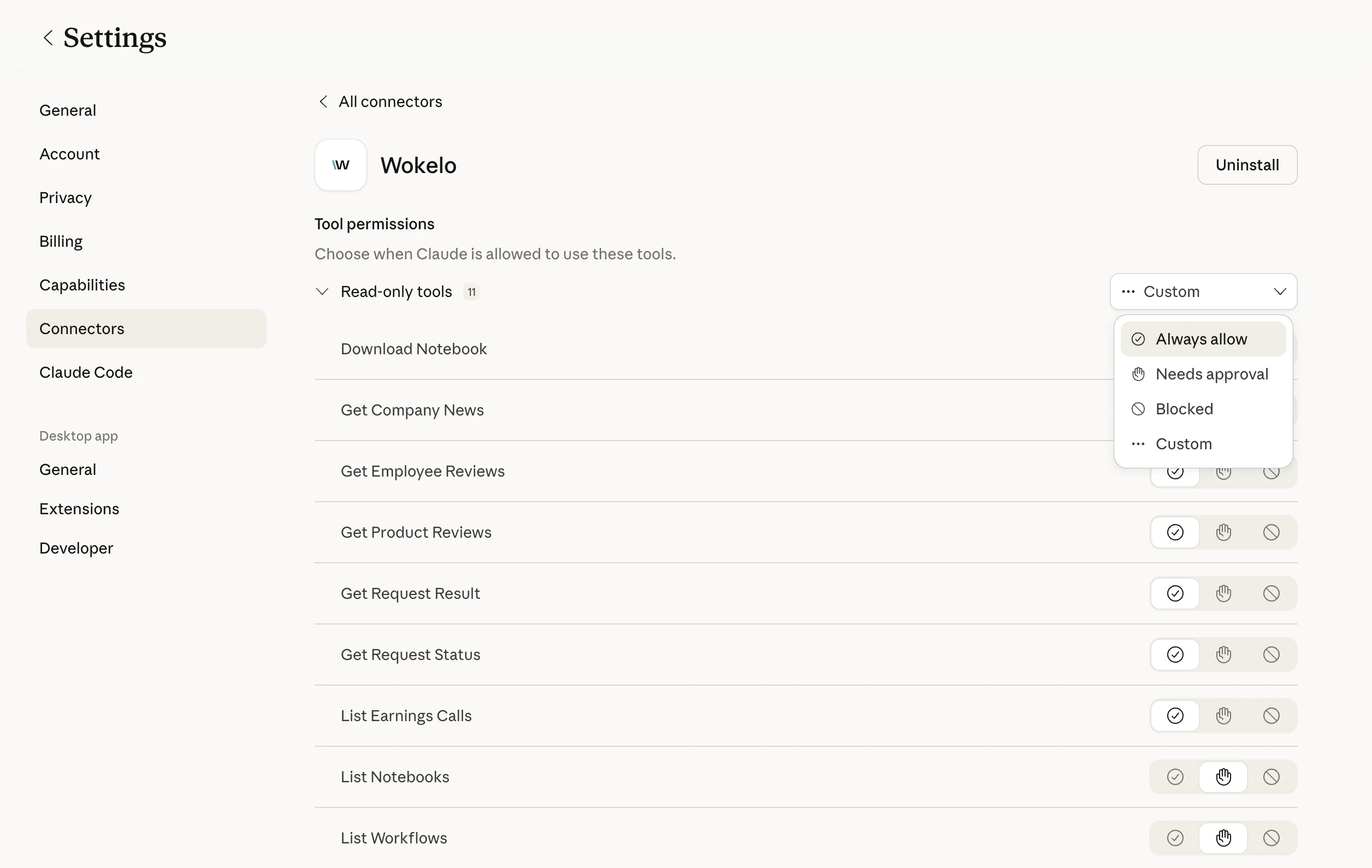
Valores predeterminados recomendados
| Permiso | Herramientas | Por qué |
|---|---|---|
| Always allow | search_company, get_company_news, get_employee_reviews, get_product_reviews, list_workflows, list_notebooks, list_earnings_calls, get_request_status, get_request_result | Rápidas, de solo lectura, bajo costo de créditos |
| Needs approval | submit_company_enrichment, submit_industry_enrichment, submit_market_map, submit_target_screening, submit_buyer_screening, start_workflow, download_notebook | De larga duración y consumen más créditos |
| Blocked | cancel_request (opcional) | Bloquear solo si quieres evitar la cancelación accidental de trabajos de compañeros |
Límites y cuotas
| Límite | Valor | Notas |
|---|---|---|
| Empresas por llamada de enriquecimiento (solo secciones rápidas) | 200 | Firmographics, financiación, headcount, finanzas, etc. |
| Empresas por llamada de enriquecimiento (con secciones de IA) | 20 | Disminuye drásticamente cuando se incluyen secciones lentas de IA |
| Empresas por flujo de comparación de pares | 5 | Tope máximo en el parámetro websites |
| Trabajos asíncronos concurrentes | Depende del plan | Contacta a tu account manager para conocer los límites |
| Consumo de créditos | Varía según la herramienta | Los flujos de informes asíncronos consumen más |
Si alcanzas un límite, tu asistente devolverá un error de Wokelo. Vuelve a intentarlo con un lote más pequeño o contacta a tu account manager para aumentar las cuotas.
Solución de problemas
Verifica que completaste el OAuth — si la ventana de autenticación se cerró antes de tiempo, el conector no se registrará. Elimínalo y vuelve a agregarlo, luego observa la redirección a la página de inicio de sesión de Wokelo. Si estás en ChatGPT, confirma también que Developer Mode esté habilitado a nivel del workspace. El skill file casi con seguridad falta o está desactualizado. Vuelve a subir el [Skill File](https://wkemails.blob.core.windows.net/clients/%28%279a7adb3f-b1d2-4fe0-9062-3aea68bae540%27%2C%29/SKILL.md) más reciente. El skill le indica al asistente que prefiera Wokelo sobre la búsqueda web para consultas sobre empresas. Tu sesión de OAuth ha expirado. Abre **Connectors → Configure → Wokelo** y vuelve a autenticarte. No se pierde ningún dato. La investigación de industria y los informes completos de empresa pueden tardar legítimamente 30–60 minutos. Si un trabajo supera los 90 minutos sin resultados, pídele a tu asistente que llame a `cancel_request` y reenvíe el trabajo, o contacta a soporte con el `request_id`. Estás incluyendo una sección lenta de IA (p. ej., `business_model`, `management_profiles`). Elimina la sección de IA o divide en lotes de 20. Pregúntale a tu asistente: *"Lista mis flujos de trabajo disponibles de Wokelo."* Llamará a `list_workflows` y mostrará los códigos de flujos personalizados de tu firma. Luego pídele que ejecute el que quieras.Preguntas frecuentes
El servidor MCP es un envoltorio que expone las capacidades de investigación de Wokelo a los asistentes de IA de forma nativa para chat. La [REST API](/overview) es para integración directa en tus propias aplicaciones. La mayoría de las herramientas MCP se corresponden 1:1 con endpoints de la API, pero la capa MCP añade orquestación — encadenar herramientas, manejar el polling y formatear resultados para el chat. Compatibles oficialmente: **Claude Web**, **Claude Desktop**, **ChatGPT Business** y **ChatGPT Enterprise**. Cualquier cliente compatible con MCP (Cursor, Cline, agentes personalizados) también debería funcionar, pero no está probado oficialmente. Sí — el acceso a MCP requiere una cuenta activa de Wokelo con MCP habilitado. Contacta a tu account manager si no estás seguro de tu plan. Todo el tráfico de MCP está autenticado mediante OAuth y utiliza HTTPS. Wokelo no entrena con tus consultas ni las comparte con terceros. Consulta tu acuerdo de cliente para conocer los términos completos de manejo de datos. Sí. Las herramientas asíncronas devuelven un `request_id` que puede ser consultado por un agente o un trabajo programado, incluso mediante [Cowork](https://www.anthropic.com/) o capas de orquestación similares, para entregables no supervisados como resúmenes de cartera los lunes por la mañana. La herramienta correspondiente devuelve un resultado vacío o parcial. Tu asistente debe recurrir a la búsqueda web para esa solicitud específica; el archivo de habilidades impone este comportamiento. Pregunta: *"Muéstrame mis notebooks recientes de Wokelo"* — el asistente llama a `list_notebooks`, encuentra el informe y puede descargarlo como PDF, DOCX o PPTX mediante `download_notebook`.Próximos pasos
Consultas de ejemplo y flujos de trabajo para acuerdos que puedes ejecutar hoy. Acceso directo a la API REST para integraciones personalizadas. Conecta Wokelo con Affinity, Salesforce, DealCloud y más. Preguntas sobre planes, límites o incorporación.Esta documentación está creada y alojada en Mintlify, una plataforma de documentación para desarrolladores.