CAD-MCP
Controla software CAD con instrucciones en lenguaje natural para realizar operaciones de dibujo.
Documentación
Servidor CAD-MCP (Servidor de Protocolo de Contexto de Modelo CAD)
Introducción al Proyecto
CAD-MCP es un servicio innovador de control CAD que permite controlar software CAD para operaciones de dibujo mediante instrucciones en lenguaje natural. Este proyecto combina el procesamiento de lenguaje natural y la tecnología de automatización CAD, permitiendo a los usuarios crear y modificar dibujos CAD mediante comandos de texto simples, sin necesidad de operar manualmente la interfaz CAD.
La versión 2.0 está completamente actualizada según la especificación MCP más reciente (FastMCP, salida estructurada, anotaciones de herramientas, notificaciones de progreso, HTTP Streamable), y añade 35 herramientas en total que cubren consultas, edición, capas, gestión de dibujos, bloques y paso directo de comandos, formando un bucle de retroalimentación completo de "dibujar → inspeccionar → corregir".
Características
Funciones de Control CAD
- Soporte para Múltiples Software CAD: Soporta software CAD principal como AutoCAD, GstarCAD (GCAD) y ZWCAD
- Funciones Básicas de Dibujo:
- Dibujo de líneas
- Dibujo de círculos
- Dibujo de arcos
- Dibujo de elipses
- Dibujo de rectángulos
- Dibujo de polilíneas
- Adición de texto
- Relleno de patrones
- Anotación de dimensiones
- Funciones de Consulta (la IA puede ver el contenido real del dibujo):
- Listar todas las capas
- Listar entidades en el espacio modelo (devuelve identificadores de entidades editables)
- Consultar propiedades detalladas de entidades por identificador (coordenadas/radio/contenido de texto, etc.)
- Captura de pantalla de la ventana CAD para vista previa
- Funciones de Edición: borrar, mover, rotar, escalar, copiar, reflejar, desplazar, matriz (lineal/polar), deshacer/rehacer
- Gestión de Capas: Crear y cambiar capas, consultar estados de capas
- Gestión de Dibujos: Nuevo / abrir / cerrar / guardar dibujos (DWG/DXF)
- Operaciones con Bloques: Crear, insertar y listar bloques
- Paso Directo de Comandos: Ejecutar cualquier comando CAD mediante
send_command(una vía de escape para todo lo demás)
Características del Protocolo MCP
- Salida Estructurada: Todas las herramientas devuelven
structuredContentcon unoutputSchemaque los clientes pueden analizar directamente - Anotaciones de Herramientas: Las herramientas de consulta están marcadas como
readOnlyHint; las operaciones destructivas están marcadas comodestructiveHintpara políticas de confirmación del cliente - Notificaciones de Progreso: Las operaciones de larga duración (inicio de CAD, guardado) envían notificaciones de mensaje al cliente
- Modos de Transporte Duales:
stdio(local, cliente único) ystreamable-http(remoto / múltiples clientes compartiendo una instancia de CAD) - Semántica de Errores: Los errores de validación de entrada se devuelven como errores de herramienta, permitiendo la autocorrección del modelo
Funciones de Procesamiento de Lenguaje Natural (interfaz heredada)
- Análisis de Comandos: Analizar instrucciones en lenguaje natural en parámetros de operación CAD
- Reconocimiento de Colores: Extraer información de color del texto y aplicarla a los objetos de dibujo
- Mapeo de Palabras Clave de Formas: Soporte para el reconocimiento de diversas palabras descriptivas de formas
- Mapeo de Palabras Clave de Acciones: Reconocer diversas acciones de dibujo y edición
Demostración
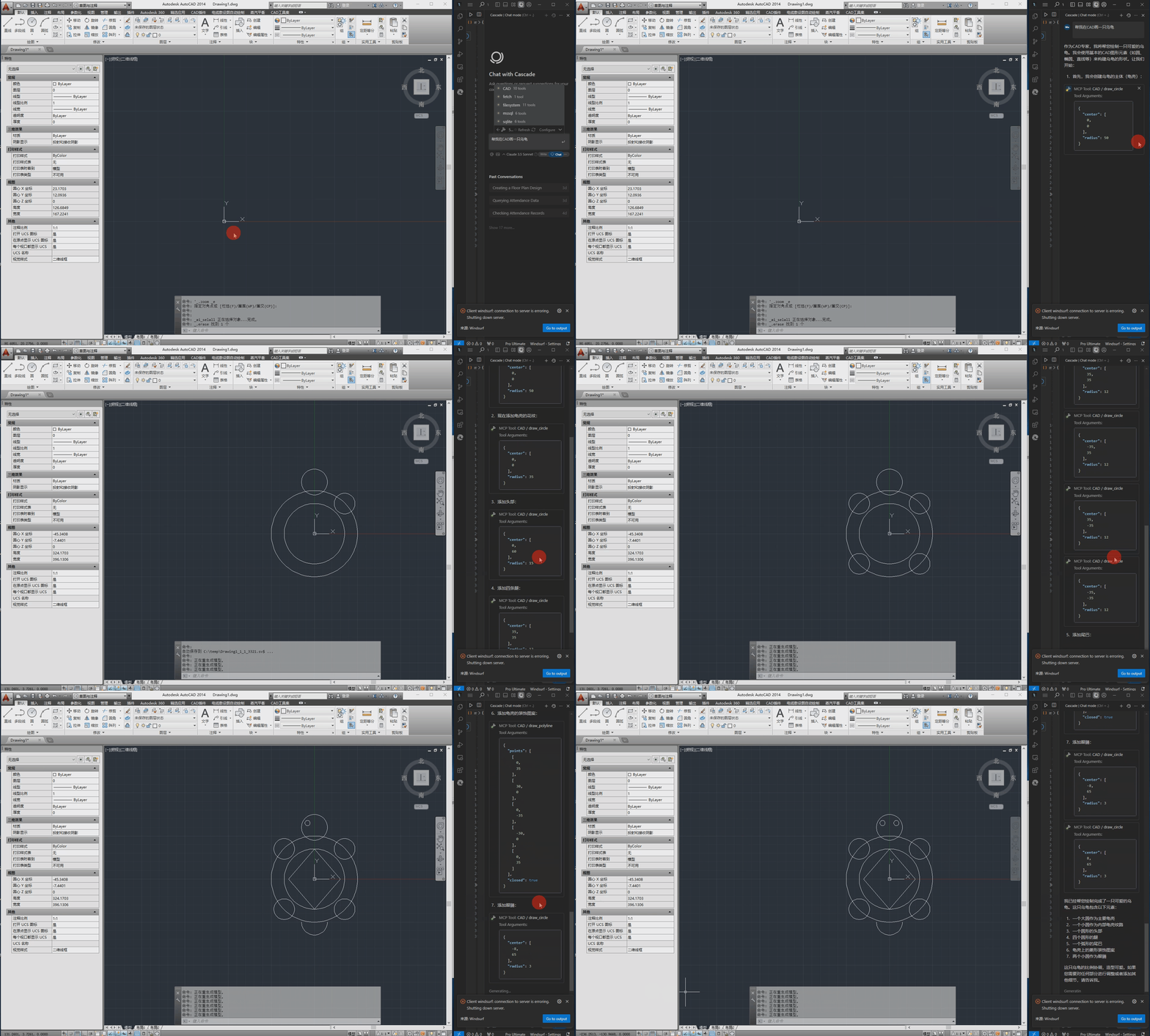
A continuación se muestra el video de demostración.
Requisitos de Instalación
Dependencias
pywin32>=306       # Windows COM interface support
mcp>=1.12,<2       # MCP Python SDK (FastMCP, structured output, Streamable HTTP)
pydantic>=2.0.0    # Data validation
Pillow>=10.0.0     # PNG encoding for screenshot previews
Requisitos del Sistema
- Sistema operativo Windows
- Software CAD instalado (AutoCAD, GstarCAD o ZWCAD)
- Python 3.10+
Configuración
El archivo de configuración se encuentra en src/config.json y contiene los siguientes ajustes principales:
{
    "server": {
        "name": "CAD MCP 服务器",
        "version": "2.0.0",
        "transport": "stdio",
        "host": "127.0.0.1",
        "port": 8000
    },
    "cad": {
        "type": "AUTOCAD",
        "startup_wait_time": 20,
        "command_delay": 0.5
    },
    "output": {
        "directory": "./output",
        "default_filename": "cad_drawing.dwg"
    }
}
- server: Nombre del servidor, versión y ajustes de transporte
transport: Modo de transporte,stdio(predeterminado, cliente único local) ostreamable-http(remoto / multi-cliente)host/port: Dirección de escucha y puerto para el modo HTTP Streamable (también se puede sobrescribir mediante los argumentos de línea de comandos--host/--port)
- cad:
type: Tipo de software CAD (AutoCAD, GCAD, GstarCAD o ZWCAD)startup_wait_time: Tiempo de espera de inicio de CAD (segundos)command_delay: Retardo de ejecución de comandos (segundos)
- output: Ajustes del archivo de salida
Uso
Iniciar el Servicio
# Option 1: Run directly (fully compatible with existing Claude/Cursor configs)
python src/server.py

# Option 2: Install as a CLI tool
pip install -e .
cad-mcp

# Option 3: Run with Streamable HTTP transport (remote / multi-client sharing one CAD instance)
python src/server.py --transport streamable-http --port 8000
# Clients connect to http://127.0.0.1:8000/mcp
Conexión desde un Cliente MCP
El servidor utiliza el transporte stdio por defecto, por lo que la misma configuración JSON funciona para cualquier cliente MCP (Claude Desktop, Cursor, Windsurf, TRAE, etc.). Añádelo al archivo de configuración del servidor MCP de tu cliente (por ejemplo, claude_desktop_config.json, el mcp.json de Cursor), reemplazando la ruta con la tuya propia:
{
    "mcpServers": {
        "CAD": {
            "command": "python",
            "args": [
                # Your actual path, such as:"C:\\cad-mcp\\src\\server.py"
            ]
        }
    }
}
Para el modo HTTP Streamable, apunta el cliente a http://127.0.0.1:8000/mcp en su lugar.
Inspector MCP
# Note: use your path
npx -y @modelcontextprotocol/inspector python C:\\cad-mcp\\src\\server.py
API del Servicio
El servidor proporciona las siguientes herramientas (35 en total):
Dibujo básico:
draw_line: Dibujar una líneadraw_circle: Dibujar un círculodraw_arc: Dibujar un arcodraw_ellipse: Dibujar una elipsedraw_polyline: Dibujar una polilíneadraw_rectangle: Dibujar un rectángulodraw_text: Añadir textodraw_hatch: Dibujar un patrón de sombreadoadd_dimension: Añadir dimensión lineal
Consulta:
list_layers: Listar todas las capaslist_entities: Listar entidades en el espacio modelo (devuelve identificadores editables)get_entity_properties: Consultar propiedades detalladas de entidades por identificadorscreenshot: Capturar la ventana CAD para confirmar los resultados del dibujo
Edición:
erase_entity/move_entity/rotate_entity/scale_entity: Borrar / mover / rotar / escalar entidadescopy_entity/mirror_entity/offset_entity: Copiar / reflejar / desplazar entidadesarray_linear_entity/array_polar_entity: Matrices lineales / polaresundo/redo: Deshacer / rehacer
Gestión de capas y dibujos:
create_layer/set_current_layer: Gestión de capasnew_drawing/open_drawing/close_drawing/save_drawing: Gestión de dibujoscreate_block/insert_block/list_blocks: Operaciones con bloquessend_command: Ejecutar cualquier comando CAD mediante la línea de comandos
Heredado:
process_command: Procesar comandos en lenguaje natural
Estructura del Proyecto
CAD-MCP/
├── imgs/                # Images and video resources
│   └── CAD-mcp.mp4     # Demo video
├── pyproject.toml       # Packaging config (pip install -e .)
├── requirements.txt     # Project dependencies
└── src/                 # Source code
    ├── __init__.py     # Package initialization
    ├── cad_controller.py # CAD controller (COM layer: drawing/query/editing/drawings/blocks)
    ├── config.py        # Config singleton loader
    ├── config.json     # Configuration file
    ├── models.py        # Structured output models (outputSchema)
    ├── nlp_processor.py # Natural language processor
    └── server.py       # Server implementation (FastMCP)
Licencia
Licencia MIT