Caybl.ai
Conecta Caybl a tu Google Analytics, Ads y Search Console con tu agente favorito.
Documentación
Connects to
and asks in
What our customers are saying
“Creating campaigns and making tweaks is quick and straightforward, which has saved our team a lot of time compared with doing everything manually in Google Ads... it's made both managing our ads and understanding the results a lot easier.”
Imogen, GBon Trustpilot
“Caybl is great at connecting Google ads, Search Console and Google analytics to Claude for analysis. It has saved me hours of analysis work and removed all the need for any downloading of files too!”
Jash Parihar, IEon Trustpilot
“We switched from a marketing analytics tool that was costing us $5,000 a year - it cut the cost, complexity and time it takes to set up campaigns. We've been recommending it to fellow marketers ever since.”
Caybl.ai user
Two ways to ask
Same data, same controls. Use whichever suits you - or both.
Use it in your own AI
- Claude, ChatGPT, Gemini, Perplexity and other MCP apps
- Unlimited questions on every plan
- Mix Caybl with your other tools and files
- Same accounts and read/write controls as Ask How connecting works
Your data
- Analytics
- Ads
- Search Console
- Tag Manager
- YouTube
- PageSpeed
Microsoft
- Bing Webmaster
- Microsoft Ads
Coming soon
- Meta Ads
The AI you use
AI assistants
and any MCP-compatible app
What can you do with Caybl.ai
One connector for your analytics, ads and search data, all answerable in the same conversation.
Report across properties
Ask about channels, campaigns, key events and conversions across every GA4 property you connect.
Find funnel drop-off
Where users abandon between two steps, and which segment is worse than the rest.
Audit spend and waste
Search terms burning budget with zero conversions, and campaigns capped by budget instead of rank.
Manage keywords and budgets
Build negative keyword lists and adjust bids and budgets, with a dry run before anything changes.
Track search performance
Which queries and pages are gaining or losing clicks, and catch indexing issues early.
See how Bing sees your site
Bing queries, crawl errors and who links to you. Bing's index also feeds Microsoft Copilot's answers.
Research keyword demand
Search volume and related terms from Bing, with no Google Ads account needed.
Get new pages indexed
Submit fresh URLs and sitemaps to Bing the moment you publish, then check they made it in.
Find wasted Microsoft Ads spend
Search terms that spent without converting, campaign performance and impression share. Changes only where you allow them.
Check real-user page speed
Core Web Vitals from Chrome's real-user data for any public URL, plus a live Lighthouse audit and the fixes worth making.
Audit and fix tracking
Find broken or duplicate tags, see what changed between versions, and publish a fix after a preview, with one-step rollback.
Grow your YouTube channel
Top videos, YouTube search terms, where viewers drop off, and revenue and RPM for monetized channels.
Ask across every source at once
Combine GA4, Ads, Search Console, Bing, Microsoft Ads, YouTube and more in one conversation - which campaigns bring traffic that actually converts and ranks. Meta Ads is coming soon.
GA4 Google Ads Search Console Bing Microsoft Ads
Which campaigns bring traffic that actually converts and ranks?
“Organic Search” and “Brand Search” both convert above 4% and already rank on page 1 for their target queries - the two Display campaigns bring clicks but neither converts or ranks.
An answer you can check, and act on
- It shows its work. See which sources and how many rows it read before it answers.
- Real tables, not guesses. Copy them out or ask a follow-up.
- Fixes need your OK. Nothing changes in your accounts until you approve it.
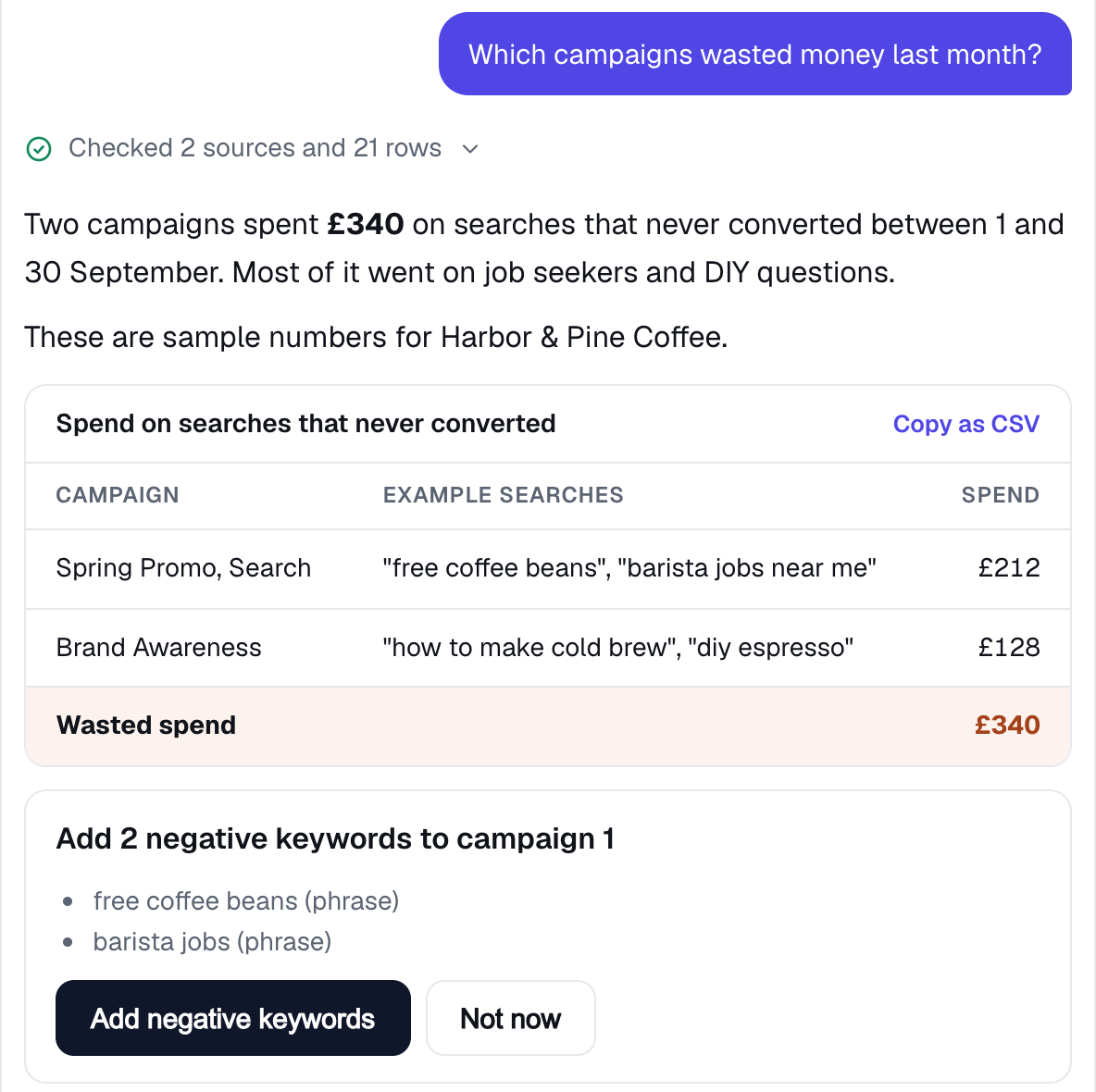
Ask, answering a question on sample data from a demo coffee business.
Try it out
Ask any of these right here in Caybl, or in Claude, ChatGPT or another AI once you’ve connected GA4 or Google Ads. Caybl matches the full tool surface of Google’s own Google Analytics MCP server - reports, realtime, funnels and property lookups - and adds Ads, Search Console, Bing, Microsoft Advertising, Tag Manager, YouTube and PageSpeed, with Meta Ads coming soon.
- Ads“Which campaigns wasted money on searches that never converted last month?” Ask this →
- Ads“Which campaigns are losing impression share to budget rather than rank?” Ask this →
- Analyze“Which channels drove the most conversions in the last 28 days?” Ask this →
- Search“Which pages lost the most clicks in Search Console this month?” Ask this →
- Realtime“How many people are on my site right now?” Ask this →
- Funnel“What's the drop-off between viewing pricing and signing up?” Ask this →
- Configure“What custom dimensions and metrics are set up on my property?” Ask this →
“Which channels actually drove signups this quarter?”
“Pull this client's traffic trend before the report is due.”
“Is organic or referral bringing in more visitors this month?”
Skip the dashboard maze
Same question - “what money have we wasted?” - two very different routes.
The usual way
- Find the right report
- Add a conversions column
- Filter to what didn’t convert
- Export it and add it up in a spreadsheet
With Caybl
- Ask in plain English
- Approve the fix, or copy the table
Left: an illustration of a typical ad-platform report, not a screenshot of a real account. Right: Caybl’s real Ask screen on sample data.
How it works
Connect once, ask in plain English, approve the fixes.
Connect once
Sign in with Google and authorize analytics access - and optionally Google Ads. You never see or paste a token.
Ask here, or in your AI
Ask in Caybl straight away, or add Caybl’s MCP endpoint to Claude, ChatGPT or Gemini. Plain language - it runs the reports.
Act on it
Apply fixes like negative keywords or budget changes in one click - only ever with your approval.
Free Claude skills for marketers
Ready-made prompts that run on the Caybl connector - paste one into Claude, ChatGPT or your AI of choice. Browse all free skills, the GA4 recipes and Google Ads recipes, or see how Caybl compares with Google’s own Analytics MCP, Composio, Windsor.ai and Porter Metrics.
- Google Ads Google Ads wasted spend finder Finds search terms, devices, locations and hours that cost money without paying back, ranked by estimated reducible spend.View skill →
- Google Ads Google Ads negative keyword builder Groups bad search terms into patterns and builds a paste-ready negative list with the right match type and level - then adds it after a preview.View skill →
- Google Ads Google Ads impression share gap finder Separates impression share lost to budget from lost to rank, and tells you which campaigns to fund now, fix first, or leave alone.View skill →
- Google Ads Google Ads budget pacing check Projects month-end spend per campaign, flags over- and under-pacing, and finds the daily budget needed to hit target.View skill →
- Google Ads Google Ads weekly digest A Monday-morning report: what changed week over week, real anomalies (not noise), the account changes behind them, and what to do this week.View skill →
- Microsoft Advertising Microsoft Advertising wasted spend finder Finds Microsoft Ads search terms spending without converting, proposes negative keywords, and checks whether campaigns lose impression share to budget or rank.View skill →