diagrams-mcp-server
Servidor MCP para generar diagramas de arquitectura en la nube, diagramas de flujo, diagramas de secuencia y más — impulsado por mingrammer/diagrams, Mermaid y PlantUML.
Documentación
diagrams-mcp-server


Servidor MCP para generar diagramas de arquitectura en la nube, diagramas de flujo, diagramas de secuencia y más — impulsado por tres motores de renderizado: mingrammer/diagrams, Mermaid y PlantUML.
Comenzando
Instalación Local
Requisitos previos
Graphviz es necesario para el modo de renderizado local/en proceso predeterminado. Mermaid CLI y PlantUML son opcionales — instálalos solo si necesitas esos motores de renderizado específicos localmente.
| Dependencia | Requerida para | Instalación |
|---|---|---|
| Graphviz | render_diagram (arquitectura en la nube) | brew install graphviz |
| Mermaid CLI | render_mermaid (diagramas de flujo, secuencia, etc.) | npm install -g @mermaid-js/mermaid-cli |
| Java + PlantUML | render_plantuml (diagramas UML) | brew install openjdk + descargar plantuml.jar |
Instalar el servidor
Mediante uvx (recomendado):
uvx diagrams-mcp-server
Mediante pip:
pip install diagrams-mcp-server
Desde el código fuente:
pip install git+https://github.com/ByteOverDev/diagrams-mcp.git
Configurar tu cliente MCP
Claude Desktop
Agrega a tu claude_desktop_config.json (Settings → Developer → Edit Config):
uvx (recomendado):
{
  "mcpServers": {
    "diagrams-mcp": {
      "command": "uvx",
      "args": ["diagrams-mcp-server"]
    }
  }
}
pip:
{
  "mcpServers": {
    "diagrams-mcp": {
      "command": "diagrams-mcp-server"
    }
  }
}
Claude Code (CLI)
Ejecuta:
claude mcp add diagrams-mcp -- uvx diagrams-mcp-server
O agrega a tu .mcp.json:
uvx (recomendado):
{
  "mcpServers": {
    "diagrams-mcp": {
      "command": "uvx",
      "args": ["diagrams-mcp-server"]
    }
  }
}
pip:
{
  "mcpServers": {
    "diagrams-mcp": {
      "command": "diagrams-mcp-server"
    }
  }
}
Cursor
Agrega a tu .cursor/mcp.json:
uvx (recomendado):
{
  "mcpServers": {
    "diagrams-mcp": {
      "command": "uvx",
      "args": ["diagrams-mcp-server"]
    }
  }
}
pip:
{
  "mcpServers": {
    "diagrams-mcp": {
      "command": "diagrams-mcp-server"
    }
  }
}
Windsurf
Agrega a tu ~/.codeium/windsurf/mcp_config.json:
uvx (recomendado):
{
  "mcpServers": {
    "diagrams-mcp": {
      "command": "uvx",
      "args": ["diagrams-mcp-server"]
    }
  }
}
pip:
{
  "mcpServers": {
    "diagrams-mcp": {
      "command": "diagrams-mcp-server"
    }
  }
}
VS Code
Agrega a tu .vscode/mcp.json:
uvx (recomendado):
{
  "servers": {
    "diagrams-mcp": {
      "type": "stdio",
      "command": "uvx",
      "args": ["diagrams-mcp-server"]
    }
  }
}
pip:
{
  "servers": {
    "diagrams-mcp": {
      "type": "stdio",
      "command": "diagrams-mcp-server"
    }
  }
}
Herramientas Disponibles
Descubrimiento
list_providers()→list[str]— Lista todos los proveedores de diagramas (aws,gcp,k8s,azure,onprem, etc.)list_services(provider)→list[str]— Lista las categorías de servicios dentro de un proveedor (por ejemplo,aws→compute,database,network)list_nodes(provider, service)→list[dict]— Lista las clases de nodos para un par proveedor.servicio con rutas de importaciónsearch_nodes(query)→list[dict]— Busca nodos por palabra clave en todos los proveedores (por ejemplo, "postgres", "lambda")
Renderizado
render_diagram(code)→Image(PNG) — Ejecuta un script de Python usando mingrammer/diagrams en un subproceso aislado. Devuelve un diagrama de arquitectura en la nube renderizado.render_mermaid(definition)→Image(PNG/SVG) — Renderiza una definición de diagrama Mermaid (diagramas de flujo, secuencia, clase, ER, estado, Gantt y más).render_plantuml(definition)→Image(PNG) — Renderiza una definición de diagrama PlantUML (secuencia, clase, componente, actividad, estado, despliegue).
Equivalencia entre Proveedores
find_equivalent(node, target_provider?)→dict— Encuentra servicios equivalentes entre proveedores de nube (por ejemplo,EC2→ComputeEngineen GCP).list_categories()→list[dict]— Lista las 30 categorías de roles de infraestructura con nodos mapeados entre proveedores.
Recursos
El servidor proporciona documentación de referencia accesible mediante URIs de recursos MCP:
| URI | Descripción |
|---|---|
diagrams://reference/diagram | Parámetros del constructor de diagramas, valores predeterminados y uso |
diagrams://reference/edge | Operadores de bordes, etiquetas, estilos y encadenamiento |
diagrams://reference/cluster | Anidamiento de clústeres, estilos y atributos de grafo |
diagrams://reference/mermaid | Ejemplos de sintaxis de Mermaid para 6 tipos de diagramas |
diagrams://reference/plantuml | Ejemplos de sintaxis de PlantUML para 6 tipos de diagramas |
Ejemplos
Arquitectura en la Nube (mingrammer/diagrams)
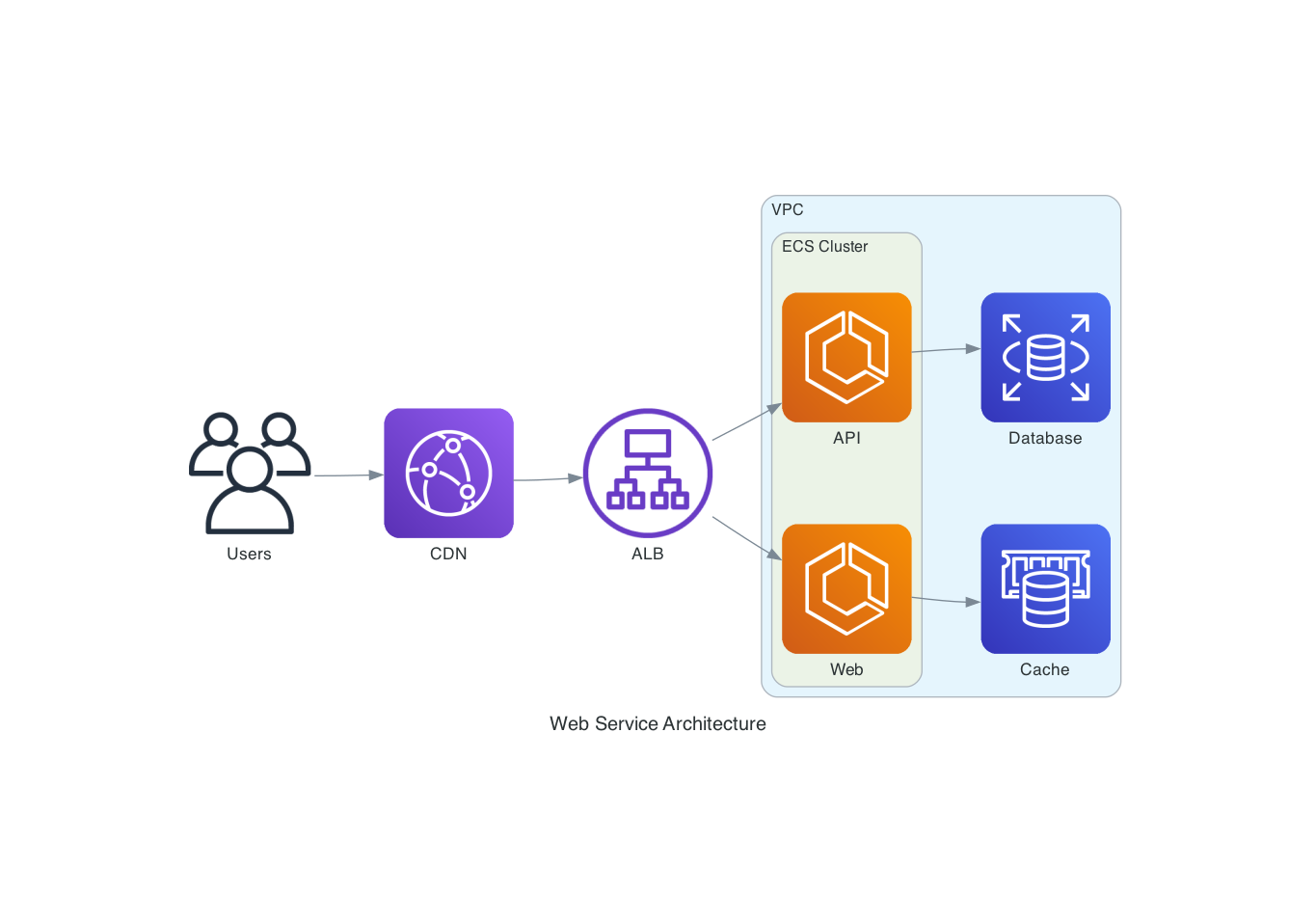
"Dibuja una arquitectura de AWS con un ALB enrutando a dos servicios ECS, respaldados por RDS y ElastiCache"
from diagrams import Diagram, Cluster
from diagrams.aws.network import ALB
from diagrams.aws.compute import ECS
from diagrams.aws.database import RDS, ElastiCache

with Diagram("ECS Service", direction="LR"):
    lb = ALB("ALB")

    with Cluster("ECS Cluster"):
        services = [ECS("Web"), ECS("API")]

    lb >> services
    services[0] >> ElastiCache("Cache")
    services[1] >> RDS("Database")
Diagrama de Flujo (Mermaid)
"Crea un diagrama de flujo que muestre un pipeline de CI/CD"

Diagrama de Secuencia (PlantUML)
"Muestra el flujo de autenticación entre un cliente, una puerta de enlace de API y un servicio de autenticación"
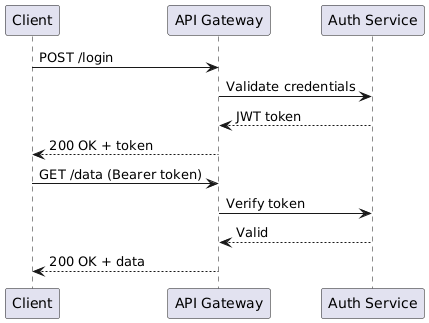
@startuml
Client -> "API Gateway": POST /login
"API Gateway" -> "Auth Service": Validate credentials
"Auth Service" --> "API Gateway": JWT token
"API Gateway" --> Client: 200 OK + token
Client -> "API Gateway": GET /data (Bearer token)
"API Gateway" -> "Auth Service": Verify token
"Auth Service" --> "API Gateway": Valid
"API Gateway" --> Client: 200 OK + data
@enduml
Desarrollo
# Clone and install
git clone https://github.com/ByteOverDev/diagrams-mcp.git
cd diagrams-mcp
pip install -e ".[dev]"

# Run tests
pytest

# Lint and format
ruff check .
ruff format .

# Run the MCP server locally (stdio mode)
diagrams-mcp-server
Modo Facade/Renderer Dividido
Para implementaciones alojadas, el servidor MCP puede ejecutarse como una fachada ligera que delega el trabajo de renderizado a un servicio de renderizado separado. Esto mantiene el proceso MCP siempre activo pequeño mientras Graphviz, Chromium, Mermaid CLI, Java y PlantUML viven solo en la imagen del renderizador.
# Terminal 1: renderer service
RENDERER_HOST=0.0.0.0 RENDERER_PORT=8001 diagrams-renderer-server

# Terminal 2: HTTP MCP facade delegating to the renderer
FASTMCP_TRANSPORT=http \
FASTMCP_HOST=0.0.0.0 \
FASTMCP_PORT=8000 \
DIAGRAMS_RENDERER_MODE=remote \
DIAGRAMS_RENDERER_URL=http://127.0.0.1:8001 \
diagrams-mcp-server
Se incluyen ejemplos de Docker/Railway:
| Archivo | Propósito |
|---|---|
Dockerfile.facade | Imagen de fachada MCP ligera sin binarios exclusivos del renderizador |
Dockerfile.renderer | Imagen del renderizador con Graphviz, Chromium, Mermaid CLI, Java y PlantUML |
railway.facade.toml | Ejemplo de configuración del servicio de fachada en Railway |
railway.renderer.toml | Ejemplo de configuración del servicio de renderizado en Railway |
Variables de entorno clave:
| Variable | Propósito |
|---|---|
DIAGRAMS_RENDERER_MODE=remote | Hace que la fachada use el servicio de renderizado HTTP |
DIAGRAMS_RENDERER_URL | URL base del renderizador, por ejemplo http://diagrams-renderer.railway.internal:8080 |
DIAGRAMS_IMAGE_STORE_DIR | Directorio opcional de almacenamiento temporal de imágenes respaldado por archivos |
BASE_URL | URL base pública opcional utilizada al devolver enlaces de descarga absolutos |
Proveedores Soportados
La herramienta render_diagram admite todos los proveedores de la biblioteca mingrammer/diagrams, incluyendo:
AWS, GCP, Azure, Kubernetes, On-Premise, AlibabaCloud, OCI, OpenStack, DigitalOcean, Elastic, Outscale, Generic y nodos Custom.
Usa list_providers() y search_nodes(query) para descubrir los nodos disponibles.
Licencia
MIT