DBHub
Servidor MCP universal de bases de datos compatible con bases de datos principales.
Documentación
[!NOTE]
Presentado por Bytebase, plataforma de gobernanza de bases de datos de código abierto.

            +------------------+    +--------------+    +------------------+
            |                  |    |              |    |                  |
            |                  |    |              |    |                  |
            |  Claude Desktop  +--->+              +--->+    PostgreSQL    |
            |                  |    |              |    |                  |
            |  Claude Code     +--->+              +--->+    SQL Server    |
            |                  |    |              |    |                  |
            |  Cursor          +--->+    DBHub     +--->+    SQLite        |
            |                  |    |              |    |                  |
            |  VS Code         +--->+              +--->+    MySQL         |
            |                  |    |              |    |                  |
            |  Copilot CLI     +--->+              +--->+    MariaDB       |
            |                  |    |              |    |                  |
            |                  |    |              |    |                  |
            +------------------+    +--------------+    +------------------+
                 MCP Clients           MCP Server             Databases
DBHub es un servidor MCP mínimo: eficiente en tokens, sin dependencias y con solo dos herramientas por defecto, con extras opcionales. Esta pasarela ligera permite que clientes compatibles con MCP se conecten y exploren diferentes bases de datos:
- Mínimo: Sin dependencias, eficiente en tokens con un conjunto mínimo de herramientas MCP para maximizar la ventana de contexto
- Multi-base de datos: PostgreSQL, MySQL, MariaDB, SQL Server y SQLite a través de una única interfaz
- Multi-conexión: Conéctate a múltiples bases de datos simultáneamente con configuración TOML
- Protecciones: Modo de solo lectura, límite de filas y tiempo de espera de consultas para evitar operaciones descontroladas
- Acceso seguro: Túnel SSH y cifrado SSL/TLS
DBHub es el ejemplo oficial en la documentación de Claude Code para conectarse a PostgreSQL mediante MCP.
Eficiencia de Tokens
DBHub carga solo 2 herramientas por defecto con 1.4k tokens — 13-14x menos que las alternativas — manteniendo la ventana de contexto abierta para tu trabajo real.
| MCP Server | Configuración por defecto | Herramientas por defecto |
|---|---|---|
| DBHub | 1.4k | 2 (execute_sql, search_objects) |
| MCP Toolbox | 19.0k | 28 |
| Supabase MCP | 19.3k | todas |
Casos de Uso
- Desarrollo local: Exploración de esquemas, validación de consultas y depuración de datos con Claude Code, VS Code, Cursor, etc.
- Acceso no técnico: Expón vistas seleccionadas y de solo lectura al personal no técnico mediante Claude Desktop, VS Code, Cursor, etc.
- Consolidación multi-base de datos: Reemplaza servidores MCP separados para cada base de datos con un único proceso de DBHub
- Solución de problemas en producción: Diagnósticos de solo lectura con protecciones contra consultas descontroladas
Bases de Datos Compatibles
PostgreSQL, MySQL, SQL Server, MariaDB y SQLite.
Herramientas MCP
DBHub implementa herramientas MCP para operaciones de bases de datos:
- execute_sql: Ejecuta consultas SQL con soporte de transacciones y controles de seguridad
- search_objects: Busca y explora esquemas, tablas, columnas, índices y procedimientos de bases de datos con divulgación progresiva
- explain_sql (opcional): Muestra el plan de ejecución de una consulta sin ejecutarla
- health_check (opcional): Informa sobre el estado del grupo de conexiones y la proporción de aciertos de caché de búfer
- Custom Tools: Define operaciones SQL reutilizables y parametrizadas en tu archivo de configuración
dbhub.toml
Workbench
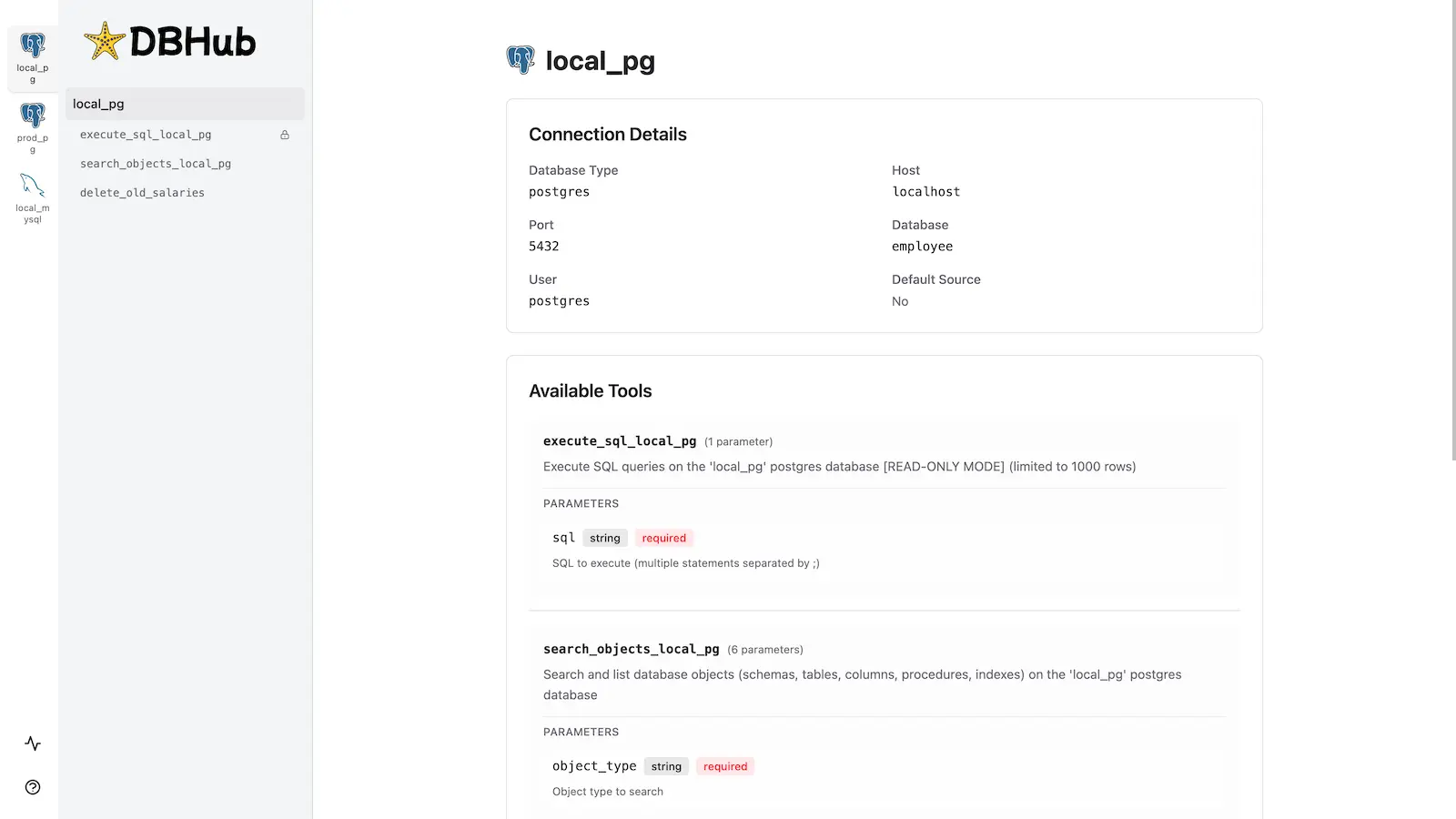
DBHub incluye una interfaz web integrada para interactuar con tus herramientas de base de datos. Proporciona una forma visual de ejecutar consultas, ejecutar herramientas personalizadas y ver trazas de solicitudes sin necesidad de un cliente MCP.
Instalación
npx @bytebase/dbhub@latest --transport http --port 8080 --dsn "postgres://user:password@localhost:5432/dbname?sslmode=disable"
También disponible como:
- Imagen de Docker
- MCP Bundle (instalación con un clic, solo lectura)
- Plugin de Claude Code
Consulta la Guía de instalación para todas las opciones, las Opciones de línea de comandos para los parámetros y la Configuración multi-base de datos para conectar varias bases de datos a la vez.
Desarrollo
Requiere Node.js >= 22.5.0 (DBHub utiliza el módulo integrado node:sqlite).
# Install dependencies
pnpm install

# Run in development mode
pnpm dev

# Build and run for production
pnpm build && pnpm start --transport stdio --dsn "postgres://user:password@localhost:5432/dbname"
Consulta Pruebas y Depuración.