FLUX
Servidor oficial MCP de FLUX de Black Forest Labs. Genera, edita, varía y explora imágenes de FLUX.2 directamente en cualquier cliente compatible con MCP.
Documentación

FLUX MCP
Lleva FLUX a las herramientas que ya usas.
Genera, edita, varía y explora FLUX y videos desde cualquier cliente compatible con MCP.



Instalar · Galería · Herramientas · Habilidades · Ejemplos · Solución de problemas
El servidor FLUX MCP expone el conjunto completo de herramientas de FLUX — texto a imagen, edición de imágenes, composición con múltiples referencias, prueba virtual de prendas, video FLUX 3, variaciones e historial — a cualquier cliente que hable el Protocolo de Contexto de Modelos. Genera opciones en paralelo, edita imágenes adjuntas mediante indicaciones, prueba prendas en una foto, anima imágenes fijas en clips con audio y crea variaciones a partir de cualquier resultado que te guste. Sin código de API, sin claves pegadas en la conversación.
- Alojado, remoto, solo OAuth. Conéctate a
https://mcp.bfl.ai. Inicia sesión con tu cuenta BFL, elige la organización a facturar — listo. - Cada modelo FLUX.2. Pro, Max, Klein (4B y 9B), Flex. Tu cliente elige el adecuado para la tarea.
- Video FLUX 3. Texto a video, imagen a video desde fotogramas clave y continuación de video con audio sincronizado, incluye vistas previas de borradores.
- Diseñado para chat. Hasta 8 imágenes en paralelo por indicación. Edita imágenes adjuntas. Explora y reutiliza el historial.
- Guías de indicaciones especializadas. Las guías oficiales de BFL cubren flujos de trabajo enfocados en imagen y FLUX 3.
- Pagas a BFL directamente. Sin intermediarios, sin cuotas compartidas. Tarifas actuales: bfl.ai/pricing.
Instalar
Claude — Escritorio y claude.ai
- Abre Configuración → Conectores.
- Haz clic en Añadir conector personalizado.
- Nómbralo
FLUX, URLhttps://mcp.bfl.ai. - Haz clic en Conectar, inicia sesión y elige la organización BFL a facturar.
Claude Code
claude mcp add --transport http FLUX https://mcp.bfl.ai
Un navegador se abre en el primer uso para OAuth. Los tokens se renuevan automáticamente.
Cursor
Un clic: Añadir a Cursor — abre Cursor con el servidor FLUX prellenado.
Manual — añade a .cursor/mcp.json:
{
  "mcpServers": {
    "FLUX": {
      "url": "https://mcp.bfl.ai"
    }
  }
}
Codex
codex mcp add flux --url https://mcp.bfl.ai
codex mcp login flux
O añade a ~/.codex/config.toml:
[mcp_servers.flux]
url = "https://mcp.bfl.ai"
Windsurf
Edita ~/.codeium/windsurf/mcp_config.json (ten en cuenta que Windsurf usa serverUrl, no url):
{
  "mcpServers": {
    "FLUX": {
      "serverUrl": "https://mcp.bfl.ai"
    }
  }
}
Recarga los plugins desde el panel Cascade. La primera llamada a FLUX abre un navegador para iniciar sesión.
Otros clientes MCP (puente stdio vía mcp-remote)
Para clientes que admiten MCP stdio pero no manejan el flujo OAuth por sí mismos — por ejemplo Hermes (Nous Research) y herramientas similares que solo aceptan tokens estáticos de portador:
{
  "mcpServers": {
    "FLUX": {
      "command": "npx",
      "args": ["-y", "mcp-remote", "https://mcp.bfl.ai"]
    }
  }
}
mcp-remote abre un navegador para OAuth, guarda los tokens en ~/.mcp-auth/ y los renueva automáticamente.
Galería
Genera un lote de opciones en una sola indicación
"Genera 4 variantes de retrato editorial — iluminación, paleta y ambiente variados."
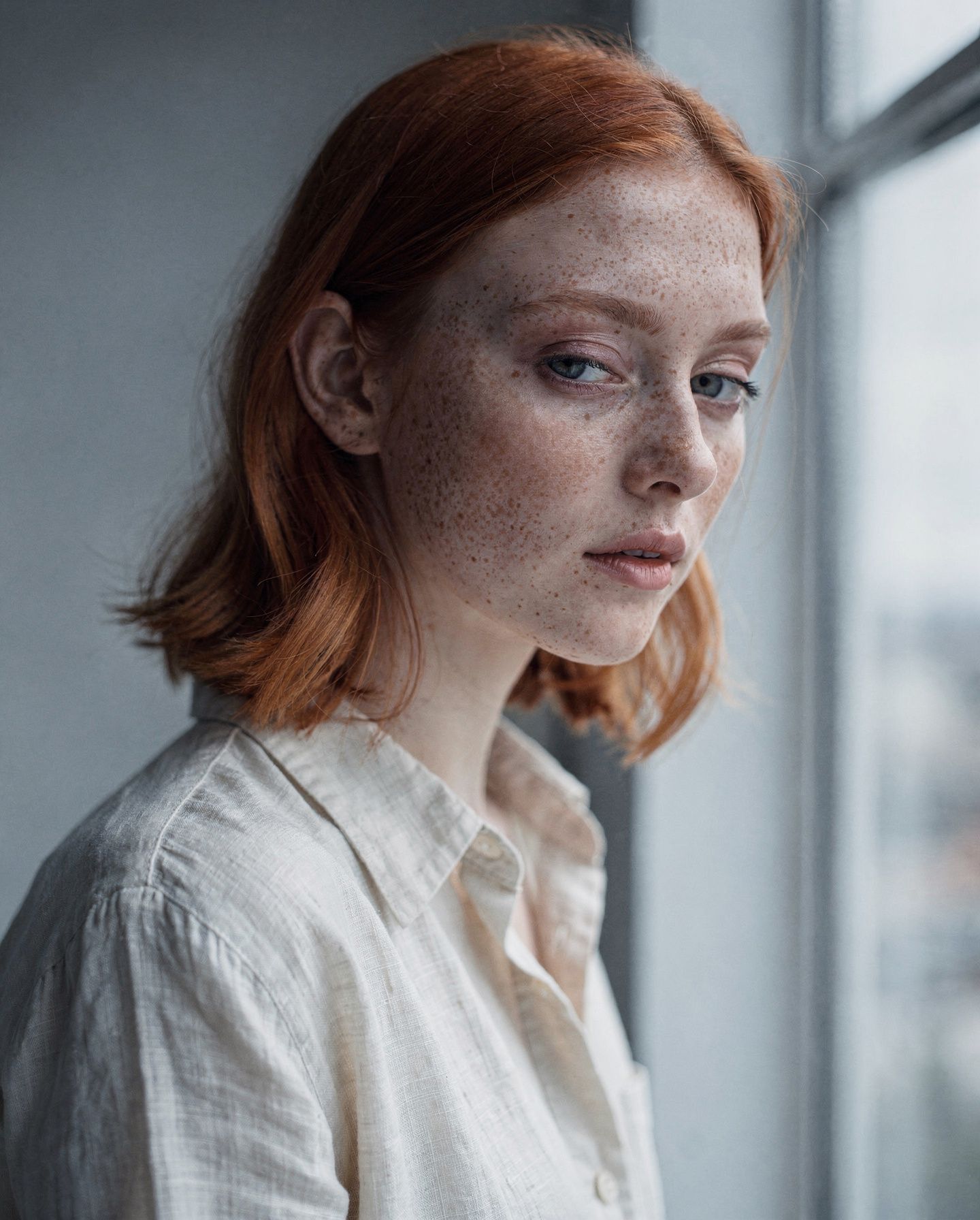
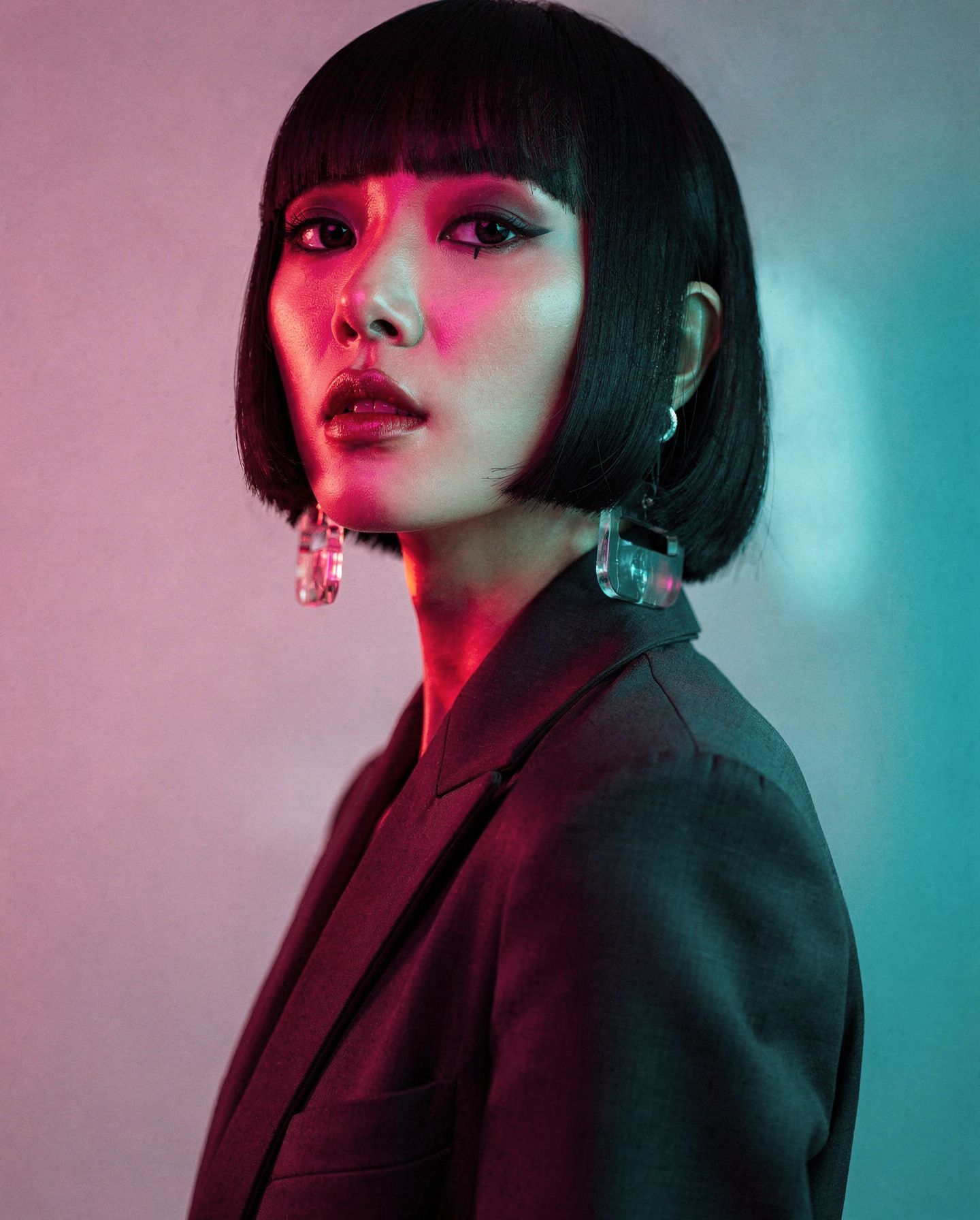
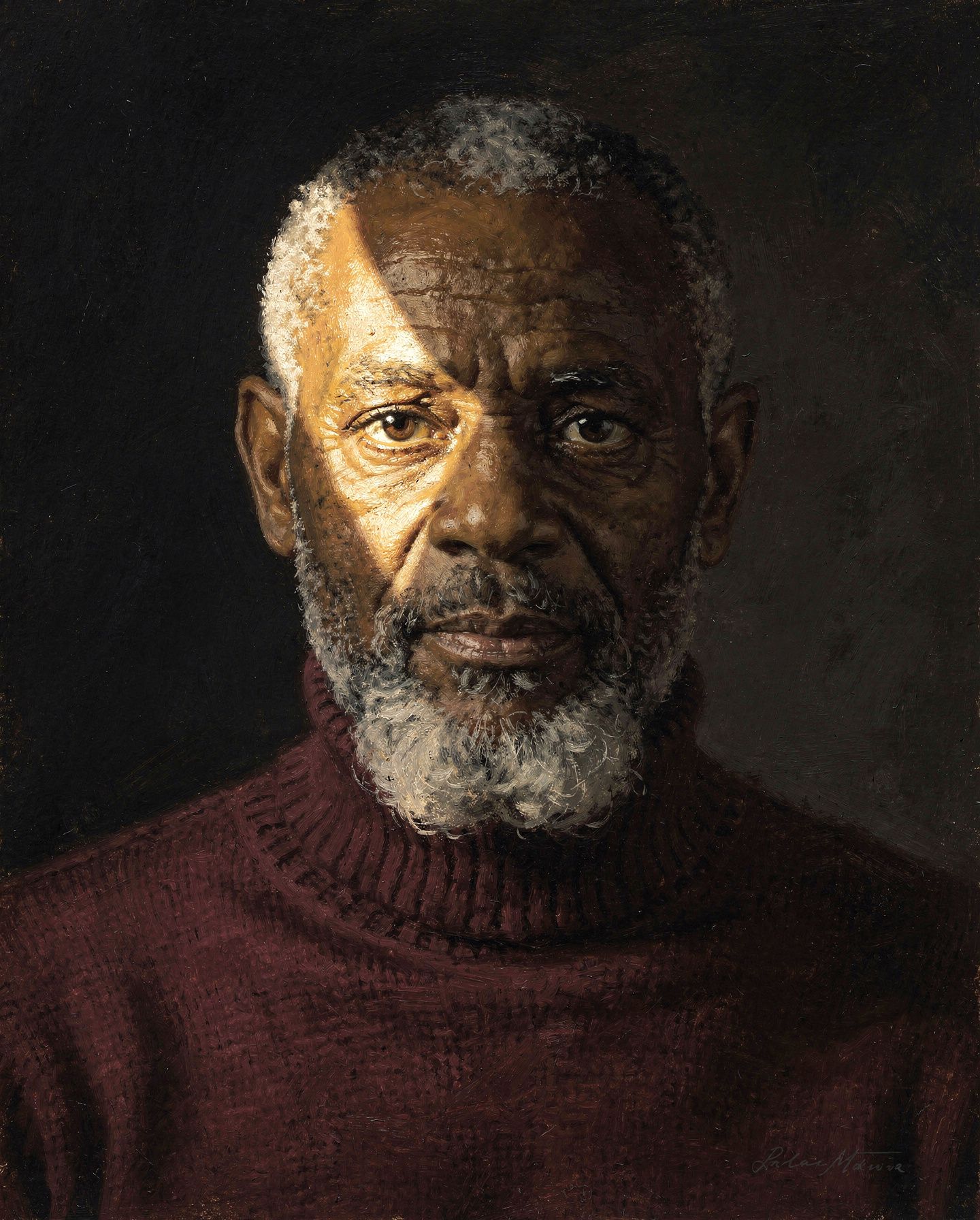

O solo una — cuando necesitas una única toma destacada
"Una fotografía aérea en picado de piscinas de sal desérticas poco profundas, luz solar directa e intensa."

Edita cualquier imagen directamente en el chat
"Añade un camello en la arena."
| Antes | Después |
|  |
Explora y reutiliza todo tu historial de generaciones
"Muéstrame mis generaciones recientes de FLUX."
Cada generación se guarda. Toca cualquier mosaico para editar, variar o descargar. Las variaciones se ramifican desde cualquier imagen anterior con un clic.
Herramientas
Tu cliente elige qué herramienta llamar según tu indicación — no necesitas invocarlas por nombre.
| Herramienta | Qué hace |
|---|---|
generate_image | Genera 1–8 imágenes en paralelo. Cubre texto a imagen, ediciones, composición con múltiples referencias, transferencia de estilo, ediciones tipo inpaint y outpaint — todo mediante indicaciones. |
vto | Prueba virtual de prendas — viste a una persona (o mascota) con una prenda, sombrero, gafas de sol, zapatos, bolso o cualquier accesorio de una imagen de referencia. Conserva rostro, cabello y pose; solo cambia el artículo usado. |
generate_video | Genera 1–4 videos en paralelo con FLUX 3 — texto a video, imagen a video desde fotogramas clave o continuación de un video existente. 5–20 segundos, audio sincronizado. |
enhance_video | Re-renderiza un video borrador a calidad completa — la misma composición, semilla y plan de indicación que el borrador que elegiste. |
generate_variations | Produce N imágenes más en la misma dirección que una generación anterior (identificada por request_id). El valor predeterminado es 4, máximo 8. |
get_history | Lista generaciones recientes como una cuadrícula de miniaturas con acciones por mosaico de Variaciones / Editar / copiar / descargar. Paginación por claves, filtros de fecha. |
get_credits | Devuelve tu saldo de crédito BFL restante. |
list_skills | Lista las guías de indicaciones oficiales de BFL — mejores prácticas de imagen, dirección de video, audio y diálogo, fotogramas clave, anuncios de productos, looks de archivo, integración de API. |
get_skill | Obtén una guía por nombre. Las guías largas devuelven una introducción más un índice de secciones; obtén las secciones que la tarea necesite. |
Modelos
Disponibles en generate_image:
| Modelo | Úsalo para |
|---|---|
flux2_pro_preview (predeterminado) | Trabajo cotidiano — mejor equilibrio entre calidad y velocidad |
flux2_max | Tomas destacadas, activos finales — máxima calidad |
flux2_klein_9b_preview | Iteraciones más rápidas, hasta 4 imágenes de entrada |
flux2_klein_4b | Opción más rápida |
flux2_flex | Tipografía y texto legible |
El catálogo completo, los límites de imágenes de referencia por modelo, las FLUX Tools (vto) y el video FLUX 3 también se exponen como el recurso MCP bfl://models.
Video
generate_video renderiza clips MP4 de 24fps de 5–20 segundos con audio sincronizado, hasta 4 en paralelo por llamada. Cada solicitud usa uno de tres modos:
| Modo | Entrada | Qué obtienes |
|---|---|---|
t2v | Solo indicación | Un clip generado a partir de tu descripción |
i2v | Indicación + 1–10 imágenes de fotogramas clave | Un fotograma clave anima una imagen fija desde su fotograma de apertura exacto; dos conectan un fotograma de apertura y uno de cierre; 3–10 forman un guion gráfico distribuido uniformemente a lo largo del clip (se requiere duration explícito) |
v2v | Indicación + un video fuente | Una continuación de los segundos finales de la fuente, audio incluido |
- Las indicaciones son prosa FLUX 3 razona sobre la indicación y planifica la generación antes de renderizar — describe la escena, el movimiento y el sonido. No hay semilla ni parámetro de modelo en el video.
- Fotogramas clave hacen referencia a un resultado anterior (
request_id), una imagen subida o una URL pública. Las marcas de tiempo opcionales por fotograma (en segundos, ascendentes — se establecen en todos los fotogramas o en ninguno) fijan posiciones exactas en el clip; condurationestablecido enauto, el clip se ejecuta hasta la última marca de tiempo (máximo 20 segundos). - Videos fuente para
v2vson un resultado anterior degenerate_video, un MP4 adjunto de hasta 50 MB o una URL pública de MP4. - Controles de formato.
duration: 5–20 segundos oauto(predeterminado).aspect_ratio:auto(predeterminado),21:9,2:1,16:9,4:3,1:1,3:4o9:16.resolution:hd(predeterminado, clase 704p) ofhd(finalizado por un upsampler de video en un lienzo de clase 1080p).generate_audio: activado por defecto. - Los borradores son la forma de explorar.
draft: truerenderiza una vista previa rápida de baja resolución de la generación planificada exacta (solohd). Genera borradores baratos en lote, elige el ganador yenhance_videolo re-renderiza a calidad completa desde surequest_id. - Los renderizados toman minutos — los clips largos hasta aproximadamente una hora. La herramienta devuelve inmediatamente un
request_idpendiente; los resultados sobreviven al cierre del chat y se reanudan automáticamente. - El condicionamiento basado en referencias (referencias de identidad y movimiento) no es parte de la superficie de video; un modo dedicado
r2vllegará más adelante.
Habilidades de indicaciones
El servidor incluye guías de indicaciones especializadas de black-forest-labs/skills y las sirve de tres maneras, para que cada cliente tenga al menos una. Estas guías cubren flujos de trabajo enfocados; una guía general de indicaciones de FLUX 3 aún no está incluida:
- Herramientas —
list_skillsyget_skill(name). Funciona en todas partes, incluido ChatGPT. - Recursos —
bfl://skills/<name>para clientes con selectores de recursos (Claude, Cursor). - Indicaciones —
skill_<name_with_underscores>indicaciones de barra diagonal donde el cliente las admita (por ejemplo,skill_flux_image_best_practices).
Pregunta "¿qué habilidades de FLUX tienes?", o simplemente solicita algo especializado como un anuncio de producto, metraje Super 8, dirección de diálogo. Las herramientas de generación apuntan a tu cliente hacia la guía correspondiente antes de que escriba la indicación.
Indicaciones de ejemplo
Prueba estas en tu cliente una vez que FLUX esté conectado:
Generate 4 editorial portrait variants — varied lighting, palette, and mood.
Use FLUX.2 [pro] at 1440×1792.
A top-down aerial photograph of shallow desert salt pools at golden hour,
intense direct sunlight, #FF6B6B and #F5E6D3 mineral deposits, FLUX.2 [max].
[attach an image]
Add a camel on the sand. Preserve the rest of the composition exactly.
Generate a movie poster with the title "MIRAGE" in 1970s grindhouse type,
high-contrast cyan and orange. Use FLUX.2 [flex].
[attach a selfie]
Try this on me — a red Nike Tech Fleece hoodie, oversized fit.
[attach an image]
Animate this into a 10-second clip — slow push-in, wind through the palms,
distant surf.
Generate 3 draft videos of a paper lantern rising over a night market,
each with a different camera move. I'll enhance the best one.
Show me my recent FLUX generations.
[click Variations on a past image]
4 more like this one, vary the lighting.
Consejos de indicaciones
- Coloca el sujeto al principio. Pon el objeto, persona o escena más importante primero.
- Describe la iluminación. "Luz suave de hora dorada" o "luz de estudio difusa y nublada" da al modelo una dirección útil.
- Usa colores hex.
#FF6B6B (coral pink)es más preciso que "rojo rosáceo". - Cita el texto renderizado. Usa cadenas citadas exactas para tipografía, etiquetas, carteles y señales.
- Evita indicaciones negativas. FLUX responde a lo que describes, no a una lista de lo que debes evitar.
- Itera a partir de los resultados. Usa Variaciones para alternativas, o Editar para seguir refinando una imagen generada.
El servidor expone guías especializadas para flujos de trabajo enfocados. Una guía general de indicaciones de FLUX 3 aún no está incluida.
Solución de problemas
Las herramientas no aparecen después de conectar
- Claude Desktop / claude.ai: Configuración → Conectores, confirma que FLUX aparece como Conectado. Si falló silenciosamente, elimínalo y vuelve a añadirlo — asegúrate de que las ventanas emergentes no estén bloqueadas para que la ventana de OAuth pueda abrirse.
- Claude Code:
claude mcp listdebería mostrar el servidor. - Codex:
codex mcp listdebería mostrarflux. Inicia una nueva sesión de Codex después de añadirlo. - Prueba rápida: pregunta a tu cliente "verifica mis créditos BFL".
Actualizar herramientas o reconectar el servidor
- Claude.ai / Desktop: Configuración → Conectores → desactiva y activa FLUX, o haz clic en Reconectar.
- Claude Code:
/mcpmuestra el estado y la reautenticación. Reconstrucción completa:claude mcp remove FLUX claude mcp add --transport http FLUX https://mcp.bfl.ai - Codex:
codex mcp login flux. Reconstrucción completa:codex mcp remove flux codex mcp add flux --url https://mcp.bfl.ai - Clientes mcp-remote:
rm -rf ~/.mcp-authy reinicia el cliente para forzar un OAuth nuevo.
Errores de autenticación o facturación
- Asegúrate de tener una cuenta de BFL en bfl.ai.
- Desconecta y vuelve a conectar el conector para rehacer el OAuth.
- Verifica que la organización seleccionada tenga créditos suficientes.
- Pide a tu cliente que revise tus créditos de BFL para confirmar el saldo.
Una generación sigue cargando
Los lotes grandes, FLUX.2 [max] o ediciones complejas tardan más que las generaciones más pequeñas. Los clientes MCP visuales actualizan la vista de imagen automáticamente.
Los renders de video tardan minutos — los clips largos hasta aproximadamente una hora. Devuelven una solicitud pendiente de inmediato y se reanudan automáticamente, incluso si cierras el chat y vuelves más tarde.
La edición de imagen o video adjunto falla
Tu cliente MCP necesita permiso para subir medios adjuntos a BFL. Si tu cliente bloquea HTTPS saliente desde su sandbox, permite *.bfl.ai o pasa una URL pública en su lugar. Las subidas de video son solo MP4, hasta 50 MB.
Cambiar la organización facturada
Desconecta el conector de FLUX en tu cliente y vuelve a conectarlo. El flujo de OAuth te pedirá seleccionar una organización nuevamente.
Habilidades del agente (repositorio complementario)
MCP y las Habilidades del agente resuelven problemas diferentes:
| MCP (este repositorio) | Habilidades del agente | |
|---|---|---|
| Qué hace | Genera, edita, varía y explora imágenes directamente en el chat | Enseña a tu agente de codificación a escribir código de la API de FLUX |
| Mejor para | Trabajo creativo dentro de Claude u otro cliente MCP | Construir aplicaciones que llaman a la API de FLUX |
Usa ambos. Se complementan entre sí y las guías de indicaciones del repositorio de habilidades también se sirven directamente a través de MCP (ver Habilidades de indicaciones).
Enlaces
- Documentación — docs.bfl.ai
- Precios — bfl.ai/pricing
- Estado — status.bfl.ai
- Black Forest Labs — bfl.ai
Licencia
MIT © Black Forest Labs