Kai
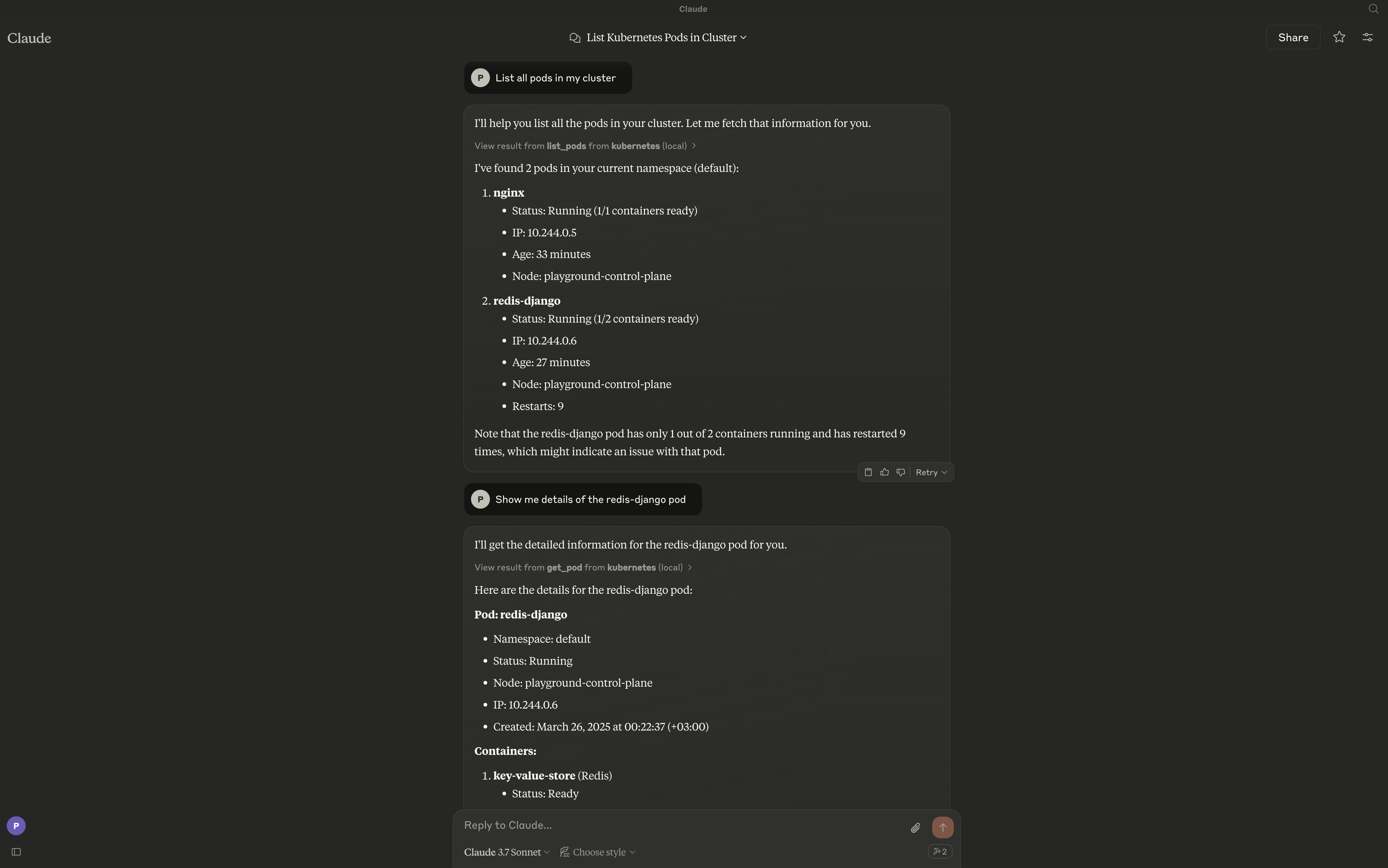
Kai proporciona un puente entre modelos de lenguaje grandes (LLMs) y tus clústeres de Kubernetes, permitiendo la interacción en lenguaje natural con los recursos de Kubernetes. El servidor expone un conjunto completo de herramientas para gestionar clústeres, espacios de nombres, pods, despliegues, servicios y otros recursos de Kubernetes.
Documentación
Kai - Servidor MCP de Kubernetes
Un servidor de Model Context Protocol (MCP) para gestionar clústeres de Kubernetes desde clientes compatibles con MCP como Claude Desktop, Cursor y Continue.
Descripción General
Kai expone operaciones de Kubernetes como herramientas MCP, permitiendo que un cliente LLM gestione tu clúster mediante lenguaje natural: cargas de trabajo, redes, configuración, almacenamiento, RBAC, recursos personalizados y manifiestos sin procesar.
Características
Cargas de Trabajo Principales
- Pods - Crear, listar, obtener, eliminar y transmitir registros
- Deployments - Crear, listar, describir y actualizar
- Jobs - Gestión de cargas de trabajo por lotes (crear, obtener, listar, eliminar)
- CronJobs - Cargas de trabajo por lotes programadas (crear, obtener, listar, eliminar)
Redes
- Services - Crear, obtener, listar y eliminar
- Ingress - Enrutamiento HTTP/HTTPS, configuración TLS (crear, obtener, listar, actualizar, eliminar)
Configuración
- ConfigMaps - Gestión de configuración (crear, obtener, listar, actualizar, eliminar)
- Secrets - Gestión de secretos (crear, obtener, listar, actualizar, eliminar)
- Namespaces - Gestión de namespaces (crear, obtener, listar, eliminar)
Operaciones de Clúster
- Context Management - Cambiar de contexto, listar contextos, renombrar, eliminar
- Nodes - Monitorización de nodos, cordon y drenaje (list, get, cordon, uncordon, drain)
- Cluster Health - Estado del clúster y métricas de recursos (salud del clúster, métricas de nodos/pods)
Almacenamiento
- Persistent Volumes - Gestión de PV (list, get, delete) y gestión de PVC (create, list, get, delete)
- Storage Classes - Operaciones de clases de almacenamiento (list, get)
Seguridad
- RBAC - Roles, RoleBindings, ClusterRoles, ClusterRoleBindings y ServiceAccounts (list, get)
Utilidades
- Port Forwarding - Reenviar puertos a pods y servicios (start, stop, list sessions)
Avanzado
- Apply/Delete Manifests - Aplicar o eliminar YAML/JSON sin procesar, multi-documento y de cualquier tipo, incluidos CRDs (apply_yaml, delete_yaml)
- Custom Resources - Operaciones de CRD y recursos personalizados (list/get CRDs, list/get/delete custom resources)
- Events - Listado y filtrado de eventos (por namespace, tipo, objeto implicado)
- API Discovery - Exploración de recursos de API (list_api_resources)
Requisitos
El servidor se conecta a tu contexto kubectl actual por defecto. Asegúrate de tener acceso a un clúster de Kubernetes configurado para kubectl (por ejemplo, minikube, Rancher Desktop, kind, EKS, GKE, AKS).
Instalación
go install github.com/basebandit/kai/cmd/kai@latest
Imagen de contenedor
Se publica una imagen multi-arquitectura (linux/amd64, linux/arm64) en Docker Hub:
docker pull cyclon/kai:v1.0.0
docker run --rm cyclon/kai:v1.0.0 -version
Opciones de CLI
kai [options]

Options:
  -kubeconfig string        Path to kubeconfig file (default "~/.kube/config")
  -context string           Name for the loaded context (default "local")
  -in-cluster               Use in-cluster config (when running inside a pod)
  -transport string         stdio (default), streamable-http, or sse-legacy
  -sse-addr string          HTTP listen address for streamable-http/sse-legacy (default ":8080")
  -tls-cert string          Path to TLS certificate (enables HTTPS)
  -tls-key string           Path to TLS private key (enables HTTPS)
  -request-timeout duration Timeout for Kubernetes API requests (default 30s)
  -metrics                  Expose Prometheus metrics at /metrics (default true)
  -log-format string        json (default) or text
  -log-level string         debug, info, warn, error (default "info")
  -version                  Show version information
Los registros se escriben en stderr en formato JSON estructurado por defecto, lo que facilita su análisis:
{"time":"2024-01-15T10:30:00Z","level":"INFO","msg":"kubeconfig loaded","path":"/home/user/.kube/config","context":"local"}
{"time":"2024-01-15T10:30:00Z","level":"INFO","msg":"starting server","transport":"stdio"}
Configuración
Claude Desktop
Edita tu configuración de Claude Desktop:
# macOS
code ~/Library/Application\ Support/Claude/claude_desktop_config.json

# Linux
code ~/.config/Claude/claude_desktop_config.json
Añade la configuración del servidor:
{
  "mcpServers": {
    "kubernetes": {
      "command": "/path/to/kai"
    }
  }
}
Con kubeconfig personalizado:
{
  "mcpServers": {
    "kubernetes": {
      "command": "/path/to/kai",
      "args": ["-kubeconfig", "/path/to/custom/kubeconfig"]
    }
  }
}
Cursor
Añade a tu configuración de MCP de Cursor:
{
  "mcpServers": {
    "kubernetes": {
      "command": "/path/to/kai"
    }
  }
}
Continue
Añade a tu configuración de Continue (~/.continue/config.json):
{
  "experimental": {
    "modelContextProtocolServers": [
      {
        "transport": {
          "type": "stdio",
          "command": "/path/to/kai"
        }
      }
    ]
  }
}
Modo HTTP (clientes web, uso remoto)
Para clientes que no usan stdio, ejecuta el transporte HTTP transmisible:
kai -transport=streamable-http -sse-addr=:8080
El endpoint MCP es http://localhost:8080/mcp. Las sondas de salud están en /healthz y /readyz, y las métricas de Prometheus en /metrics. El transporte SSE heredado (-transport=sse-legacy, endpoint /sse) sigue funcionando pero está obsoleto.
Kubeconfig Personalizado
Por defecto, Kai usa ~/.kube/config. Puedes especificar un kubeconfig diferente:
kai -kubeconfig=/path/to/custom/kubeconfig -context=my-cluster
Ejecución Dentro de un Clúster de Kubernetes
Al desplegar Kai dentro de un clúster de Kubernetes, usa la bandera -in-cluster para usar automáticamente las credenciales de la cuenta de servicio del pod:
kai -in-cluster -transport=streamable-http -sse-addr=:8080
La forma recomendada de ejecutar Kai dentro del clúster es con kmcp (de kagent), que gestiona servidores MCP como recursos MCPServer:
apiVersion: kagent.dev/v1alpha1
kind: MCPServer
metadata:
  name: kai
spec:
  transportType: http
  httpTransport:
    targetPort: 8080
    path: /mcp
  deployment:
    image: cyclon/kai:v1.0.0
    port: 8080
    cmd: /kai
    args: ["-in-cluster", "-transport=streamable-http", "-sse-addr=:8080"]
    serviceAccountName: kai
kmcp crea el Deployment y el Service por ti. La cuenta de servicio necesita RBAC para los recursos que gestiona Kai: get/list/watch amplios, además de create/update/delete donde uses herramientas de mutación. Consulta la guía de despliegue de kmcp.
Ejemplo ejecutable: deploy/kagent/kai.example.yaml (solo para pruebas: otorga cluster-admin; reduce el alcance para uso real).
Ejemplos de Uso
Una vez configurado, puedes interactuar con tu clúster usando lenguaje natural:
- "Lista todos los pods en el namespace predeterminado"
- "Crea un deployment llamado nginx con 3 réplicas usando la imagen nginx:latest"
- "Muéstrame los registros del pod my-app"
- "Elimina el service llamado backend"
- "Crea un cronjob que se ejecute cada 5 minutos"
- "Crea un ingress para my-app con TLS habilitado"
- "Reenvía el puerto del service nginx en el puerto 8080:80"
- "Aplica este manifiesto: "
Contribuciones
¡Las contribuciones son bienvenidas! Consulta nuestras pautas de contribución para más información.
Licencia
Este proyecto está licenciado bajo la Licencia MIT.