SSI Stock Data MCP
Consulta datos intradía de acciones vietnamitas utilizando la API SSI FastConnect.
Documentación
SSI Stock Data MCP


Tabla de contenido
- Tabla de contenido
- 1. Introducción
- 2. Características
- 3. Inicio rápido
- 4. Herramientas
- 5. Desarrollo
- 6. Licencia
1. Introducción
SSI Stock Data MCP es un servidor Model Context Protocol (MCP) para obtener datos intradía de acciones de Vietnam. Permite a asistentes y herramientas de IA consultar datos intradía utilizando la API de SSI FastConnect de forma programática y segura.
2. Características
- Lista de códigos de acciones por bolsa
- Obtener información detallada de un código de acción
- Obtener la lista de códigos de acciones en una cesta de índice
- Obtener la lista de códigos de índice
- Obtener la información de apertura, máximo, mínimo, cierre, volumen y valor de un código de acción por cada dato de tick
- Obtener la información de apertura, máximo, mínimo, cierre, volumen y valor de un código de acción por día
- Obtener los resultados de negociación diarios del índice compuesto
- Obtener la información de negociación diaria de un código de acción
- Soporte de contenedores Docker
- Soporte para obtener datos en tiempo real mediante adaptador de streaming (planificado)
- Soporte para gestión de órdenes y negociación a través de MCP (consideración futura)
3. Inicio rápido
3.1. Requisitos previos
- Python 3.12+
- uv (para gestión rápida de dependencias).
- Docker (opcional, para despliegue en contenedores).
- Asegúrate de registrarte en el servicio SSI FastConnect antes de ejecutar este servidor MCP. Puedes registrarte en SSI FastConnect para obtener tu ID de consumidor y secreto.
Instalación mediante Smithery
Para instalar SSI Stock MCP Server para Claude Desktop automáticamente mediante Smithery:
npx -y @smithery/cli install @archiephan78/ssi-stock-mcp-server --client claude
3.2. Ejecución local
- Clona el repositorio:
# Clone the repository
$ git clone https://github.com/archiephan78/ssi-stock-mcp-server.git
- Configura las variables de entorno
# Set environment variables (see .env.sample)
FC_DATA_URL=https://fc-data.ssi.com.vn/ #optional
FC_DATA_AUTH_TYPE=Bearer #optional
FC_DATA_CONSUMER_ID=your_consumer_id
FC_DATA_CONSUMER_SECRET=your_consumer_secret
- Añade la configuración del servidor a tu archivo de configuración del cliente. Por ejemplo, para Claude Desktop:
{
  "mcpServers": {
    "SSIStockMCPServer": {
      "command": "uv",
      "args": ["--directory", "full-path", "run", "ssi-stock-mcp-server"],
      "env": {
        "FC_DATA_CONSUMER_ID": "id",
        "FC_DATA_CONSUMER_SECRET": "id",
        "FC_DATA_URL": "https://fc-data.ssi.com.vn/",
        "FC_DATA_AUTH_TYPE": "Bearer"
      }
    }
  }
}
- Reinicia Claude Desktop para cargar la nueva configuración.
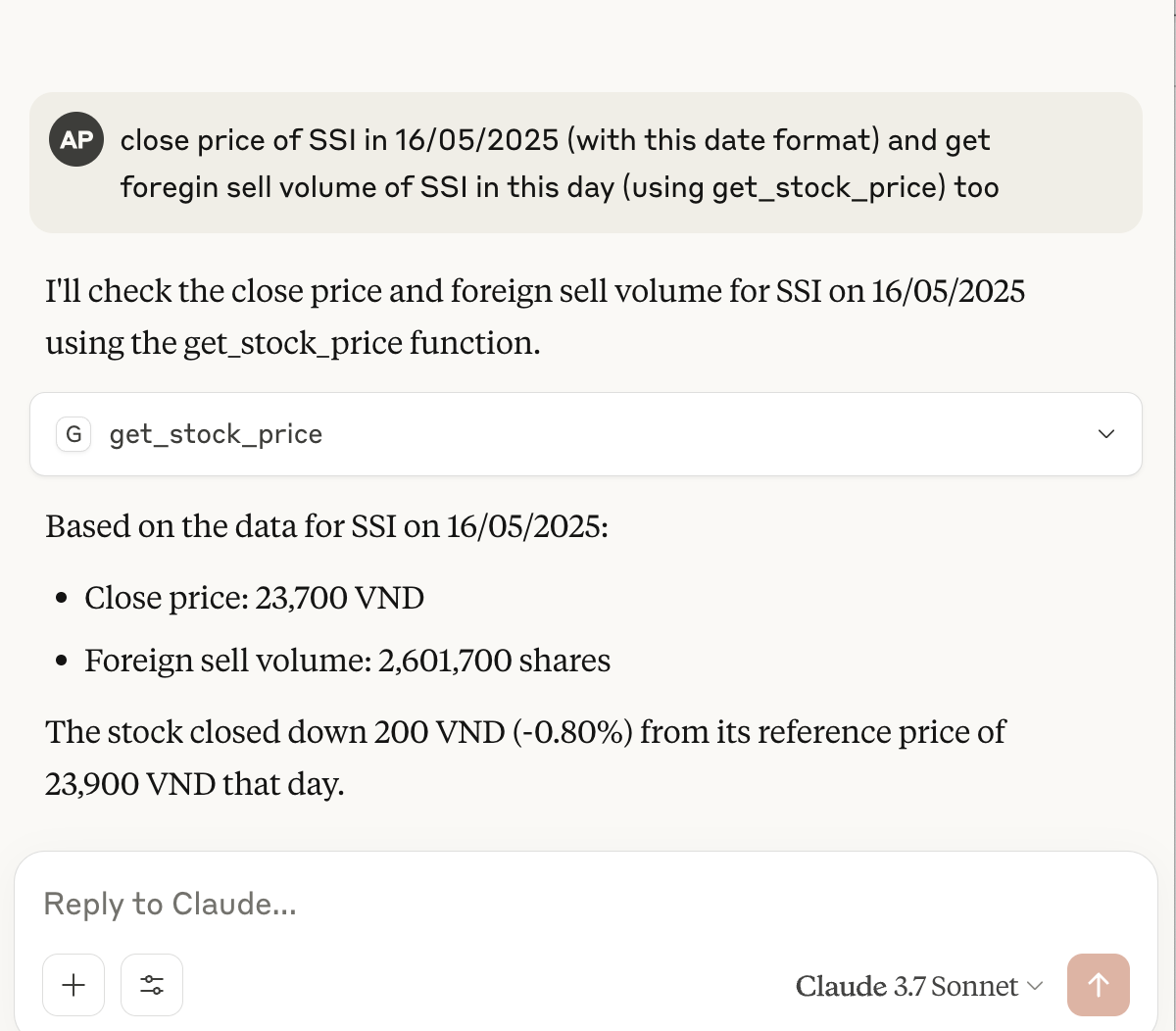
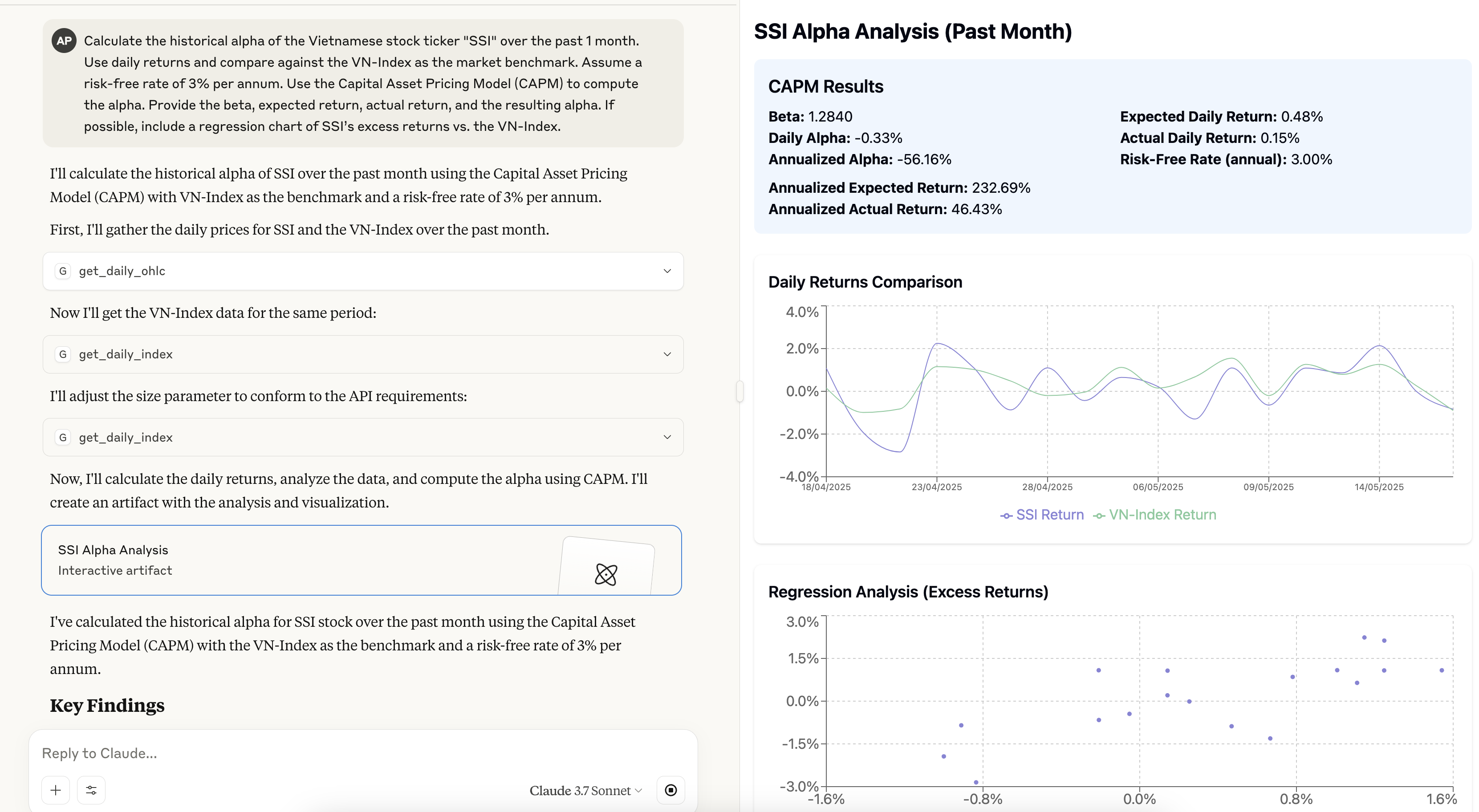
- Ahora puedes pedir a Claude que interactúe con los datos usando lenguaje natural:
- "¿Qué hay de interesante en el índice VN30 hoy?"
- "obtener el volumen de venta de extranjeros de SSI hoy"
- "comparar el volumen de SSI con VND en el día de hoy"
- "volumen total de operaciones (matchvol) de SSI en la última semana"
3.3. Ejecución con Docker
- Ejecútalo con la imagen preconstruida (o puedes construirla tú mismo):
$ docker run -p 8000:8000
             -e FC_DATA_CONSUMER_ID=id
             -e FC_DATA_CONSUMER_SECRET=id ghcr.io/archiephan78/ssi-stock-mcp-server
- Ejecutando con Docker en Claude Desktop:
{
  "mcpServers": {
    "SSIStockMCPServer": {
      "command": "docker",
      "args": [
        "run",
        "--rm",
        "-i",
        "-e", "FC_DATA_CONSUMER_ID",
        "-e", "FC_DATA_CONSUMER_SECRET",
        "ghcr.io/archiephan78/ssi-stock-mcp-server:latest"
      ],
      "env": {
        "FC_DATA_CONSUMER_ID": "your_username",
        "FC_DATA_CONSUMER_SECRET": "your_password"
      }
    }
  }
}
Esta configuración pasa las variables de entorno de Claude Desktop al contenedor Docker utilizando el indicador -e solo con el nombre de la variable, y proporcionando los valores reales en el objeto env.
4. Herramientas
El servidor MCP expone herramientas:
- Obtener lista de valores:
get_securities_list() - Obtener detalle de valores:
get_securities_details() - Obtener índice:
get_index_components() - Obtener lista de índices:
get_index_list() - Obtener apertura, máximo, mínimo, cierre diarios:
get_daily_ohlc() - Obtener apertura, máximo, mínimo, cierre intradía:
get_intraday_ohlc() - Obtener índice diario:
get_daily_index() - Obtener precio de acción:
get_stock_price()
Consulta src/ssi_stock_mcp_server/server.py para obtener detalles completos de la API.
5. Desarrollo
¡Las contribuciones son bienvenidas! Por favor, abre un issue o envía un pull request si tienes sugerencias o mejoras.
Este proyecto utiliza uv para gestionar las dependencias. Instala uv siguiendo las instrucciones para tu plataforma.
# Clone the repository
$ git clone https://github.com/archiephan78/ssi-stock-mcp-server.git
$ uv venv
$ source .venv/bin/activate  # On Unix/macOS
$ .venv\Scripts\activate     # On Windows
$ uv pip install -e .
# run test
$ pytest
6. Licencia
Contacto / Soporte
- Por favor, abre un issue en GitHub si encuentras algún problema o necesitas soporte.
- Email: n/a