drawdb-mcp
Servidor DrawDB + MCP
Documentación

drawDB + MCP Server
Este fork de DrawDB extiende el original con integración de asistente de IA mediante el Protocolo de Contexto de Modelo (MCP). Los asistentes de IA como Claude pueden crear, modificar y gestionar diagramas de bases de datos programáticamente.
El backend es el propietario del diagrama. Las herramientas MCP leen y escriben directamente el estado autoritativo, por lo que cada herramienta funciona tanto si el navegador está abierto como si no — no necesitas que el editor esté en ejecución para que un asistente construya un esquema. Cuando una GUI está conectada, actúa como una vista sincronizada: el backend envía cada cambio confirmado a ella, y las ediciones realizadas en el editor se envían de vuelta. Una pestaña que se reconecta adopta lo que el backend tenga.
Relación con el DrawDB original
Este proyecto comenzó como un fork de DrawDB, pero desde entonces ha divergido sustancialmente y, intencionalmente, no se mantiene sincronizado con el upstream. Se seleccionan ocasionalmente correcciones y características del proyecto padre, pero ambos continuarán separándose a medida que drawdb-mcp evolucione por su cuenta. DrawDB sigue siendo un proyecto separado y mantenido activamente, y todo el crédito es para sus autores — ver drawdb-io/drawdb.
Video de demostración
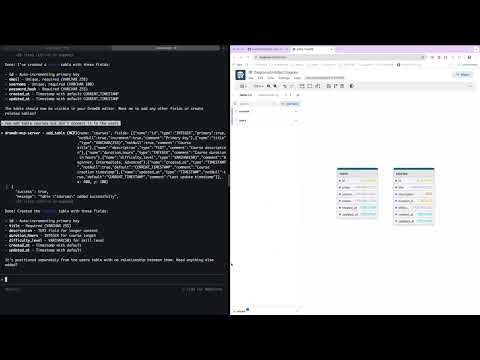
Mira cómo diseñar esquemas de bases de datos usando lenguaje natural con Claude AI.
Arquitectura:
- apps/gui: Frontend React derivado de DrawDB — una vista sincronizada del diagrama del backend, no el almacén
- apps/backend: Servidor MCP NestJS que mantiene el estado autoritativo del diagrama
- packages/diagram-core: Capa de dominio sin framework — esquemas de entidades, el reductor de estado, las tablas de tipos de datos y los códecs SQL/DBML, para que el backend pueda renderizar exportaciones sin GUI en ejecución
- packages/remote-control-contract: el contrato ORPC tipado que comparten ambas direcciones del socket
- Construido con Turborepo y pnpm workspaces
Primeros pasos
Inicio rápido con Docker (Recomendado)
La forma más fácil de empezar es usando Docker:
docker run \
  --name drawdb-mcp \
  -p 8080:80 \
  -p 3000:3000 \
  --restart unless-stopped \
  ghcr.io/anatoly-lab/drawdb-mcp:latest
Luego:
- Abrir GUI: http://localhost:8080
- Conectar Claude Code al servidor MCP:
claude mcp add --transport http drawdb-mcp http://127.0.0.1:3000
Ahora Claude puede crear y modificar diagramas de bases de datos por ti.
Versiones preliminares
latest rastrea solo versiones estables. Las betas y candidatos de lanzamiento se publican bajo su versión exacta y nunca se mueven latest, por lo que fija la versión completa para ejecutar una:
docker run \
  --name drawdb-mcp \
  -p 8080:80 \
  -p 3000:3000 \
  ghcr.io/anatoly-lab/drawdb-mcp:2.0.0-beta.1
Consulta GHCR_DEPLOYMENT.md para ver las etiquetas disponibles y el uso avanzado.
Desarrollo local
Requisitos previos
- Node.js 20.19+ o 22.22+ (ver
enginesenpackage.json) - pnpm 8.15.0+ (instalar mediante
npm install -g pnpm)
Iniciar tanto GUI como backend:
git clone https://github.com/anatoly-lab/drawdb-mcp
cd drawdb-mcp
pnpm install
pnpm dev
Iniciar solo GUI:
pnpm gui:dev
# Access at http://localhost:5173
Iniciar solo backend:
pnpm backend:dev
# WebSocket at ws://localhost:3000/remote-control
Compilar
Compilar ambas aplicaciones:
pnpm install
pnpm build
Compilar una aplicación específica:
pnpm build --filter=gui
pnpm build --filter=backend
Conectar Claude Code al servidor MCP
Cuando se ejecuta localmente, conecta Claude Code:
claude mcp add --transport http drawdb-mcp http://127.0.0.1:3000
El frontend se conecta al backend mediante WebSocket automáticamente. Recuerda que es una vista del estado del backend, no del almacén: las herramientas siguen funcionando sin navegador abierto, y una pestaña que se reconecta adopta lo que el backend tenga.
Despliegue con Docker
Consulta DOCKER_BUILD.md para instrucciones detalladas de compilación.
Compilar con Docker Compose:
docker-compose up --build
# Access at http://localhost:8080
O compilar directamente:
docker build -t drawdb-mcp:local .
docker run -p 8080:80 -p 3000:3000 drawdb-mcp:local
La imagen de Docker incluye tanto frontend como backend. WebSocket se enruta a través de Nginx.
Actualización a nuevas versiones
Al actualizar a una nueva versión (ya sea mediante Docker o desarrollo local), debes realizar una actualización forzada en tu navegador para limpiar el JavaScript del frontend en caché:
- Windows/Linux:
Ctrl + Shift + RoCtrl + F5 - macOS:
Cmd + Shift + R
Sin una actualización forzada, el navegador puede seguir usando el código antiguo del frontend en caché incluso aunque el backend se haya actualizado, lo que puede causar errores o comportamientos inesperados.
Características
Exportar e importar
El servidor MCP proporciona herramientas para exportar e importar diagramas de bases de datos en múltiples formatos:
Formatos de exportación:
- SQL DDL: Exporta sentencias SQL específicas de la base de datos (PostgreSQL, MySQL, SQLite, MariaDB, MSSQL, Oracle)
- DBML: Exporta a Database Markup Language (formato legible por humanos, independiente de la base de datos)
- JSON: Exporta el estado completo del diagrama para copia de seguridad/restauración
Formatos de importación:
- DBML: Importa esquemas de bases de datos desde formato DBML
- JSON: Importa el estado completo del diagrama
Herramientas MCP disponibles:
export_sql- Exporta el diagrama como SQL DDL para el tipo de base de datos actualexport_dbml- Exporta el diagrama como DBMLimport_dbml- Importa el esquema de base de datos desde DBMLexport_diagram- Exporta el diagrama completo como JSONimport_diagram- Importa el diagrama completo desde JSON
Consulta CLAUDE.md para la lista completa de herramientas MCP disponibles y su uso.
Licencia y créditos
Este proyecto está licenciado bajo la GNU Affero General Public License v3.0 (AGPL-3.0), heredada y mantenida del DrawDB original. Consulta el archivo LICENSE para el texto completo.
Construido sobre DrawDB por los autores y colaboradores de DrawDB. Muchas gracias al proyecto original por la base sobre la que se construye este fork.