Odoo
Integra Odoo con modelos de lenguaje grandes (LLMs) para una automatización mejorada de procesos empresariales.
Documentación
mcp-server-odoo
Un servidor extensible del Model Context Protocol que proporciona integración entre Odoo y los LLMs.
Atención: el proyecto está en una fase muy temprana de desarrollo. Espera encontrar asperezas. ¡Agradecemos cualquier comentario!
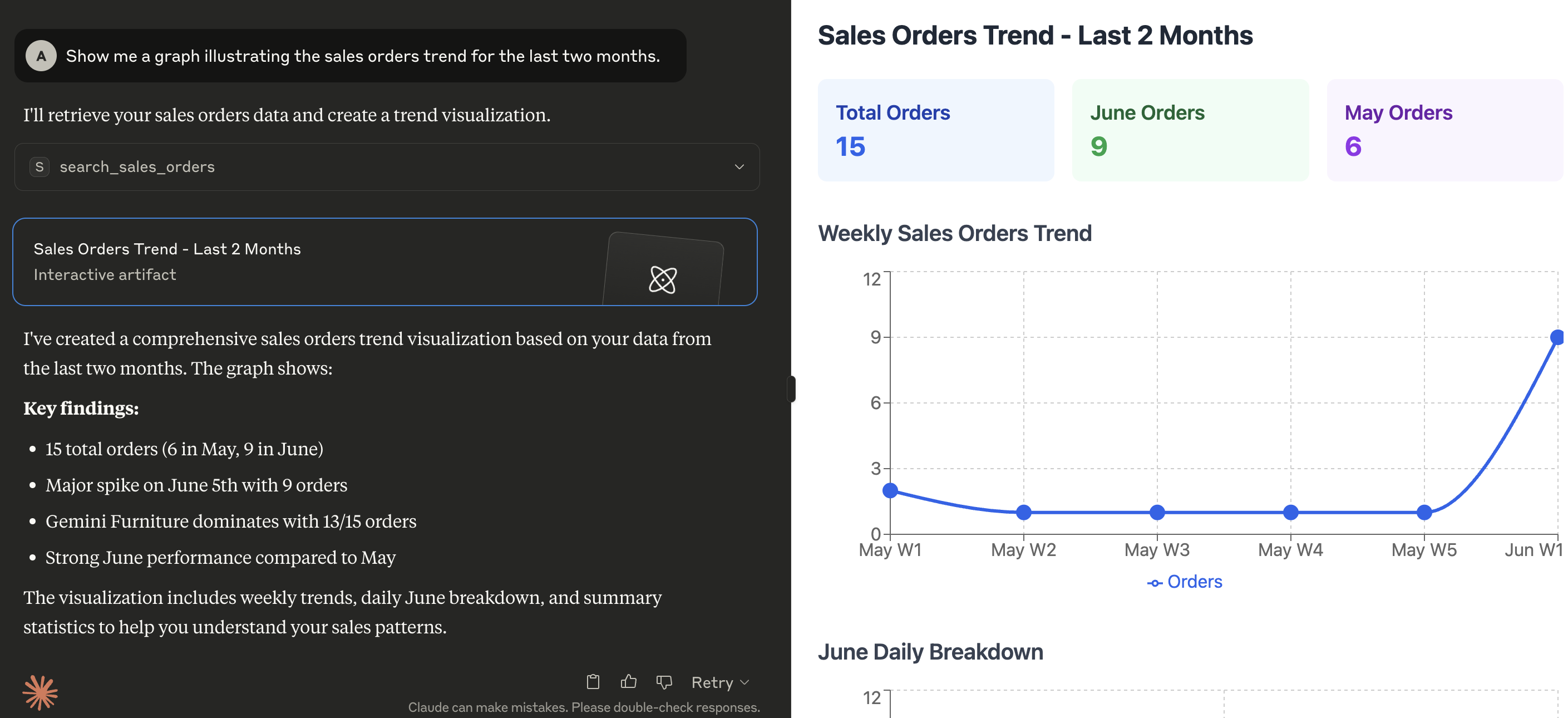
El servidor MCP en acción
Aquí hay una demostración de qué tipo de capacidades habilita el MCP en Claude for Desktop:
Requisitos previos
Configuración
El servidor busca las siguientes variables en el entorno de ejecución:
| Variable | Requerida | Descripción | Ejemplo |
|---|---|---|---|
ODOO_BASE_URL | Sí | La URL de la instancia de Odoo | http://localhost:8069 |
ODOO_DATABASE | Sí | El nombre de la base de datos a la que conectarse | mydatabase |
ODOO_USERNAME | Sí | Nombre de usuario para la autenticación | admin |
ODOO_PASSWORD | Sí | Contraseña o clave de API para la autenticación | admin |
ODOO_VERSION | Sí | Versión principal de tu servidor de Odoo | 18 |
LOG_LEVEL | No | Nivel de registro deseado (consulta niveles de registro de Python), el valor predeterminado es INFO | INFO |
TRANSPORT_PROTOCOL | Sí | El protocolo de transporte MCP a utilizar. Los valores válidos son stdio para comunicación solo local o sse / streamable-http para comunicación remota | stdio |
HOST | No | La(s) dirección(es) IP en las que el servidor debe escuchar conexiones de los clientes | 127.0.0.1 |
TOOLS_TO_REGISTER | Sí | Lista separada por comas de herramientas para exponer al cliente MCP. Las herramientas pueden elegirse entre las incluidas en este proyecto (consulta el directorio src/mcp_server_odoo/tools), o personalizadas proporcionadas por archivos externos (consulta EXT_DIRECTORIES) | search_partners,search_quotations,search_sales_orders,search_customer_invoices |
EXT_DIRECTORIES | No | Lista separada por comas de rutas para buscar herramientas adicionales que se puedan cargar en tiempo de ejecución | /your/custom/path |
Instalación
Instala la herramienta con uv tool:
uv tool install --from git+https://github.com/alberto-re/mcp-server-odoo mcp-server-odoo
Ejecutar el servidor
Ejecútalo directamente con uvx:
uvx mcp-server-odoo
Ejecutar dentro de Docker
Se incluye un Dockerfile si deseas ejecutar el servidor MCP dentro de un contenedor Docker.
Para construir el contenedor, ejecuta este comando desde el directorio raíz del repositorio:
docker build -t mcp-server-odoo .
Ahora puedes ejecutar el contenedor desde la imagen construida con:
docker run --rm --env-file /path/to/env/file -p 8000:8000 mcp-server-odoo
Cuando se ejecuta dentro de un contenedor, recuerda usar un protocolo de transporte basado en HTTP (es decir, establece TRANSPORT_PROTOCOL a sse o streamable-http)
y hacer que el servidor escuche en todas las interfaces (es decir, establece HOST a 0.0.0.0).
Integraciones
Conexión con Claude Desktop
- Edita el archivo de configuración de Claude for Desktop.
- En MacOS, la configuración se encuentra en
~/Library/Application Support/Claude/claude_desktop_config.json. - En Windows, la configuración se encuentra en
%APPDATA%\Claude\claude_desktop_config.json
- Agrega la configuración del servidor bajo la sección mcpServers.
{
  "mcpServers": {
    "mcp-server-odoo": {
      "command": "uvx",
      "args": [
        "mcp-server-odoo"
      ],
      "env": {
        "ODOO_BASE_URL": "http://localhost:8069",
        "ODOO_DATABASE": "mydatabase",
        "ODOO_USERNAME": "admin",
        "ODOO_PASSWORD": "admin",
        "ODOO_VERSION": "18",
        "TRANSPORT_PROTOCOL": "stdio",
        "TOOLS_TO_REGISTER": "search_partners,search_quotations,search_sales_orders,search_customer_invoices"
      }
    }
  }
}
- Reinicia Claude for Desktop.
Conexión con mcphost
-
Edita el archivo de configuración de mcphost. Consulta la documentación para saber dónde busca los archivos de configuración.
-
Agrega la configuración del servidor bajo la sección mcpServers.
{
  "mcpServers": {
    "mcp-server-odoo": {
      "command": "uvx",
      "args": [
        "mcp-server-odoo"
      ],
      "env": {
        "ODOO_BASE_URL": "http://localhost:8069",
        "ODOO_DATABASE": "mydatabase",
        "ODOO_USERNAME": "admin",
        "ODOO_PASSWORD": "admin",
        "ODOO_VERSION": "18",
        "TRANSPORT_PROTOCOL": "stdio",
        "TOOLS_TO_REGISTER": "search_partners,search_quotations,search_sales_orders,search_customer_invoices"
      }
    }
  }
}
- Ejecuta el comando
mcphost.