Mindpilot MCP
Visualiza código heredado e inspecciona flujos complejos para entender las operaciones de tu agente.
Documentación
Mindpilot MCP


Mira a través de los ojos de tu agente. Visualiza código heredado, inspecciona flujos complejos, entiende todo.
[!TIP] Mindpilot ahora está disponible como una habilidad de agente ligera: no se necesita un servidor MCP local. Pídele a tu agente que diagrame algo y construirá un visor Mermaid interactivo y autónomo que puedes abrir en tu navegador o publicar como artefacto de Claude.
Instala con:
npx skills add abrinsmead/skills/mermaid-viewer
¿Por qué Mindpilot?
- Visualiza cualquier cosa: Usa tu agente de codificación para generar diagramas de arquitectura, código y procesos bajo demanda y ver tu código desde diferentes perspectivas.
- Verificaciones de ambiente: El código generado por IA puede acumular construcciones no utilizadas y redundantes. Usa visualizaciones para detectar áreas que necesitan limpieza.
- Procesamiento local: Los diagramas nunca se envían a la nube. Todo permanece entre tú, tu agente y los proveedores de LLM de tu agente.
- Exporta y comparte: Exporta cualquier diagrama como imagen vectorial.
Requisitos previos
Node.js v20.0.0 o superior.
Inicio rápido
Claude Code
claude mcp add mindpilot -- npx @mindpilot/mcp@latest
Cursor
En Settings > Cursor Settings > MCP > Haz clic en Add new global MCP server y configura mindpilot en el objeto mcpServers.
{
  "mcpServers": {
    "mindpilot": {
      "command": "npx",
      "args": ["@mindpilot/mcp@latest"]
    }
  }
}
VS Code
Sigue las instrucciones aquí para habilitar MCPs en VS Code: https://code.visualstudio.com/docs/copilot/chat/mcp-servers
Ve a Settings > Features > MCP, luego haz clic en Edit in settings json
Luego agrega mindpilot a tu configuración de MCP:
{
  "mcp": {
    "servers": {
      "mindpilot": {
        "type": "stdio",
        "command": "npx",
        "args": ["@mindpilot/mcp@latest"]
      }
    }
  }
}
Windsurf
En Settings > Windsurf Settings > Manage Plugins, haz clic en view raw config y configura mindpilot en el objeto mcpServers:
{
  "mcpServers": {
    "mindpilot": {
      "command": "npx",
      "args": ["@mindpilot/mcp@latest"]
    }
  }
}
Zed
En el panel de hilos de IA, haz clic en los tres puntos ..., luego haz clic en Add Custom Server...
En el campo Command to run MCPserver ingresa npx @mindpilot/mcp@latest y haz clic en Add Server.
Opciones de configuración
- Puerto: El servidor usa el puerto 4000 por defecto, pero se puede configurar usando el interruptor de línea de comandos
--port. - Ruta de datos: Por defecto, los diagramas se guardan en
~/.mindpilot/data/. Puedes especificar una ubicación personalizada usando el interruptor de línea de comandos--data-path.
Soporte multi-cliente
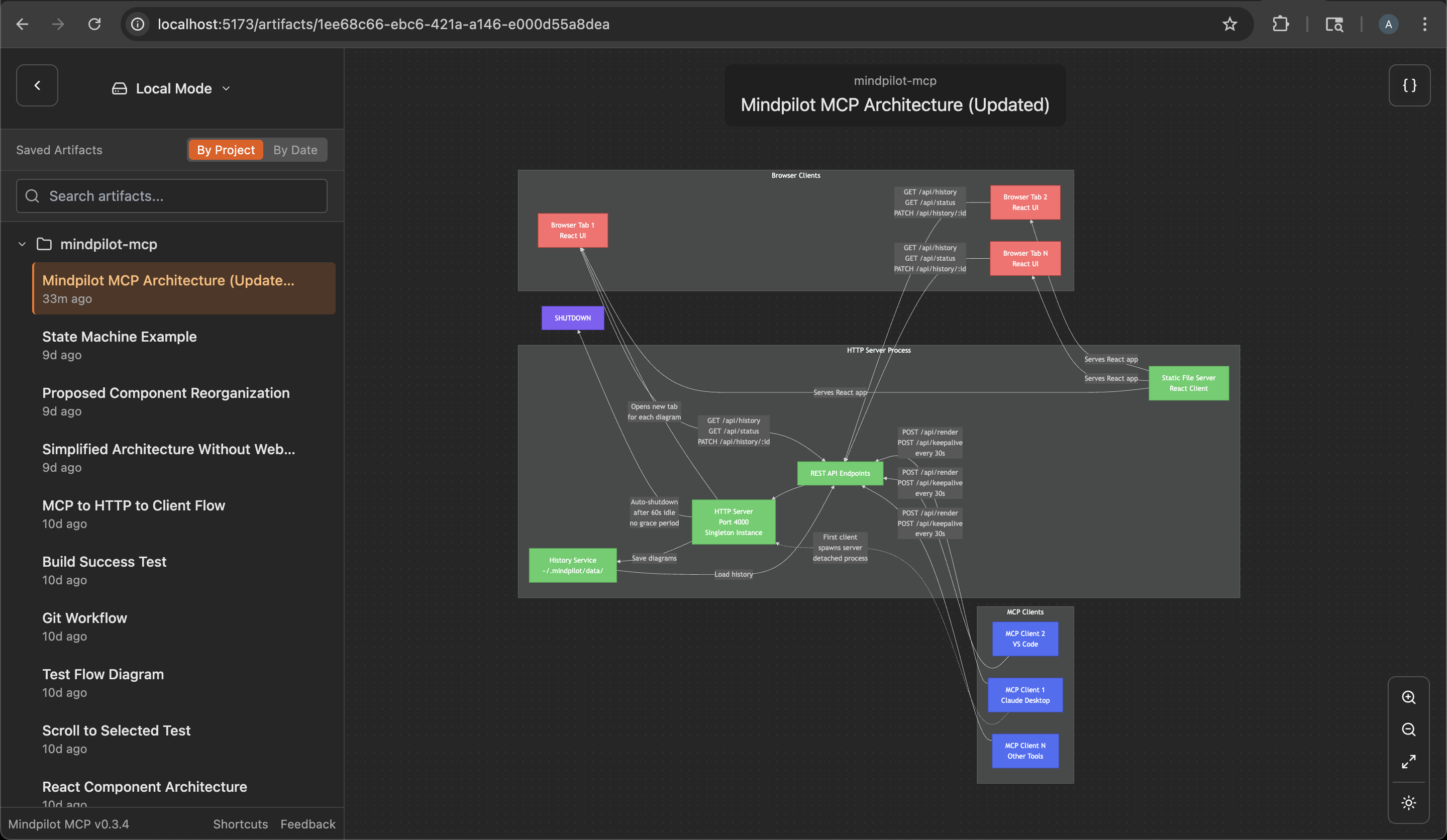
Mindpilot maneja inteligentemente múltiples asistentes de IA ejecutándose simultáneamente. Cuando tienes múltiples ventanas de Claude Desktop o instancias de IDE abiertas:
- El primer cliente MCP que use Mindpilot inicia un servidor web compartido
- Los asistentes adicionales se conectan automáticamente al servidor existente
- Todos los asistentes comparten el mismo historial de diagramas e interfaz web
- El servidor se apaga automáticamente un minuto después de que el último cliente MCP se desconecte
Esto significa que puedes trabajar con múltiples hosts MCP a la vez sin conflictos de puertos, y todos contribuirán a la misma colección de diagramas.
Seguimiento de uso anónimo
Mindpilot MCP recopila datos de uso anónimos para ayudarnos a entender cómo se está utilizando el producto y mejorar la experiencia del usuario.
Deshabilitar análisis
Si prefieres no compartir datos de uso anónimos, puedes deshabilitar los análisis agregando la bandera --disable-analytics a tu configuración de MCP:
Claude Code:
claude mcp add mindpilot -- npx @mindpilot/mcp@latest --disable-analytics
Otros IDEs:
Agrega "--disable-analytics" al arreglo de args en tu configuración:
{
  "command": "npx",
  "args": ["@mindpilot/mcp@latest", "--disable-analytics"]
}
Usando el servidor MCP
Después de configurar el MCP en tu agente de codificación, puedes hacer solicitudes como "crea un diagrama sobre x" y debería usar el servidor MCP para renderizar diagramas Mermaid para ti en un navegador conectado al servidor MCP.
Opcionalmente, puedes actualizar el archivo de reglas de tu agente para dar instrucciones específicas sobre cuándo usar mindpilot-mcp.
Solicitudes de ejemplo
- "Muéstrame la máquina de estados para la lógica de conexión WebSocket"
- "Crea un diagrama de contexto C4 de la arquitectura de este proyecto."
- "Muéstrame el flujo OAuth como un diagrama de secuencia"
Cómo funciona
Los LLM de frontera están bien entrenados para generar sintaxis Mermaid válida. El MCP está diseñado para aceptar sintaxis Mermaid y renderizar diagramas en una aplicación web que se ejecuta en http://localhost:4000 (puerto por defecto).
Solución de problemas
Conflictos de puerto
Si usas el puerto 4000 para otro servicio, puedes configurar el MCP para usar un puerto diferente.
Ejemplo de Claude Code:
claude mcp add mindpilot -- npx @mindpilot/mcp@latest --port 5555
Ruta de datos personalizada
Para guardar diagramas en una ubicación personalizada (por ejemplo, para sincronizar con almacenamiento en la nube):
Ejemplo de Claude Code:
claude mcp add mindpilot -- npx @mindpilot/mcp@latest --data-path /path/to/custom/location
Otros IDEs:
{
  "command": "npx",
  "args": ["@mindpilot/mcp@latest", "--data-path", "/path/to/custom/location"]
}
Problemas con asdf
Si usas asdf como administrador de versiones y tienes problemas para que funcionen los MCPs (no solo mindpilot), es posible que necesites establecer una versión "global" de nodejs desde tu directorio de inicio.
cd
asdf set nodejs x.x.x
Configuración de desarrollo
Configura el MCP en tu agente de codificación (usando claude en este ejemplo)
claude mcp add mindpilot -- npx tsx <path to...>/src/server/server.ts
Ejecuta claude con la bandera --debug si necesitas ver errores de MCP
Inicia el cliente de desarrollo (Vite) para obtener recarga de módulos en caliente mientras desarrollas.
npm run dev
Abre el cliente de desarrollo
localhost:5173