symbolica-mcp
Un servidor de computación científica para matemáticas simbólicas, análisis de datos y visualización utilizando bibliotecas populares de Python como NumPy, SciPy y Pandas.
Documentación
symbolica-mcp
Un servidor de computación científica del Protocolo de Contexto de Modelos (MCP) que permite a la IA, como Claude, realizar computación simbólica, llevar a cabo cálculos, analizar datos y generar visualizaciones. Esto es particularmente útil para aplicaciones científicas y de ingeniería, incluyendo la computación cuántica, todo dentro de un entorno contenerizado.
Características
- Ejecutar operaciones de computación científica con NumPy, SciPy, SymPy, Pandas
- Realizar matemáticas simbólicas y resolver ecuaciones diferenciales
- Soporte para operaciones de álgebra lineal y manipulaciones de matrices
- Análisis de computación cuántica
- Crear visualizaciones de datos con Matplotlib y Seaborn
- Realizar operaciones de aprendizaje automático con scikit-learn
- Ejecutar operaciones de tensores y cálculos complejos de matrices
- Analizar conjuntos de datos con herramientas estadísticas
- Soporte multiplataforma (detecta automáticamente Windows, macOS y Linux), especialmente para usuarios con chips de la serie M de Mac
- Funciona tanto en procesadores Intel/AMD (x86_64) como ARM
Inicio rápido
Usando la imagen de Docker
# Pull the image from Docker Hub
docker pull ychen94/computing-mcp:latest

# Run the container (automatically detects host OS)
docker run -i --rm -v /tmp:/app/shared ychen94/computing-mcp:latest
Para usuarios de Windows:
docker run -i --rm -v $env:TEMP:/app/shared ychen94/computing-mcp:latest
Integración con Claude para Desktop
- Abre Claude para Desktop
- Abre Configuración ➝ Desarrollador ➝ Editar Configuración
- Agrega la siguiente configuración:
Para MacOS/Linux:
{
  "mcpServers": {
    "computing-mcp": {
      "command": "docker",
      "args": [
        "run",
        "-i",
        "--rm",
        "-v",
        "/tmp:/app/shared",
        "ychen94/computing-mcp:latest"
      ]
    }
  }
}
Para Windows:
{
  "mcpServers": {
    "computing-mcp": {
      "command": "docker",
      "args": [
        "run",
        "-i",
        "--rm",
        "-v",
        "%TEMP%:/app/shared",
        "ychen94/computing-mcp:latest"
      ]
    }
  }
}
Ejemplos
Productos de tensores
Can you calculate and visualize the tensor product of two matrices? Please run:

import numpy as np
import matplotlib.pyplot as plt

# Define two matrices
A = np.array([[1, 2],
              [3, 4]])
B = np.array([[5, 6],
              [7, 8]])

# Calculate tensor product using np.kron (Kronecker product)
tensor_product = np.kron(A, B)

# Display the result
print("Matrix A:")
print(A)
print("\nMatrix B:")
print(B)
print("\nTensor Product A ⊗ B:")
print(tensor_product)

# Create a visualization of the tensor product
plt.figure(figsize=(8, 6))
plt.imshow(tensor_product, cmap='viridis')
plt.colorbar(label='Value')
plt.title('Visualization of Tensor Product A ⊗ B')
Matemáticas simbólicas
Can you solve this differential equation? Please run:
import sympy as sp
import matplotlib.pyplot as plt
import numpy as np

# Define symbolic variable
x = sp.Symbol('x')
y = sp.Function('y')(x)

# Define the differential equation: y''(x) + 2*y'(x) + y(x) = 0
diff_eq = sp.Eq(sp.diff(y, x, 2) + 2*sp.diff(y, x) + y, 0)

# Solve the equation
solution = sp.dsolve(diff_eq)
print("Solution:")
print(solution)

# Plot a particular solution (C1=1, C2=0)
solution_func = solution.rhs.subs({sp.symbols('C1'): 1, sp.symbols('C2'): 0})
print("Particular solution:")
print(solution_func)

# Create a numerical function we can evaluate
solution_lambda = sp.lambdify(x, solution_func)

# Plot the solution
x_vals = np.linspace(0, 5, 100)
y_vals = [float(solution_lambda(x_val)) for x_val in x_vals]

plt.figure(figsize=(10, 6))
plt.plot(x_vals, y_vals)
plt.grid(True)
plt.title("Solution to y''(x) + 2*y'(x) + y(x) = 0")
plt.xlabel('x')
plt.ylabel('y(x)')
plt.show()
Análisis de datos
Can you perform a clustering analysis on this dataset? Please run:

import numpy as np
import pandas as pd
import matplotlib.pyplot as plt
from sklearn.cluster import KMeans
from sklearn.preprocessing import StandardScaler

# Create a sample dataset
np.random.seed(42)
n_samples = 300

# Create three clusters
cluster1 = np.random.normal(loc=[2, 2], scale=0.5, size=(n_samples//3, 2))
cluster2 = np.random.normal(loc=[7, 7], scale=0.5, size=(n_samples//3, 2))
cluster3 = np.random.normal(loc=[2, 7], scale=0.5, size=(n_samples//3, 2))

# Combine clusters
X = np.vstack([cluster1, cluster2, cluster3])

# Create DataFrame
df = pd.DataFrame(X, columns=['Feature1', 'Feature2'])
print(df.head())

# Standardize data
scaler = StandardScaler()
X_scaled = scaler.fit_transform(X)

# Apply KMeans clustering
kmeans = KMeans(n_clusters=3, random_state=42)
df['Cluster'] = kmeans.fit_predict(X_scaled)

# Plot the clusters
plt.figure(figsize=(10, 6))
for cluster_id in range(3):
    cluster_data = df[df['Cluster'] == cluster_id]
    plt.scatter(cluster_data['Feature1'], cluster_data['Feature2'],
                label=f'Cluster {cluster_id}', alpha=0.7)

# Plot cluster centers
centers = scaler.inverse_transform(kmeans.cluster_centers_)
plt.scatter(centers[:, 0], centers[:, 1], s=200, c='red', marker='X', label='Centers')

plt.title('K-Means Clustering Results')
plt.xlabel('Feature 1')
plt.ylabel('Feature 2')
plt.legend()
plt.grid(True)
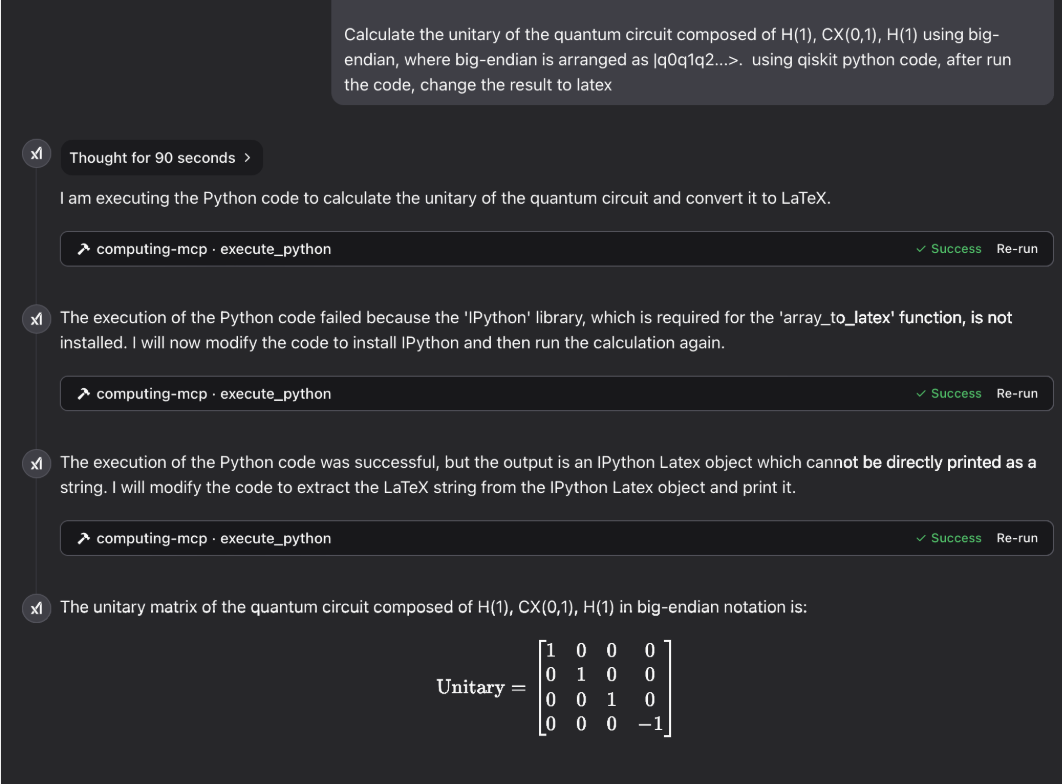
Computación cuántica
Galería
física láser:

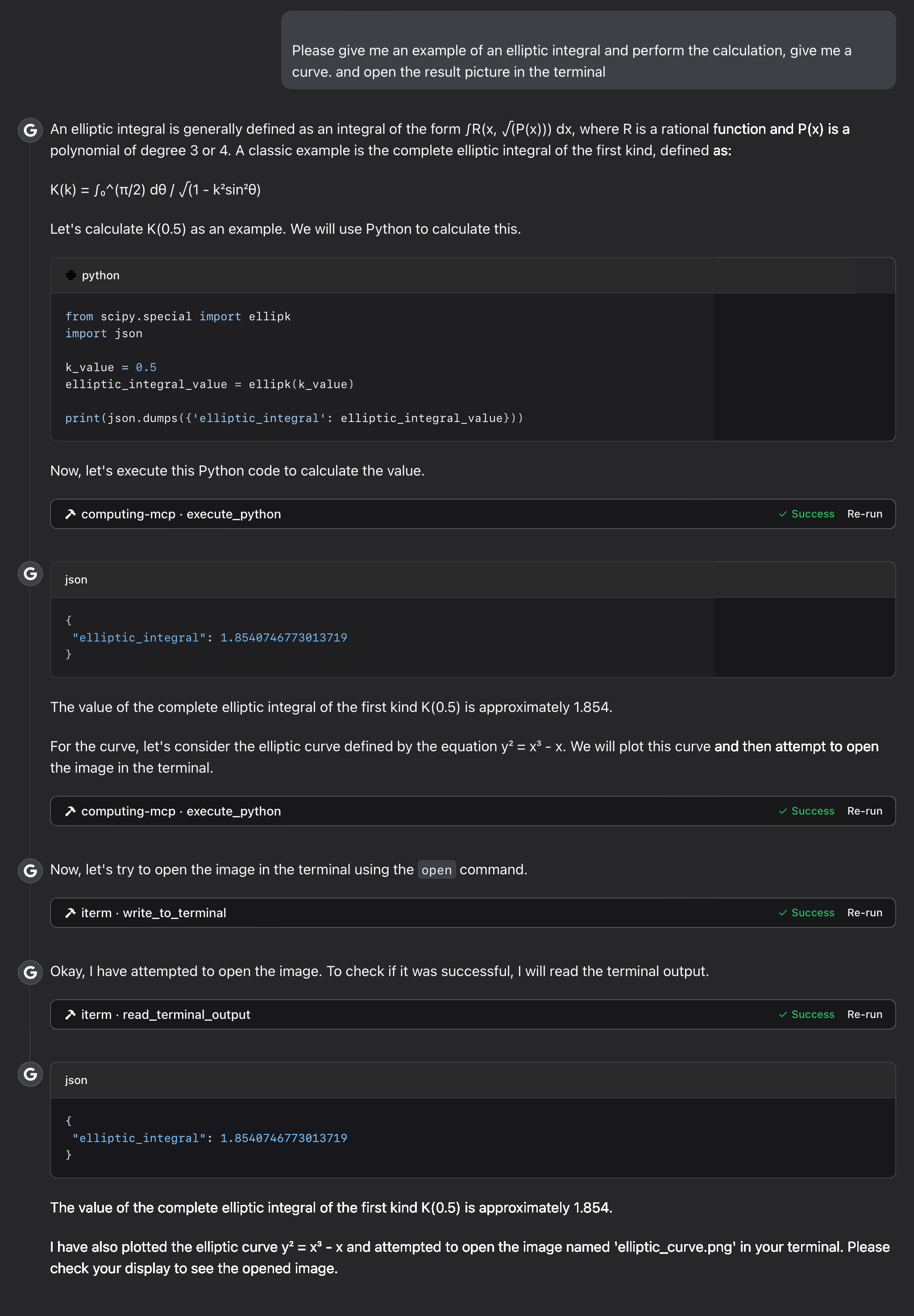
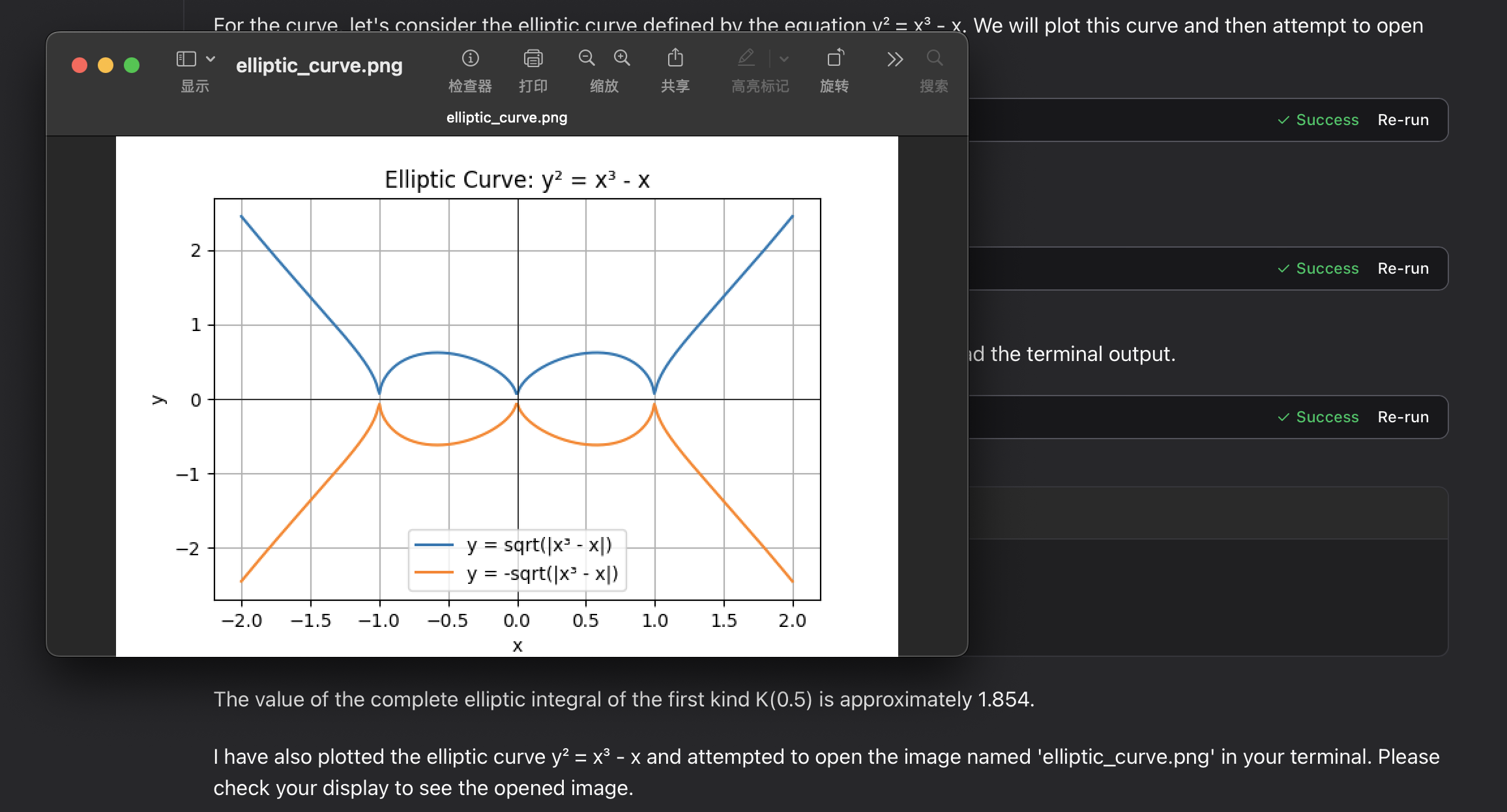
integral elíptica:
Solución de problemas
Problemas comunes
-
Errores de permisos con montajes de volúmenes
- Asegúrate de que el directorio de montaje exista y tenga los permisos adecuados
-
Los archivos de imágenes de gráficos no aparecen
-
Verifica la ruta en tu sistema host:
/tmppara macOS/Linux o tu carpeta temporal para Windows -
Verifica que Docker tenga permisos para escribir en la ubicación de montaje
-
Revisa el contenido de salida de la herramienta mcp
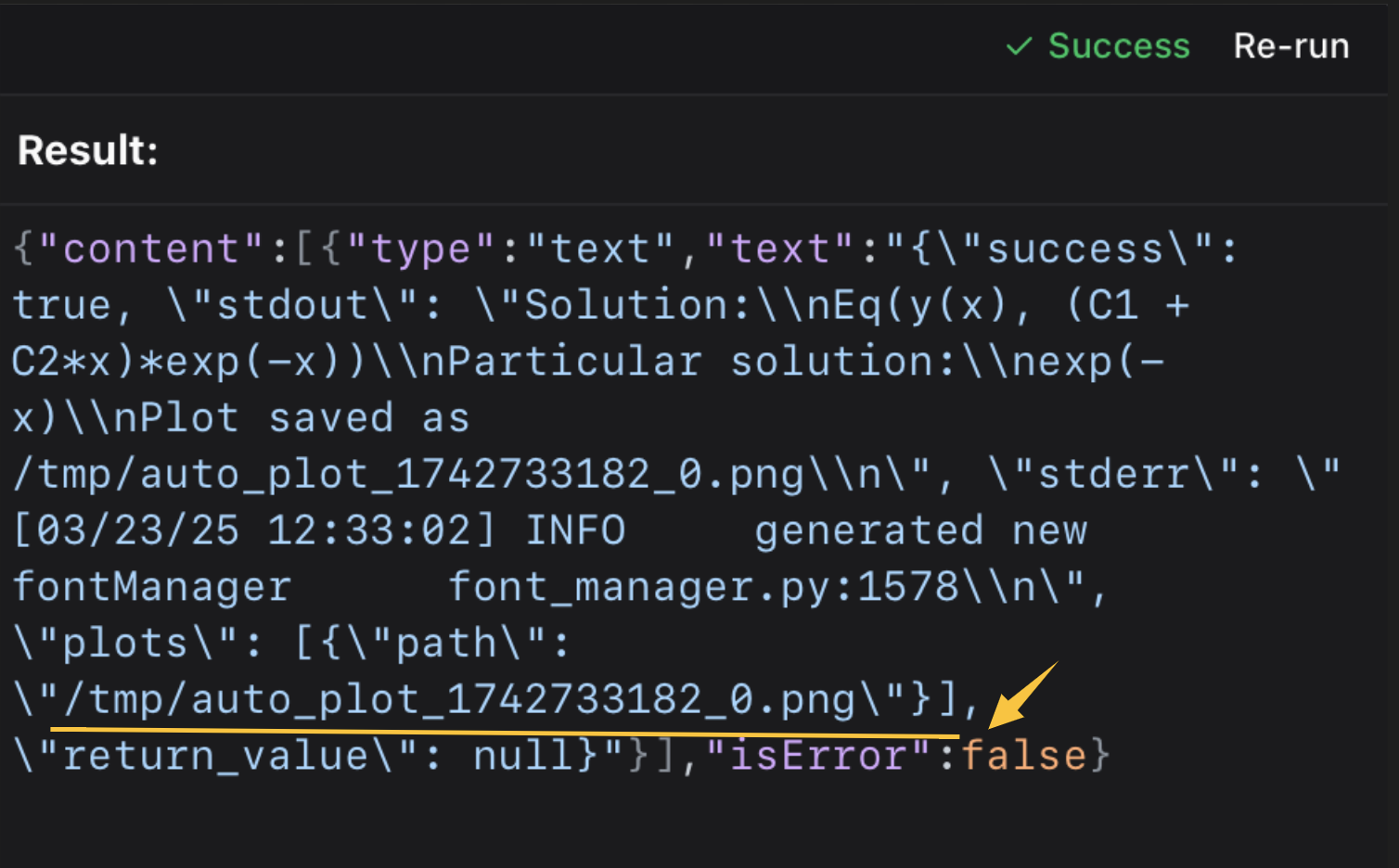 luego ábrelo en la terminal o en tu visor de imágenes.
⭐️ ⭐️ Utilizo el iterm-mcp-server u otros servidores mcp de terminales para abrir el archivo sin interrumpir tu flujo de trabajo. ⭐️ ⭐️
-
Soporte
Si encuentras problemas, abre un issue en GitHub con:
- Mensajes de error
- Tu sistema operativo y versión de Docker
- Pasos para reproducir el problema
Licencia
Este proyecto está licenciado bajo la Licencia MIT.
Para más detalles, consulta el archivo LICENSE en el repositorio de este proyecto.