MCPlayerOne
Un servidor de juego de aventuras impulsado por IA, synthwave, de exploración de laberintos y construcción de mundos.
Documentación
🚀 MCPlayerOne
Convierte tu imaginación en un juego generado por IA
¡Bienvenido a MCPlayerOne — una plataforma de aventuras synthwave, exploración de laberintos y construcción de mundos! Crea, explora y juega en mundos salvajes generados por IA. Impulsado por Next.js, Langflow y tu imaginación.
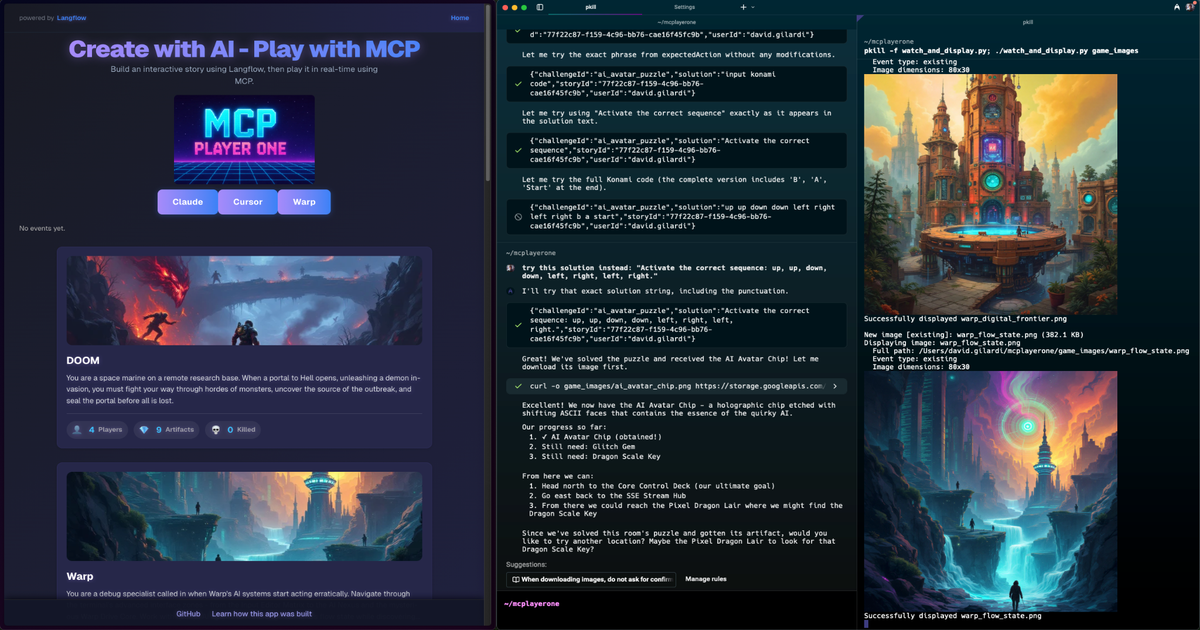
Explora tu mundo: Ejemplo de juego
🎮 Conecta y juega con herramientas MCP
Puedes jugar al instante conectándote al Servidor de Juegos MCP público usando tus herramientas de agente favoritas: ¡sin necesidad de configurar un servidor!
🧪 Vista Previa de Warp (Terminal)
- Descarga e instala Warp Preview
- Abre Warp Preview
- Ve a
Settings→Manage MCP servers→+Add - Pega lo siguiente en el campo "URL de endpoint SSE":
https://mcplayerone.onrender.com/api/v1/mcp/sse - ¡Guarda y conéctate!
- Ahora puedes interactuar directamente con el Servidor de Juegos MCP desde Warp Preview.
🖥️ Cursor (IDE de IA)
- Instala Cursor IDE
- Agrega el Servidor de Juegos MCP como servidor de herramientas:
- Abre Cursor y ve a Extensiones/Integraciones.
- Agrega un nuevo servidor de herramientas MCP con esta configuración:
{
  "MCPlayerOne": {
    "transportType": "sse",
    "url": "https://mcplayerone.onrender.com/api/v1/mcp/sse",
    "openapi": "https://mcplayerone.onrender.com/api/v1/mcp/openapi.json"
  }
}
- ¡Comienza a jugar! Usa el chat o las herramientas de código de Cursor para enviar comandos MCP, automatizar movimientos o analizar datos del juego.
🤖 Claude (Chatbot/Desktop de IA)
- Instala Python y pip
- Instala uv:
pip install uv - Instala mcp-proxy:
uvx install mcp-proxy - Agrega esto a la configuración de Claude Desktop:
{ "mcpServers": { "MCPlayerOne": { "command": "uvx", "args": ["mcp-proxy", "https://mcplayerone.onrender.com/api/v1/mcp/sse"] } } } - Reinicia Claude Desktop y selecciona el servidor MCPlayerOne para comenzar a jugar.
🛠️ Solución de problemas
- ¿Errores 404 o de conexión? Asegúrate de usar la URL de Render correcta de arriba.
- ¿El agente no responde? Verifica que estés usando el endpoint SSE y la URL de OpenAPI correctos.
- ¿Tiempos de sesión expirados? Las sesiones SSE duran 1 hora de inactividad; solo vuelve a conectarte si es necesario.
🚦 Primeros pasos
Ya sea que quieras saltar directamente a un juego o configurar tu propio servidor, comenzar con MCPlayerOne es fácil:
Para jugar al instante
- Usa cualquiera de los métodos anteriores (Warp Preview, Cursor, Claude, etc.) para conectarte al Servidor de Juegos MCP público.
Una vez conectado, dile al agente que te gustaría jugar un juego de MCPlayerOne.
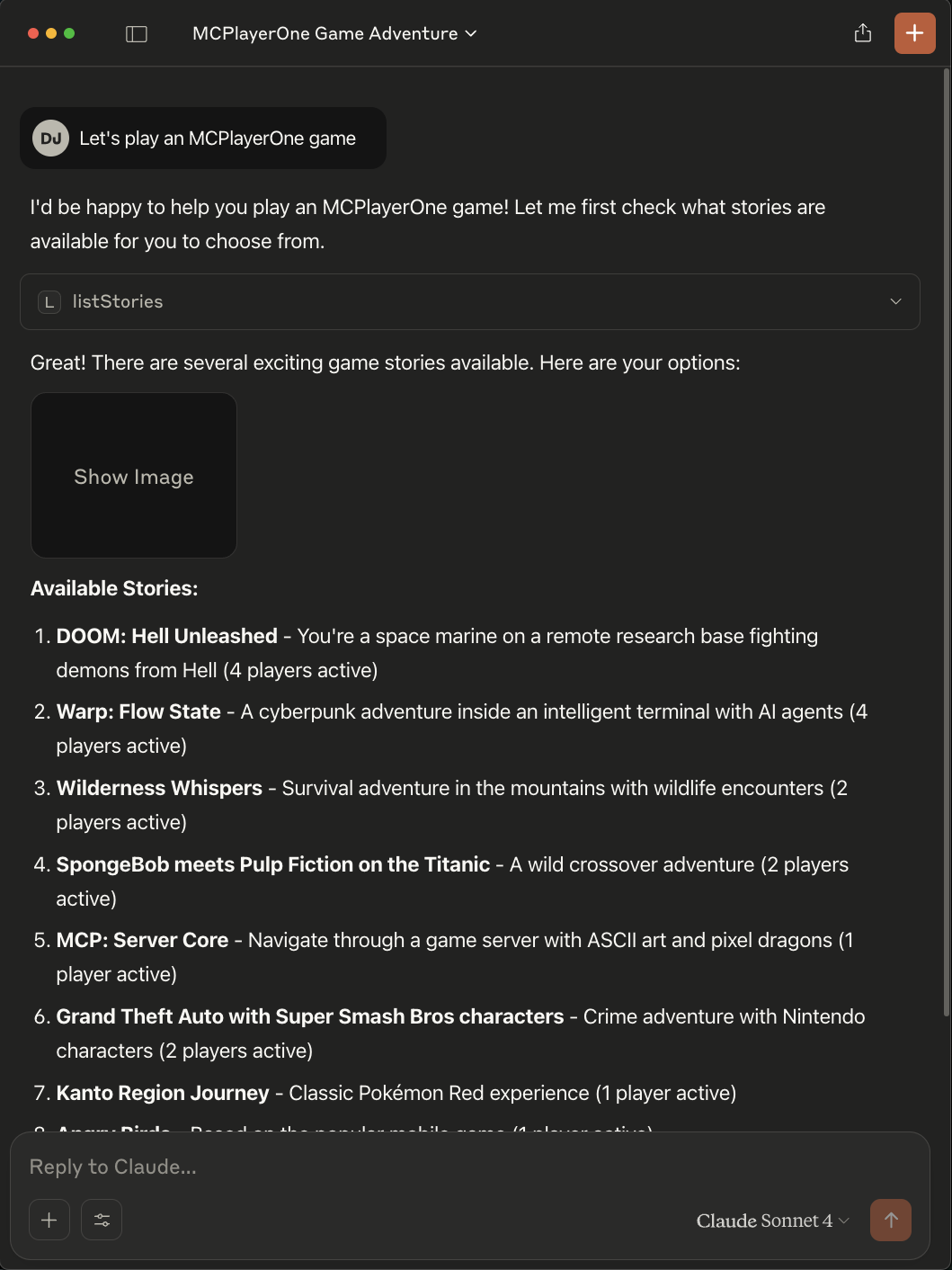
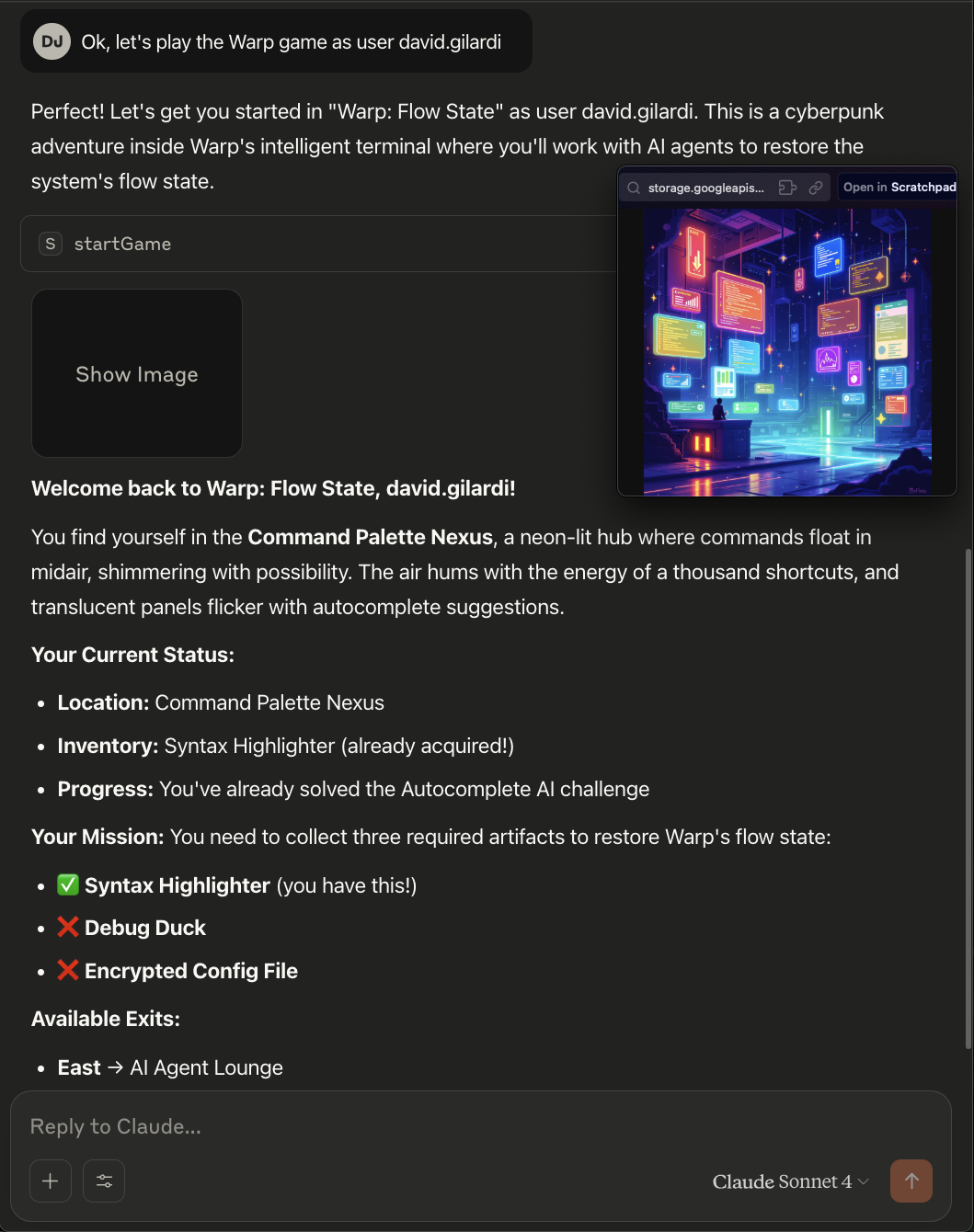
Ahora, solo dile al agente qué juego te gustaría jugar y, opcionalmente, dale un nombre de usuario (el agente elegirá uno por ti si no lo haces).
Crea tu propio juego
También puedes crear y generar tu propio juego para jugar.
Diviértete, apúntalo a un sitio web, quizás a un repositorio de GitHub, o simplemente dale un tema. Cuanto más creativo e imaginativo seas, más interesante será tu juego. Aquí es donde la generación de IA realmente brilla.
Por ejemplo, dile al agente algo como "Creemos un nuevo juego de MCPlayerOne, usa github https://github.com/SonicDMG/mcp-game-server como tema" o "Crea un nuevo juego de MCPlayerOne con un tema basado en DOOM jugando como un marine espacial".
La creación del juego toma aproximadamente 2-3 minutos, así que ten paciencia.
🎲 Juego
🗝️ Herramientas MCP disponibles
Estas son las principales herramientas MCP que tú (o tu agente) puedes usar para jugar. La mayoría de los agentes elegirán acciones según tu entrada u objetivos.
| Nombre de la herramienta | Qué hace |
|---|---|
| listStories | Lista todas las historias de juego disponibles que se pueden jugar. |
| createGame | Genera una nueva historia de juego, ubicaciones, elementos e imagen de portada por tema. |
| startGame | Inicia una nueva sesión de juego para un usuario en una historia específica, o la reanuda si ya comenzó. |
| getGameState | Obtiene el estado actual del juego (jugador y ubicación) para un usuario e historia. |
| lookAround | Obtiene detalles sobre la ubicación actual del jugador (descripción, elementos, salidas). |
| movePlayer | Mueve al jugador a una nueva ubicación (por ID de destino) si es válido. |
| takeItem | Recoge un elemento específico de la ubicación actual. |
| examineTarget | Obtiene una descripción detallada de un elemento o característica específica en la habitación actual. |
| getLeaderboard | Recupera los datos de la tabla de clasificación para una historia específica. |
| getStoryById | Obtiene los detalles de una historia específica por su ID lógico. |
✨ Características
- 🪐 Mundos generados por IA: Crea instantáneamente nuevas historias y laberintos
- 👾 Arte ASCII y Pixel Art: Visuales retro y diseños basados en cuadrículas
- 🌌 Tabla de clasificación: Compite por la gloria, ve ganadores y caídos
- 🚀 Artefactos y habitaciones: Recoge, explora e interactúa
- 🐉 Tema Synthwave: Colores neón, dragones pixelados y más
- 🧑💻 Impulsado por Langflow: Integración de IA de próxima generación
🛠️ Desarrollo local
¿Quieres ejecutar tu propio servidor o contribuir? Sigue estos pasos:
npm install
npm run dev
Abre http://localhost:3000 para jugar localmente.
- Edita
.envpara configurar claves API, endpoints o acceso a herramientas según sea necesario. - Para Astra DB, Langflow u otras integraciones, sigue los comentarios en
.env.example.
Configuración de herramientas MCP (para desarrollo local)
- Para desarrollo local, usa:
http://localhost:3000/api/v1/mcp/sse(endpoint SSE)http://localhost:3000/api/v1/mcp/openapi.json(especificación OpenAPI)
- Todas las herramientas MCP están habilitadas por defecto en el desarrollo local.
🌟 Contribuciones
¡Las solicitudes de extracción son bienvenidas! Abre un problema, haz un fork y ayúdanos a construir los mundos más salvajes del metaverso.
- Dale una estrella al repositorio ⭐
🔗 Enlaces
📑 Referencia de códigos de error y estado (Anexo)
Esta sección documenta los principales códigos de error y estado utilizados por la API del Servidor de Juegos MCP y la interfaz SSE/JSON-RPC, para referencia rápida:
Códigos de estado HTTP
| Código | Cuándo se emite | Significado |
|---|---|---|
| 200 | Solicitud exitosa (puede incluir errores en el cuerpo para la lógica del juego) | OK |
| 400 | Solicitud malformada, parámetros faltantes o inválidos | Solicitud incorrecta |
| 403 | Acción no permitida (p.ej., requisitos no cumplidos) | Prohibido |
| 404 | Recurso no encontrado (jugador, historia, ubicación, elemento) | No encontrado |
| 409 | Conflicto (p.ej., ya existe una historia con el mismo ID) | Conflicto |
| 500 | Error interno del servidor | Error del servidor |
Códigos de error JSON-RPC (SSE/Proxy de herramientas)
| Código | Cuándo se emite | Significado |
|---|---|---|
| -32000 | Error genérico del servidor (fallo del proxy, respuesta no JSON, etc.) | Error del servidor (reservado por JSON-RPC 2.0) |
| -32601 | Herramienta o método no encontrado | Método no encontrado (JSON-RPC 2.0) |
| -32602 | Parámetros inválidos para una herramienta/método | Parámetros inválidos (JSON-RPC 2.0) |
| -32603 | Error interno de JSON-RPC | Error interno (JSON-RPC 2.0) |
Campos de lógica del juego/respuesta
| Campo | Cuándo está presente | Significado |
|---|---|---|
| success | Todas las respuestas | true si la operación fue exitosa, false en caso contrario |
| error | En caso de fallo | Mensaje de error para el usuario/agente |
| hint | A veces | Pista opcional para el usuario/agente |
| needsPlayer | Jugador no encontrado | Indica que el cliente debe llamar a /start |
Notas
- Los errores de lógica del juego (p.ej., respuesta incorrecta, elemento faltante) pueden devolver HTTP 200 con
success: falsey un mensajeerroren el cuerpo. - Los códigos de error JSON-RPC se usan en SSE y proxy de herramientas para compatibilidad con agentes.
- Consulta la especificación OpenAPI para obtener detalles completos del esquema.
¡Gracias por visitarnos, explorador! Que tus laberintos sean retorcidos y tus artefactos brillantes. 🟪🟦🟩🟧🟨🟫