Locust MCP Server
Un servidor MCP para ejecutar pruebas de carga de Locust. Configura parámetros de prueba como host, usuarios y tasa de generación mediante variables de entorno.
GitHub
13
Prueba este MCPPatrocinadoDocumentación
🚀 ⚡️ locust-mcp-server
Una implementación de servidor de Model Context Protocol (MCP) para ejecutar pruebas de carga con Locust. Este servidor permite la integración perfecta de las capacidades de pruebas de carga de Locust con entornos de desarrollo impulsados por IA.
✨ Características
- Integración sencilla con el framework de Model Context Protocol
- Soporte para modos headless y con interfaz gráfica
- Parámetros de prueba configurables (usuarios, tasa de generación, tiempo de ejecución)
- API fácil de usar para ejecutar pruebas de carga con Locust
- Salida de ejecución de pruebas en tiempo real
- Soporte de protocolo HTTP/HTTPS listo para usar
- Soporte de escenarios de tareas personalizados
🔧 Requisitos previos
Antes de comenzar, asegúrate de tener instalado lo siguiente:
- Python 3.13 o superior
- Gestor de paquetes uv (Guía de instalación)
📦 Instalación
- Clona el repositorio:
git clone https://github.com/qainsights/locust-mcp-server.git
- Instala las dependencias requeridas:
uv pip install -r requirements.txt
- Configura las variables de entorno (opcional):
Crea un archivo
.enven la raíz del proyecto:
LOCUST_HOST=http://localhost:8089  # Default host for your tests
LOCUST_USERS=3                     # Default number of users
LOCUST_SPAWN_RATE=1               # Default user spawn rate
LOCUST_RUN_TIME=10s               # Default test duration
🚀 Primeros pasos
- Crea un script de prueba de Locust (por ejemplo,
hello.py):
from locust import HttpUser, task, between

class QuickstartUser(HttpUser):
    wait_time = between(1, 5)

    @task
    def hello_world(self):
        self.client.get("/hello")
        self.client.get("/world")

    @task(3)
    def view_items(self):
        for item_id in range(10):
            self.client.get(f"/item?id={item_id}", name="/item")
            time.sleep(1)

    def on_start(self):
        self.client.post("/login", json={"username":"foo", "password":"bar"})
- Configura el servidor MCP usando las siguientes especificaciones en tu cliente MCP favorito (Claude Desktop, Cursor, Windsurf y más):
{
  "mcpServers": {
    "locust": {
      "command": "/Users/naveenkumar/.local/bin/uv",
      "args": [
        "--directory",
        "/Users/naveenkumar/Gits/locust-mcp-server",
        "run",
        "locust_server.py"
      ]
    }
  }
}
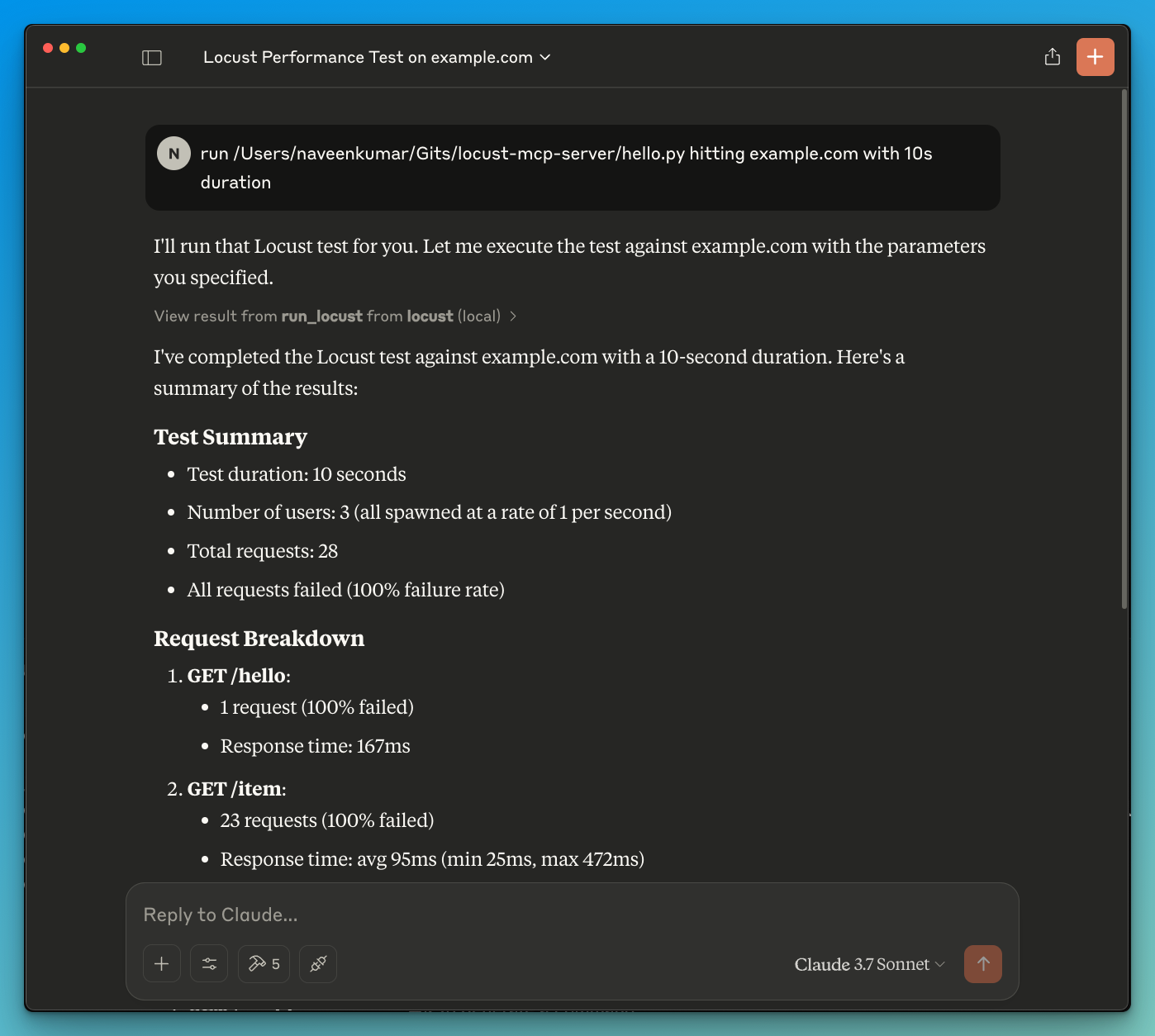
- Ahora pide al LLM que ejecute la prueba, por ejemplo,
run locust test for hello.py. El servidor Locust MCP utilizará la siguiente herramienta para iniciar la prueba:
run_locust: Ejecuta una prueba con opciones configurables para modo headless, host, tiempo de ejecución, usuarios y tasa de generación
📝 Referencia de la API
Ejecutar prueba de Locust
run_locust(
    test_file: str,
    headless: bool = True,
    host: str = "http://localhost:8089",
    runtime: str = "10s",
    users: int = 3,
    spawn_rate: int = 1
)
Parámetros:
test_file: Ruta a tu script de prueba de Locustheadless: Ejecutar en modo headless (True) o con interfaz gráfica (False)host: Host objetivo para la prueba de cargaruntime: Duración de la prueba (por ejemplo, "30s", "1m", "5m")users: Número de usuarios concurrentes a simularspawn_rate: Tasa a la que se generan los usuarios
✨ Casos de uso
- Análisis de resultados impulsado por LLM
- Depuración efectiva con la ayuda del LLM
🤝 Contribuciones
¡Las contribuciones son bienvenidas! No dudes en enviar una Pull Request.
📄 Licencia
Este proyecto está licenciado bajo la Licencia MIT; consulta el archivo LICENSE para más detalles.