ScrAPI MCP Server
Un servidor para extraer páginas web usando la API de ScrAPI.
Documentación

Servidor MCP de ScrAPI




El Servidor MCP de ScrAPI permite que clientes compatibles con MCP extraigan páginas web a través de ScrAPI.
ScrAPI es útil cuando una página necesita una sesión de navegador real, resolución de CAPTCHA, acceso a proxies residenciales, manejo de banners de cookies, renderizado de JavaScript, obtención con geolocalización, o acciones de navegador previas al raspado, como hacer clic y desplazarse.
Contenido
- Características
- Herramientas disponibles
- Requisitos previos
- Clave de API
- Inicio rápido
- Configuración del cliente MCP
- Transporte HTTP
- Servidor alojado en la nube
- Ejemplos de uso
- Comandos del navegador
- Solución de problemas
- Desarrollo
- Licencia
Características
- Extrae cualquier URL válida de
https://ohttp://a través de ScrAPI. - Devuelve HTML sin procesar o Markdown legible.
- Ejecuta comandos del navegador antes de extraer.
- Usa transporte stdio para clientes MCP de escritorio.
- Usa transporte HTTP Streamable para clientes MCP remotos y pruebas locales.
- Se ejecuta con
npx, Docker, Smithery, o desde el código fuente.
Herramientas Disponibles
scrape_url_html
Extrae una URL y devuelve el resultado como HTML.
Úsalo cuando necesites la estructura de la página, enlaces, tablas, metadatos incrustados o análisis posteriores personalizados.
Entradas:
| Nombre | Tipo | Obligatorio | Descripción |
|---|---|---|---|
url | string | Sí | La URL absoluta a extraer. Debe ser una URL válida. |
browserCommands | string | No | Cadena de matriz JSON de comandos del navegador para ejecutar antes de extraer. |
Devuelve:
- Contenido de
text/htmlde la página solicitada. isError: truecon el cuerpo del error de ScrAPI cuando la solicitud ascendente falla.
scrape_url_markdown
Extrae una URL y devuelve el resultado como Markdown.
Úsalo cuando el contenido de texto importe más que la estructura HTML, por ejemplo, extracción de artículos, textos de productos, resúmenes de resultados de búsqueda o análisis de páginas aptos para LLM.
Entradas:
| Nombre | Tipo | Obligatorio | Descripción |
|---|---|---|---|
url | string | Sí | La URL absoluta a extraer. Debe ser una URL válida. |
browserCommands | string | No | Cadena de matriz JSON de comandos del navegador para ejecutar antes de extraer. |
Devuelve:
- Contenido de
text/markdownde la página solicitada. isError: truecon el cuerpo del error de ScrAPI cuando la solicitud ascendente falla.
Requisitos Previos
Elige una de las siguientes opciones de ejecución:
- Node.js 18 o más reciente para
npxo desarrollo local. - Docker para uso basado en contenedores.
- Un cliente compatible con MCP como Claude Desktop, MCP Inspector u otro cliente que admita servidores MCP stdio o HTTP Streamable.
Clave de API
Configura SCRAPI_API_KEY para usar tu cuenta de ScrAPI:
export SCRAPI_API_KEY="your-scrapi-api-key"
PowerShell:
$env:SCRAPI_API_KEY = "your-scrapi-api-key"
Se requiere una clave de API. Sin una, ScrAPI actualmente permite uso gratuito limitado en ciertos dominios con menor concurrencia y prioridad de cola.
Inicio Rápido
Ejecutar con NPX
El transporte predeterminado es stdio, que es el transporte que la mayoría de los clientes MCP de escritorio usan cuando inician un proceso de servidor local.
npx -y @deventerprisesoftware/scrapi-mcp
Con una clave de API:
SCRAPI_API_KEY="your-scrapi-api-key" npx -y @deventerprisesoftware/scrapi-mcp
PowerShell:
$env:SCRAPI_API_KEY = "your-scrapi-api-key"
npx -y @deventerprisesoftware/scrapi-mcp
Ejecutar con Docker
La imagen Docker publicada se inicia en modo HTTP de forma predeterminada y escucha en el puerto 5000.
docker run --rm -p 5000:5000 -e SCRAPI_API_KEY="your-scrapi-api-key" deventerprisesoftware/scrapi-mcp
Punto final MCP:
http://localhost:5000/mcp
Para ejecutar el contenedor como servidor stdio para un cliente MCP local:
docker run -i --rm -e TRANSPORT=stdio -e SCRAPI_API_KEY="your-scrapi-api-key" deventerprisesoftware/scrapi-mcp
Configuración del Cliente MCP
La mayoría de los asistentes de codificación locales usan una de estas dos formas de configuración:
- Stdio: el cliente inicia este paquete con
npxo Docker y se comunica a través de stdin/stdout. - HTTP Streamable: tú inicias este servidor con
TRANSPORT=httpy luego apuntas el cliente ahttp://localhost:5000/mcpo a tu URL implementada.
Cuando un cliente tiene una configuración de tiempo de espera de herramientas, usa un valor cercano a 300000 milisegundos o 300 segundos. ScrAPI puede tardar varios minutos en páginas que requieren resolución de CAPTCHA, renderizado del navegador o múltiples comandos del navegador.
Claude Desktop con NPX
Agrega esto a tu claude_desktop_config.json:
{
  "mcpServers": {
    "ScrAPI": {
      "command": "npx",
      "args": ["-y", "@deventerprisesoftware/scrapi-mcp"],
      "env": {
        "SCRAPI_API_KEY": "your-scrapi-api-key"
      }
    }
  }
}
Claude Desktop con Docker
{
  "mcpServers": {
    "ScrAPI": {
      "command": "docker",
      "args": [
        "run",
        "-i",
        "--rm",
        "-e",
        "SCRAPI_API_KEY",
        "deventerprisesoftware/scrapi-mcp"
      ],
      "env": {
        "SCRAPI_API_KEY": "your-scrapi-api-key"
      }
    }
  }
}
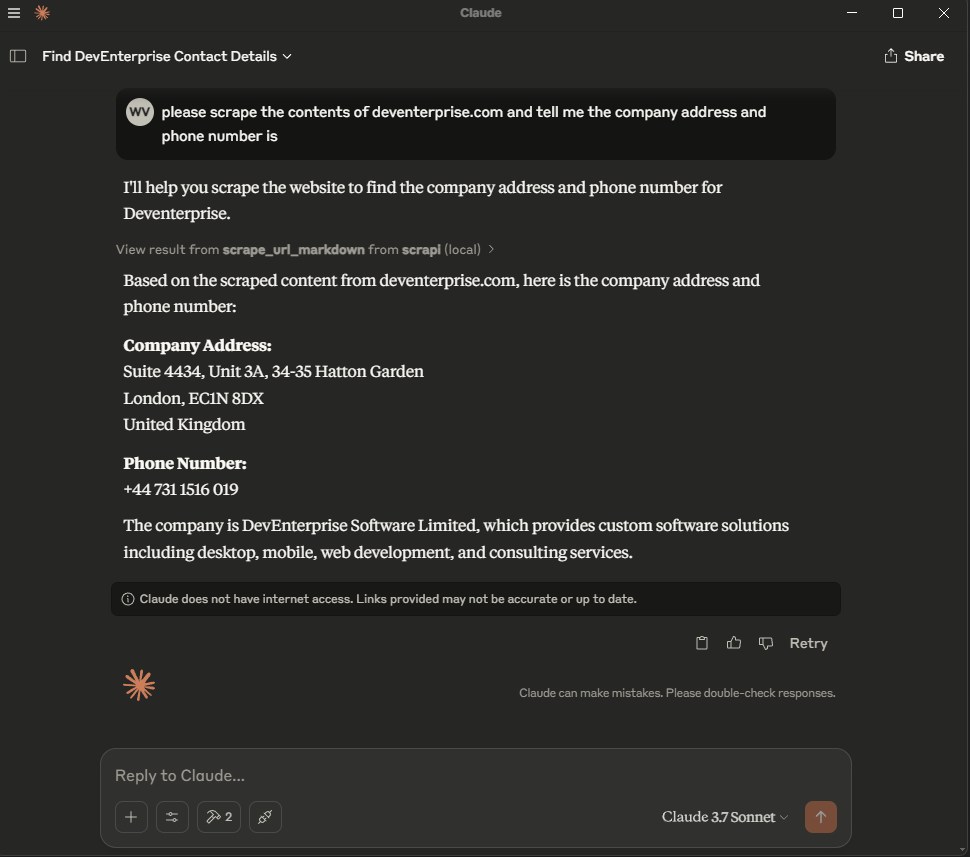
Después de cambiar la configuración, reinicia Claude Desktop. Deberías ver las dos herramientas de ScrAPI disponibles en la lista de herramientas MCP.
Cursor
Cursor admite configuración de proyecto en .cursor/mcp.json y configuración global en ~/.cursor/mcp.json. Consulta la documentación de MCP de Cursor.
Configuración stdio:
{
  "mcpServers": {
    "scrapi": {
      "command": "npx",
      "args": ["-y", "@deventerprisesoftware/scrapi-mcp"],
      "env": {
        "SCRAPI_API_KEY": "${env:SCRAPI_API_KEY}"
      }
    }
  }
}
Configuración HTTP:
{
  "mcpServers": {
    "scrapi": {
      "url": "http://localhost:5000/mcp"
    }
  }
}
Para HTTP, inicia el servidor primero:
TRANSPORT=http PORT=5000 SCRAPI_API_KEY="your-scrapi-api-key" npx -y @deventerprisesoftware/scrapi-mcp
Windsurf
Windsurf Cascade almacena servidores MCP en ~/.codeium/windsurf/mcp_config.json. También puedes agregar servidores desde Windsurf Settings > Cascade > MCP Servers. Consulta la documentación de MCP de Windsurf.
Configuración stdio:
{
  "mcpServers": {
    "scrapi": {
      "command": "npx",
      "args": ["-y", "@deventerprisesoftware/scrapi-mcp"],
      "env": {
        "SCRAPI_API_KEY": "${env:SCRAPI_API_KEY}"
      }
    }
  }
}
Configuración HTTP:
{
  "mcpServers": {
    "scrapi": {
      "serverUrl": "http://localhost:5000/mcp"
    }
  }
}
Windsurf admite serverUrl o url para servidores MCP HTTP remotos. Si tu equipo usa controles MCP empresariales, el ID del servidor en la lista blanca de administración debe coincidir con el nombre de la clave, por ejemplo scrapi.
Kilo Code
Kilo Code almacena la configuración de MCP en el archivo de configuración principal de Kilo. Usa ~/.config/kilo/kilo.jsonc para configuración global, kilo.jsonc en la raíz del proyecto, o .kilo/kilo.jsonc para configuración específica del proyecto. Consulta la documentación de MCP de Kilo Code.
Configuración stdio local:
{
  "mcp": {
    "scrapi": {
      "type": "local",
      "command": ["npx", "-y", "@deventerprisesoftware/scrapi-mcp"],
      "environment": {
        "SCRAPI_API_KEY": "your-scrapi-api-key"
      },
      "enabled": true,
      "timeout": 300000
    }
  }
}
Configuración HTTP remota:
{
  "mcp": {
    "scrapi": {
      "type": "remote",
      "url": "http://localhost:5000/mcp",
      "enabled": true,
      "timeout": 300000
    }
  }
}
En Windows, si npx no se encuentra desde la interfaz de Kilo Code, usa cmd como comando y pasa /c, npx, -y y @deventerprisesoftware/scrapi-mcp como argumentos.
Codex
Codex admite servidores MCP en la CLI y la extensión del IDE. Ambos usan la misma configuración de MCP. De forma predeterminada, Codex la almacena en ~/.codex/config.toml; los proyectos de confianza también pueden usar .codex/config.toml. Consulta la documentación de MCP de Codex.
Agrega un servidor stdio con la CLI de Codex:
codex mcp add scrapi --env SCRAPI_API_KEY="your-scrapi-api-key" -- npx -y @deventerprisesoftware/scrapi-mcp
codex mcp list
Configuración stdio equivalente de config.toml:
[mcp_servers.scrapi]
command = "npx"
args = ["-y", "@deventerprisesoftware/scrapi-mcp"]
startup_timeout_sec = 20
tool_timeout_sec = 300

[mcp_servers.scrapi.env]
SCRAPI_API_KEY = "your-scrapi-api-key"
Configuración HTTP:
[mcp_servers.scrapi]
url = "http://localhost:5000/mcp"
tool_timeout_sec = 300
En la interfaz de terminal de Codex, ejecuta /mcp para confirmar que el servidor está conectado.
VS Code
VS Code almacena la configuración de MCP en .vscode/mcp.json para un espacio de trabajo o en tu perfil de usuario. La clave de nivel superior es servers, no mcpServers. Consulta la referencia de configuración de MCP de VS Code.
Configuración stdio:
{
  "inputs": [
    {
      "type": "promptString",
      "id": "scrapi-api-key",
      "description": "ScrAPI API key",
      "password": true
    }
  ],
  "servers": {
    "scrapi": {
      "type": "stdio",
      "command": "npx",
      "args": ["-y", "@deventerprisesoftware/scrapi-mcp"],
      "env": {
        "SCRAPI_API_KEY": "${input:scrapi-api-key}"
      }
    }
  }
}
Configuración HTTP:
{
  "servers": {
    "scrapi": {
      "type": "http",
      "url": "http://localhost:5000/mcp"
    }
  }
}
Usa los comandos de la Paleta de comandos MCP: Add Server, MCP: List Servers y MCP: Reset Cached Tools para agregar, inspeccionar y actualizar servidores MCP.
Claude Code
Claude Code admite servidores MCP a través de la CLI de claude mcp y el comando /mcp dentro de Claude Code. Consulta la documentación de MCP de Claude Code.
Agrega un servidor stdio:
claude mcp add --transport stdio --env SCRAPI_API_KEY="your-scrapi-api-key" scrapi -- npx -y @deventerprisesoftware/scrapi-mcp
claude mcp list
Agrega un servidor HTTP:
claude mcp add --transport http scrapi http://localhost:5000/mcp
claude mcp list
Para que el servidor esté disponible en todos los proyectos de Claude Code, agrega --scope user antes del nombre del servidor:
claude mcp add --transport stdio --scope user --env SCRAPI_API_KEY="your-scrapi-api-key" scrapi -- npx -y @deventerprisesoftware/scrapi-mcp
Dentro de Claude Code, ejecuta /mcp para confirmar que el servidor está conectado.
Cliente MCP Stdio Genérico
Usa esta forma para clientes que aceptan un comando, argumentos y variables de entorno:
{
  "name": "ScrAPI",
  "command": "npx",
  "args": ["-y", "@deventerprisesoftware/scrapi-mcp"],
  "env": {
    "SCRAPI_API_KEY": "your-scrapi-api-key"
  }
}
Transporte HTTP
Configura TRANSPORT=http para ejecutar el servidor sobre HTTP Streamable.
TRANSPORT=http PORT=5000 SCRAPI_API_KEY="your-scrapi-api-key" npx -y @deventerprisesoftware/scrapi-mcp
PowerShell:
$env:TRANSPORT = "http"
$env:PORT = "5000"
$env:SCRAPI_API_KEY = "your-scrapi-api-key"
npx -y @deventerprisesoftware/scrapi-mcp
El punto final MCP es:
http://localhost:5000/mcp
Variables de entorno:
| Nombre | Predeterminado | Descripción |
|---|---|---|
SCRAPI_API_KEY | Clave predeterminada limitada | Clave de API de ScrAPI utilizada al llamar a la API de extracción de ScrAPI. |
TRANSPORT | stdio | Usa stdio o http. |
PORT | 5000 | Puerto utilizado cuando TRANSPORT=http. |
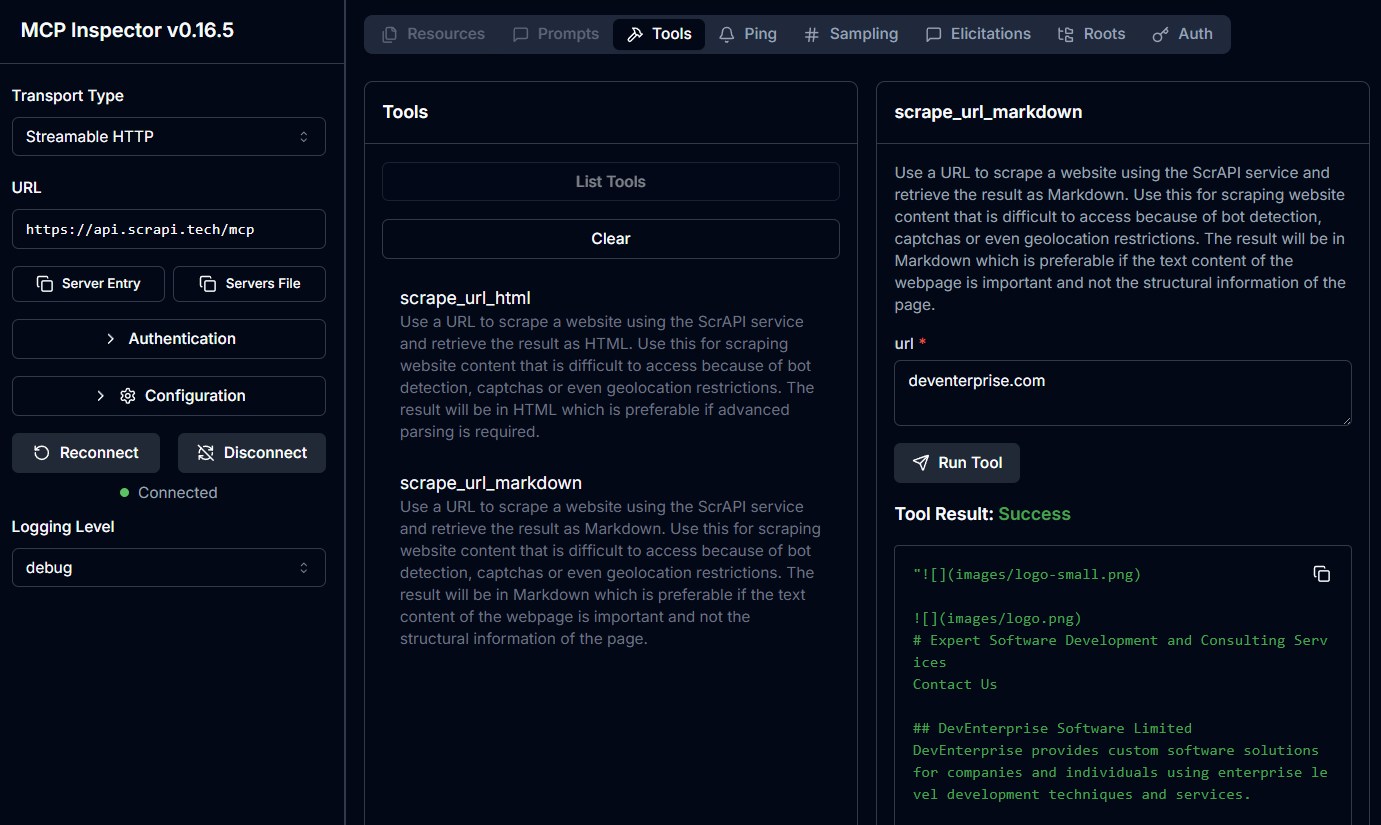
Probar con MCP Inspector
Modo stdio:
npx @modelcontextprotocol/inspector npx -y @deventerprisesoftware/scrapi-mcp
Modo HTTP:
TRANSPORT=http PORT=5000 npx -y @deventerprisesoftware/scrapi-mcp
Luego abre MCP Inspector y conéctate a:
http://localhost:5000/mcp
Servidor Alojado en la Nube
ScrAPI también proporciona puntos finales MCP alojados:
Streamable HTTP: https://api.scrapi.tech/mcp
Los servidores MCP en la nube aún no son compatibles con todos los clientes MCP. Son más útiles para clientes personalizados, MCP Inspector o plataformas que admiten servidores MCP remotos.
Para autenticarte con tu clave de API de ScrAPI, pásala como parámetro de consulta o encabezado de solicitud:
- Parámetro de consulta:
https://api.scrapi.tech/mcp?apiKey=<YOUR_API_KEY> - Encabezado de solicitud:
X-API-KEY: <YOUR_API_KEY>
Ejemplos de Uso
La interacción exacta depende de tu cliente MCP. En la mayoría de los clientes, puedes pedirle al modelo que use la herramienta de ScrAPI o llamar a la herramienta directamente desde un inspector de herramientas.
Extraer una Página como Markdown
Herramienta:
scrape_url_markdown
Argumentos:
{
  "url": "https://example.com"
}
Ejemplo de indicación:
Use ScrAPI to scrape https://example.com as Markdown and summarize the page.
Extraer una Página como HTML
Herramienta:
scrape_url_html
Argumentos:
{
  "url": "https://example.com"
}
Ejemplo de indicación:
Use ScrAPI to scrape https://example.com as HTML and extract every link.
Aceptar Cookies Antes de Extraer
El valor de browserCommands debe ser una cadena que contenga una matriz JSON.
{
  "url": "https://example.com",
  "browserCommands": "[{\"click\":\"#accept-cookies\"},{\"wait\":1000}]"
}
Buscar un Sitio Antes de Extraer Resultados
{
  "url": "https://example.com/search",
  "browserCommands": "[{\"input\":{\"input[name='q']\":\"web scraping\"}},{\"click\":\"button[type='submit']\"},{\"waitfor\":\"#results\"}]"
}
Cargar Más Contenido
{
  "url": "https://example.com/products",
  "browserCommands": "[{\"scroll\":1200},{\"wait\":1000},{\"click\":\"button.load-more\"},{\"waitfor\":\".product-card:nth-child(25)\"}]"
}
Comandos del Navegador
Ambas herramientas admiten comandos opcionales del navegador que interactúan con la página antes de que ScrAPI capture el resultado final.
Los comandos se proporcionan como una cadena de matriz JSON. Se ejecutan con comportamiento similar al humano, como movimiento aleatorio del mouse y velocidad de escritura variable.
| Comando | Formato | Descripción |
|---|---|---|
| Click | {"click": "#buttonId"} | Haz clic en un elemento por selector CSS. |
| Input | {"input": {"input[name='email']": "value"}} | Rellena un campo de entrada. |
| Select | {"select": {"select[name='country']": "USA"}} | Selecciona una opción por valor o texto visible. |
| Scroll | {"scroll": 1000} | Desplázate hacia abajo por píxeles. Usa un valor negativo para desplazarte hacia arriba. |
| Wait | {"wait": 5000} | Espera milisegundos. Máximo: 15000. |
| WaitFor | {"waitfor": "#elementId"} | Espera a que un elemento aparezca en el DOM. |
| JavaScript | {"javascript": "console.log('test')"} | Ejecuta JavaScript personalizado. |
Matriz de comandos legible:
[
  { "click": "#accept-cookies" },
  { "wait": 2000 },
  { "input": { "input[name='search']": "web scraping" } },
  { "click": "button[type='submit']" },
  { "waitfor": "#results" },
  { "scroll": 500 }
]
Escapada como argumento de herramienta MCP:
{
  "url": "https://example.com",
  "browserCommands": "[{\"click\":\"#accept-cookies\"},{\"wait\":2000},{\"input\":{\"input[name='search']\":\"web scraping\"}},{\"click\":\"button[type='submit']\"},{\"waitfor\":\"#results\"},{\"scroll\":500}]"
}
¿Necesitas ayuda para encontrar selectores CSS? Prueba la extensión de navegador Rayrun para seleccionar elementos y generar selectores.
Para más detalles, consulta la documentación de Comandos del Navegador.
Solución de Problemas
El cliente MCP no puede encontrar el servidor
- Confirma que Node.js 18 o más reciente esté instalado si usas
npx. - Confirma que Docker Desktop esté en ejecución si usas Docker.
- Reinicia el cliente MCP después de editar su archivo de configuración.
- Verifica que el comando configurado funcione en una terminal.
Las herramientas aparecen, pero la extracción falla
- Confirma que
SCRAPI_API_KEYesté configurada correctamente. - Prueba la misma URL sin
browserCommands. - Asegúrate de que
browserCommandssea una cadena de matriz JSON, no una matriz JSON sin procesar. - Usa
scrape_url_htmlsi la extracción de Markdown omite la estructura que necesitas. - Las páginas de larga duración, los flujos de CAPTCHA y las páginas con mucho JavaScript pueden tardar varios minutos.
Los comandos del navegador se ignoran
El servidor solo envía comandos del navegador cuando browserCommands se analiza como una matriz JSON. Esto es válido:
{
  "browserCommands": "[{\"click\":\"#accept-cookies\"}]"
}
Esto no es válido para este esquema de herramienta MCP porque es una matriz de objetos, no una cadena:
{
  "browserCommands": [{ "click": "#accept-cookies" }]
}
El punto final HTTP no responde
- Confirma que el servidor se inició con
TRANSPORT=http. - Confirma que el cliente se conecta a
/mcp, no a/. - Confirma que el puerto coincide con
PORT.
Desarrollo
Instala dependencias:
npm install
Ejecuta pruebas:
npm test
Compila:
npm run build
Ejecuta desde el código fuente en modo stdio:
npm run build
node dist/index.js
Ejecuta desde el código fuente en modo HTTP:
TRANSPORT=http PORT=5000 node dist/index.js
Compila la imagen Docker:
docker build -t deventerprisesoftware/scrapi-mcp -f Dockerfile .
O usa el script del paquete:
npm run docker:build
Licencia
Este servidor MCP está licenciado bajo la Licencia MIT. Eres libre de usar, modificar y distribuir el software sujeto a los términos de la Licencia MIT. Consulta LICENSE para más detalles.