MCPOmni Connect
Una puerta de enlace universal de interfaz de línea de comandos (CLI) hacia el ecosistema MCP, que integra múltiples servidores MCP, modelos de IA y protocolos de transporte.
Documentación

Dale a tu agente trabajo real. Mantén el control.
Cada acción se verifica antes de ejecutarse. Cada ejecución sobrevive a un fallo sin rehacer nada en silencio. Cada paso queda registrado.


Documentación · Inicio rápido · Recetario · Pruebas · Cómo se compara · Para tu agente de código · Pregunta a la IA
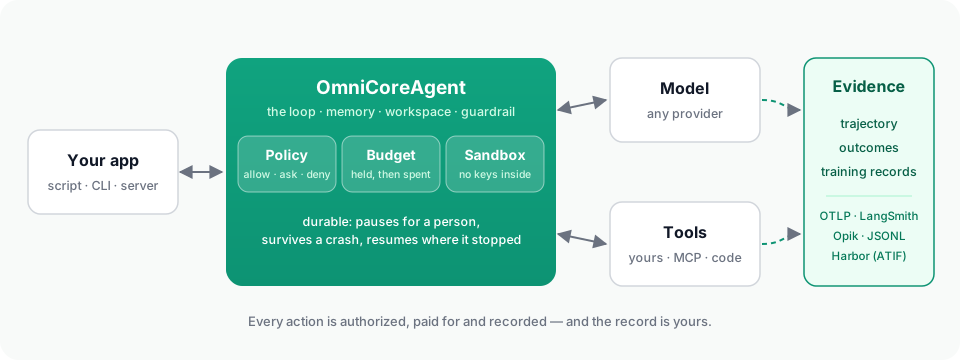
Un modelo no es un agente. El entorno de ejecución que lo rodea es lo que lo hace utilizable en una aplicación: el bucle, las herramientas, la memoria, los archivos en los que trabaja y — una vez que el agente puede hacer cosas reales — la política que dice qué puede hacer, el sandbox en el que se ejecuta su código, el registro que sobrevive a un fallo, el presupuesto que detiene su gasto y la evidencia que una persona puede leer después.
OmniCoreAgent es ese entorno de ejecución y arnés, utilizado a través de un SDK de Python. Un objeto agente, desde un primer script hasta un trabajador en segundo plano gobernado en un servidor — y hasta un benchmark.
| Qué significa aquí | |
|---|---|
| Runtime | Lo que ejecuta y mantiene el trabajo: ejecuciones y su estado, el registro duradero, trabajadores, sandboxes, persistencia. |
| Harness | Lo que rodea al modelo y controla cada paso: el bucle, el contexto, la ejecución de herramientas, aprobaciones, presupuestos, recuperación, telemetría. |
| SDK | Contra lo que escribes: OmniCoreAgent, ToolRegistry, la configuración, los métodos, la CLI y la API HTTP. |
Las palabras se superponen, y "framework de agentes" también es válido; son tres vistas de una misma cosa.
Instalación
pip install omnicoreagent            # Python 3.12–3.14; check with python --version
export LLM_API_KEY=your_api_key      # the key for the provider in model_config
En Python 3.10 o 3.11, la instalación se detiene y lo indica.
Inicio rápido
import asyncio
from omnicoreagent import OmniCoreAgent, ToolRegistry

tools = ToolRegistry()

@tools.register_tool("lookup_order")
def lookup_order(order_id: str) -> dict:
    """Look an order up in the application's own store."""
    return {"order_id": order_id, "status": "shipped", "carrier": "DHL"}

agent = OmniCoreAgent(
    name="support",
    system_instruction="You answer questions about orders, using the tools. Answer in plain text.",
    model_config={"provider": "openai", "model": "gpt-5.6-terra"},
    local_tools=tools,
)

async def main():
    result = await agent.run("Where is order 1042?", session_id="customer-7")
    print(result["response"])

    # Every run is evidence: each step, what the model asked for,
    # and what it received back.
    trajectory = await agent.get_trajectory(result["trace_id"])
    for step in trajectory["steps"]:
        for call in step["tool_calls"]:
            print(step["step"], call["tool_name"], call["arguments"], "->", call["observation"]["content"])

    # What the run turned out to be worth, whenever that is known ...
    await agent.record_outcome(result["run_id"], source="support-lead", reward=1.0, label="resolved")
    # ... and the run as one record for an evaluator or a trainer.
    [record] = await agent.training_records(run_id=result["run_id"])
    print(record["outcomes"])

    await agent.cleanup()

asyncio.run(main())
Lo que imprimió:
Order 1042 has shipped via DHL.
1 lookup_order {'order_id': '1042'} -> {"tool_name": "lookup_order", "args": {"order_id": "1042"}, "status": "success", "data": {"order_id": "1042", "status": "shipped", "carrier": "DHL"}, "message": null}
[{'outcome_id': 'outcome_57a6d81724c44f51b08c540fe83f4694', 'reward': 1.0, 'label': 'resolved', 'source': 'support-lead', 'detail': {}, 'recorded_at': '2026-09-25T18:00:36.136396+00:00'}]
Ese es el bucle completo: el modelo llama a las herramientas (las llamadas independientes se ejecutan en un lote), los resultados vuelven como observaciones estructuradas, la sesión recuerda, los archivos aterrizan en un espacio de trabajo, la salvaguarda de inyección vigila y la ejecución se registra, todo bajo la política predeterminada, que permitió sus herramientas y habría rechazado secretos en bruto, comandos de shell del host y red sin restricciones. Todo lo demás lo añades cuando lo necesitas.
Funciona con OpenAI, Anthropic, Gemini, Groq, DeepSeek, Mistral, Azure,
OpenRouter y Ollama a través de un model_config
(modelos).
Cada ejecución es evidencia
La respuesta final de un agente omite la mayor parte de la historia. El runtime conserva el resto, legible de principio a fin, para cada ejecución:
- Lo que el modelo vio en cada paso — los mensajes y las herramientas que se le ofrecieron — y lo que recibió de vuelta, que no siempre es lo que la herramienta devolvió: un resultado grande se guarda en un archivo y al modelo se le da una vista previa, y la trayectoria muestra ambos.
- Resultados que llegan después. Un pull request fusionado, una revisión, una
ejecución de CI que pasa:
record_outcomelo adjunta a la ejecución que hizo el trabajo. - Registros de entrenamiento.
training_recordsdevuelve cada ejecución terminada como un registro — lo que se envió al modelo, lo que produjo, lo que respondieron las herramientas, la política que lo sirvió, los totales y sus resultados — para un evaluador o un entrenador. - Su propio almacén, y el tuyo. El runtime conserva la evidencia en sí mismo y la exporta a OTLP, LangSmith, Opik o JSONL. Las credenciales que posee nunca se entregan al modelo ni se escriben en un registro.
(Leer una ejecución, Resultados y registros de entrenamiento)
De un script a CI a un benchmark
El mismo archivo de agente se ejecuta sin interfaz — una instrucción, un estado terminal, un código de salida, y el resultado y la trayectoria en disco — para CI y scripts:
omnicoreagent run --agent agent.py \
  --instruction "Fix the failing test in tests/test_orders.py" \
  --approval-mode deny --timeout 900 --output-dir ./out
Y en Harbor, el framework en el que se ejecuta Terminal-Bench: el agente se instala en el contenedor de cada tarea, y cada prueba reporta su recompensa, costo, tokens y una trayectoria en el formato propio de Harbor, junto al de cualquier otro agente.
pip install "omnicoreagent[harbor]"
omnicoreagent harbor doctor -m gpt-5.6-terra
omnicoreagent harbor run -d terminal-bench@2.0 -m gpt-5.6-terra -n 4
omnicoreagent harbor results jobs
(Ejecuciones sin interfaz, Harbor)
Lo que la producción necesita, y dónde está
| Necesidad | Qué hace el runtime | Leer |
|---|---|---|
| Herramientas | Tus funciones de Python, y servidores MCP (stdio, SSE, HTTP transmisible, OAuth) a través de un catálogo; lotes paralelos; detección de bucles por firma de llamada; recuperación de herramientas para conjuntos grandes. | Herramientas locales, MCP |
| Modo código | Una herramienta run_code: el modelo escribe un programa corto de Python que llama a tus herramientas, itera y calcula, ejecutado en Monty — cada llamada dentro de él gobernada y trazada, y una llamada que necesita aprobación pausa el propio programa. | Modo código |
| Gobernanza | Una política — permitir, preguntar, denegar — sobre cada capacidad que tiene el agente: cada herramienta, cada servidor MCP, el sandbox, la red, la delegación, las ejecuciones en segundo plano. ask pausa la ejecución para una persona. Con hash, para que no pueda ampliarse en tiempo de ejecución. | Modelo de seguridad, Políticas, Aprobaciones |
| Ejecución | Una herramienta execute cuyos comandos se ejecutan en un sandbox — Docker, E2B, Modal, Daytona, Vercel, el tuyo propio, o local donde un contenedor ya es el límite — sin red a menos que la política lo permita, sin ninguna de las claves y tokens de tu proceso, y con el espacio de trabajo conectado hacia adentro y hacia afuera. Un sandbox que muere se reporta y se reemplaza. | Ejecución, Proveedores |
| Ejecuciones duraderas | Cada ejecución tiene un registro: su paso, sus llamadas a herramientas, sus aprobaciones. Una ejecución se pausa por una aprobación o una recarga y se reanuda donde se detuvo; con un almacén de memoria duradero, una ejecución cuyo proceso murió continúa desde su punto de control; una llamada que fue interrumpida nunca se repite en silencio. | Ejecuciones duraderas |
| Presupuestos | Límites en dólares, tokens, llamadas, segundos de sandbox, por solicitud, sesión, agente o aplicación, por día o mes; cada llamada de modelo se cotiza y se retiene antes de realizarse; una ejecución que se agota espera a una persona. | Presupuestos |
| Memoria y contexto | Memoria de sesión en memoria, Redis, Postgres/SQL o MongoDB; contexto gestionado antes de cada llamada de modelo; salidas grandes de herramientas descargadas a archivos del espacio de trabajo. | Memoria, Contexto, Almacenes y escala |
| Sub-agentes | Trabajadores generados por el líder bajo la misma política y presupuestos, cada uno con su propio rastro vinculado al del padre. | Sub-agentes |
| Trabajo en segundo plano | Tareas programadas y manuales con un almacén de tareas duradero (Redis, MongoDB, SQL), arrendamientos, reintentos, recuperación después de un reinicio, una ejecución por tarea a la vez. | Agentes en segundo plano |
| Telemetría | Un rastro por ejecución, legible de principio a fin — cada llamada de modelo, llamada de herramienta, comando de sandbox, aprobación y decisión de presupuesto — completo por defecto (capture: "default" deja fuera los prompts del modelo), datos personales redactados del registro (nunca de la ejecución); exportado a OTLP, LangSmith, Opik o JSONL. | Leer una ejecución, Telemetría, Privacidad |
| Servicio | omniserve run --agent agent.py: REST y SSE para ejecuciones, aprobaciones, presupuestos, tareas en segundo plano, rastros; autenticación, límites de tasa, métricas; tus propias páginas junto a la API. | OmniServe |
Un agente gobernado, en una configuración:
agent = OmniCoreAgent(
    name="steward",
    system_instruction="...",
    model_config={"provider": "openai", "model": "gpt-5.6-terra"},
    mcp_tools=[{"name": "github", "transport_type": "streamable_http", "url": "https://api.githubcopilot.com/mcp/",
                "headers": {"Authorization": "Bearer ..."}}],
    agent_config={
        "governance_config": {
            "enabled": True,
            "policy": {"name": "steward", "mode": "strict", "rules": {
                "allow": [{"rule_id": "read", "capability": "tool.mcp.call",
                           "target": {"mcp_server": "github", "tool_name": "get_file_contents"}},
                          {"rule_id": "sandbox", "capability": "sandbox.execute"},
                          {"rule_id": "commands", "capability": "process.exec",
                           "constraints": {"sandbox_required": True}},
                          # The manifest asks for the network; a strict policy must allow it.
                          {"rule_id": "network", "capability": "sandbox.network.configure"}],
                "ask":   [{"rule_id": "pr", "capability": "tool.mcp.call",
                           "target": {"mcp_server": "github", "tool_name": "create_pull_request"}}],
                "deny":  [{"rule_id": "merge", "capability": "tool.mcp.call",
                           "target": {"mcp_server": "github", "tool_name": "merge_pull_request"}}],
            }},
            "budgets": {"application_id": "steward",
                        "application": [{"meter": "model_cost_usd", "limit": 5.0, "window": "day"}],
                        "request": [{"meter": "model_cost_usd", "limit": 1.0}]},
            "sandbox_config": {"provider": "e2b"},
            "sandbox_manifest": {"network_policy": {"default": "allow"}},
        },
    },
    telemetry_config={"capture": "full"},
)
Pruebas, no una lista de características
El runtime se prueba ejecutando trabajo real y difícil sobre él y dañándolo desde
afuera. Un administrador de repositorio para este repositorio — un agente en segundo plano
en un servidor que reproduce pruebas fallidas en un sandbox, las corrige detrás de la
aprobación de una persona, abre pull requests que enlazan su propio rastro, clasifica sus
propios fallos en trabajo y se ejecuta en un horario — es su primera aplicación
(apps/steward/). Las pruebas en Harbor son la segunda: tareas
construidas para que solo puedan aprobarse mediante lo que prueban, y tareas construidas
para salir mal, cada una verificada leyendo cómo terminó la prueba, no solo su recompensa.
Lo que se rompió en el camino — 54 hallazgos, cada uno con lo que pasó, por qué y
qué lo arregló — es el
informe de prueba de producción.
Cómo se compara esto con el OpenAI Agents SDK, LangGraph, Pydantic AI, el Claude Agent SDK y CrewAI — incluyendo dónde son más fuertes — está capacidad por capacidad, cada celda con fuente.
Instala solo lo que usas
pip install "omnicoreagent[serve]"        # OmniServe REST/SSE
pip install "omnicoreagent[docker]"       # Docker sandboxes; e2b, modal, daytona, vercel likewise
pip install "omnicoreagent[redis]"        # Redis memory and task store; postgres, mongodb likewise
pip install "omnicoreagent[s3]"           # S3 / R2 workspace storage
pip install "omnicoreagent[tokenizer]"    # token-exact context and budget estimates
pip install "omnicoreagent[otel]"         # OTLP export; langsmith, opik likewise
pip install "omnicoreagent[codemode]"     # code mode, in Monty
pip install "omnicoreagent[harbor]"       # Harbor and Terminal-Bench trials
pip install "omnicoreagent[all]"          # every extra above except harbor
¿Usas un agente de código con IA?
Apúntalo a AGENTS.md — un mapa de este repositorio para agentes:
qué vive dónde, cómo ejecutar las pruebas y qué página explica qué parte.
La documentación sirve llms.txt, copiar-como-markdown y un servidor MCP por la misma
razón (usa la documentación con herramientas de IA).
Recetario
Primeros pasos · Aplicaciones reales · Agentes en segundo plano · OmniServe · Producción
Desarrollo
git clone https://github.com/omnirexflora-labs/omnicoreagent.git && cd omnicoreagent
uv venv && source .venv/bin/activate
uv sync --all-extras --all-groups --locked
pytest tests/
Ver CONTRIBUTING.md. Las notas de diseño y los planes viven en
engineering/.
Licencia y autor
MIT — ver LICENSE. Construido por Abiola Adeshina (@abiorhmangana), con OmniMemory y OmniDaemon en la misma familia. Construido sobre LiteLLM, FastAPI y Pydantic.