Digma
A code observability MCP enabling dynamic code analysis based on OTEL/APM data to assist in code reviews, issues identification and fix, highlighting risky code etc.
Digma Code Observability MCP Server
A Model Context Protocol (MCP) server implementation for enabling agents to access observability insights using Digma for code observability and dynamic code analysis
Key Features 🚀
- 🗣️ Observability-assisted code reviews: Check the PR branch for any issues discovered by pre-prod observability.
- 🔎 Find code inefficiencies with dynamic code analysis: Identify issues in the code/queries that are slowing the app down
- 🔭 Utilize code runtime usage data from distributed tracing: Check for breaking changes or generated relevant tests
Example prompts 💬
help me review the code changes in this branch by looking at related runtime issuesI want to improve the performance of this app. What are the three most severe issues I can fix?I'm making changes to this function, based on runtime data. What other services and code would be affected?Are there any new issues in this code based on the Staging environment?Which database queries have the most impact on the application performance?
See it in action 📺
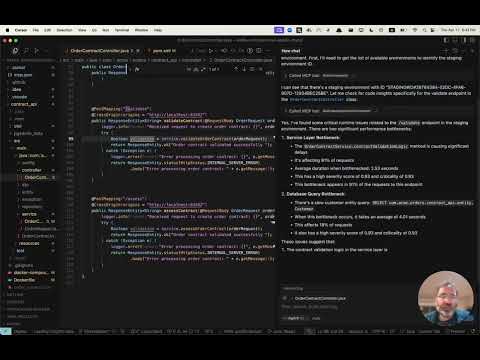
Get early access 👀
Digma pre-processes your observability data to identify issues, track code performance and runtime data - for dynamic code analysis. Visit our MCP page to sign up for early access to our MCP server.
Installation ⚙️
Configure your MCP Client (Claude, Cursor, etc.) to include the Digma MCP.
The Digma deployment includes the MCP SSE server. You can configure it using its URL in your client, or use an MCP tool such as SuperGateway to run it as a command tool.
The MCP URL path is composed of the Digma API Key as follows:
https://<DIGMA_API_URL>/mcp/<DIGMA_API_TOKEN>>/sse
Example MCP XML
If your client supports SSE servers, you can use the following syntax:
{
  "mcpServers": {
    "digma": {
    "url": "https://<DIGMA_API_URL>/mcp/DIGMA_API_TOKEN>/sse",

      }
    // ... other servers might be here ...
  }
}
To use the MCP server as a command tool, use the SuperGateway tool to bridge to the URL as seen below:
{
  "digma": {
    "command": "npx",
    "args": [
      "-y",
      "supergateway",
      "--sse",
      "https://<DIGMA_API_URL>/mcp/DIGMA_API_TOKEN>/sse"
    ]
  }
}
Using rules 👨💼
The agent is autonomous and selects when to use the data provided by Digma as needed, however, some clients allow setting rules and policies to set a more structured process.
Here is an example rules file which you can add to your cursor .cursor/rules directory
# Digma Memory File - Code Review Instructions

## Runtime Analysis Settings
- Environment: TEST

## Code Review Protocol
1. For any code or branch review request:
   - Get the list of changed files and methods in the current branch using `git diff`
   - Check for ALL runtime issues in TEST environment (not just for the method in context)
   - Check if any runtime issue may be related to the changed code
   - Check the runtime usage of the changed methods (based on the `git diff`)
   - Check if any of the changed methods (based on the `git diff`) have a high risk based on their performance impact
   - Synthesize the data with standard code review analysis


## Note
This file is used by the AI assistant to maintain consistent review protocols across sessions.
License 📜
MIT License. See LICENSE file.
Related Servers
Scout Monitoring MCP
sponsorPut performance and error data directly in the hands of your AI assistant.
Alpha Vantage MCP Server
sponsorAccess financial market data: realtime & historical stock, ETF, options, forex, crypto, commodities, fundamentals, technical indicators, & more
Tidymodels MCP Server
An MCP server for accessing tidymodels GitHub information and generating code.
MCP Agentic AI Crash Course with Python
A comprehensive crash course on the Model Context Protocol (MCP), covering everything from basic concepts to building production-ready MCP servers and clients in Python.
MCP Image Placeholder Server
Generates placeholder images from various providers like placehold.co and lorem-picsum.
Replicate Ideogram V3 Balanced
Generate images using the Ideogram V3 Balanced model on Replicate.
MCPOmni Connect
A universal command-line interface (CLI) gateway to the MCP ecosystem, integrating multiple MCP servers, AI models, and transport protocols.
Chronos Protocol
A robust MCP server that eliminates temporal blindness in AI coding agents through intelligent time tracking, persistent memory, and complete session traceability.
GXtract
GXtract is a MCP server designed to integrate with VS Code and other compatible editors. It provides a suite of tools for interacting with the GroundX platform, enabling you to leverage its powerful document understanding capabilities directly within your development environment.
mcp-backpressure
Backpressure and concurrency control middleware for FastMCP. Prevents server overload from LLM tool-call storms with configurable limits and JSON-RPC errors.
MCP Hangar
Kubernetes-native registry for managing multiple MCP servers with lazy loading, health monitoring, and RBAC
PixelLab
Generate and manipulate pixel art using the PixelLab API.