drawdb-mcp
DrawDB + MCP server
This fork of DrawDB extends the original with AI assistant integration via Model Context Protocol (MCP). AI assistants like Claude can now create, modify, and manage database diagrams programmatically through a WebSocket API.
Demo Video
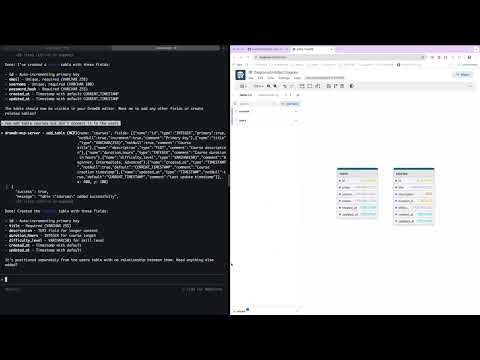
Watch how to design database schemas using natural language with Claude AI.
Architecture:
- apps/gui: Original React-based DrawDB frontend
- apps/backend: NestJS MCP server that enables AI assistants to control the diagram editor
- Built with Turborepo and pnpm workspaces
Getting Started
Quick Start with Docker (Recommended)
The easiest way to get started is using Docker:
docker run \
  --name drawdb-mcp \
  -p 8080:80 \
  -p 3000:3000 \
  --restart unless-stopped \
  ghcr.io/anatoly314/drawdb-mcp:latest
Then:
- Open GUI: http://localhost:8080
- Connect Claude Code to the MCP server:
claude mcp add --transport http drawdb-mcp http://127.0.0.1:3000
Now Claude can create and modify database diagrams for you!
See GHCR_DEPLOYMENT.md for available tags and advanced usage.
Local Development
Prerequisites
- Node.js 20+
- pnpm 8.15.0+ (install via
npm install -g pnpm)
Start both GUI and backend:
git clone https://github.com/anatoly314/drawdb-mcp
cd drawdb-mcp
pnpm install
pnpm dev
Start GUI only:
pnpm gui:dev
# Access at http://localhost:5173
Start backend only:
pnpm backend:dev
# WebSocket at ws://localhost:3000/remote-control
Build
Build both applications:
pnpm install
pnpm build
Build specific app:
pnpm build --filter=gui
pnpm build --filter=backend
Connect Claude Code to MCP Server
When running locally, connect Claude Code:
claude mcp add --transport http drawdb-mcp http://127.0.0.1:3000
The frontend automatically connects to the backend via WebSocket for real-time updates.
Docker Deployment
See DOCKER_BUILD.md for detailed build instructions.
Build with Docker Compose:
docker-compose up --build
# Access at http://localhost:8080
Or build directly:
docker build -t drawdb-mcp:local .
docker run -p 8080:80 -p 3000:3000 drawdb-mcp:local
The Docker image includes both frontend and backend. WebSocket is proxied through Nginx.
Updating to New Versions
When updating to a new version (whether via Docker or local development), you must perform a hard refresh in your browser to clear the cached frontend JavaScript:
- Windows/Linux:
Ctrl + Shift + RorCtrl + F5 - macOS:
Cmd + Shift + R
Without a hard refresh, the browser may continue using the old cached frontend code even though the backend has been updated, which can cause errors or unexpected behavior.
Features
Export & Import
The MCP server provides tools for exporting and importing database diagrams in multiple formats:
Export Formats:
- SQL DDL: Export database-specific SQL statements (PostgreSQL, MySQL, SQLite, MariaDB, MSSQL, Oracle)
- DBML: Export to Database Markup Language (human-readable, database-agnostic format)
- JSON: Export complete diagram state for backup/restore
Import Formats:
- DBML: Import database schemas from DBML format
- JSON: Import complete diagram state
Available MCP Tools:
export_sql- Export diagram as SQL DDL for current database typeexport_dbml- Export diagram as DBMLimport_dbml- Import database schema from DBMLexport_diagram- Export complete diagram as JSONimport_diagram- Import complete diagram from JSON
See CLAUDE.md for complete list of available MCP tools and their usage.
Related Servers
Scout Monitoring MCP
sponsorPut performance and error data directly in the hands of your AI assistant.
Alpha Vantage MCP Server
sponsorAccess financial market data: realtime & historical stock, ETF, options, forex, crypto, commodities, fundamentals, technical indicators, & more
Context7 Python
A Python server for searching libraries and retrieving documentation, with support for HTTP/HTTPS proxies.
Remote MCP Server (Authless)
An example of a remote MCP server without authentication, deployable on Cloudflare Workers.
MCP WordPress Post Server
Manage WordPress posts and upload images directly from file paths.
Neovim MCP Server
Connects any MCP client to the Neovim editor for seamless integration and control.
BuiltWith
Query the BuiltWith API to discover the technology stacks of websites. Requires a BuiltWith API key.
Remote MCP Server (Authless)
A remote MCP server deployable on Cloudflare Workers that operates without authentication.
flutter-skill
AI-powered E2E testing for 10 platforms. 253 MCP tools. Zero config. Test Flutter, React Native, iOS, Android, Web, Electron, Tauri, KMP, .NET MAUI from natural language.
shadcn/ui MCP
Provides context about shadcn/ui components, including structure, usage, and installation for React, Svelte, and Vue.
Vega-Lite
Generate visualizations from fetched data using the VegaLite format and renderer.
Dify Workflows
An MCP server for executing Dify workflows, configured via environment variables or a config file.