SynClub MCP Server
Official SynClub server for AI generation, including text-to-speech, voice cloning, video, and image creation.
Features
- Text-to-Speech: Convert text to natural speech with multiple voice options
- Voice Cloning: Clone voices from audio samples
- Video Generation: Generate videos from text prompts or images
- Image Generation: Create images from text descriptions
- Image Recognition: Analyze and understand image content
- Background Removal: Automatically remove backgrounds from images
- HD Image Restoration: Enhance image quality and resolution
- AI Search: Intelligent search with AI-powered results
- Japanese TTS: Specialized Japanese text-to-speech
Quick Start
1. Install uv (Python Package Manager)
# macOS/Linux
curl -LsSf https://astral.sh/uv/install.sh | sh

# Windows (PowerShell)
powershell -c "irm https://astral.sh/uv/install.sh | iex"

# Or via package managers
# brew install uv
# pip install uv
2. Get Your API Key
Obtain your API key from your account information page on the SynClub server website.
3. Configure Your MCP Client
Claude Desktop
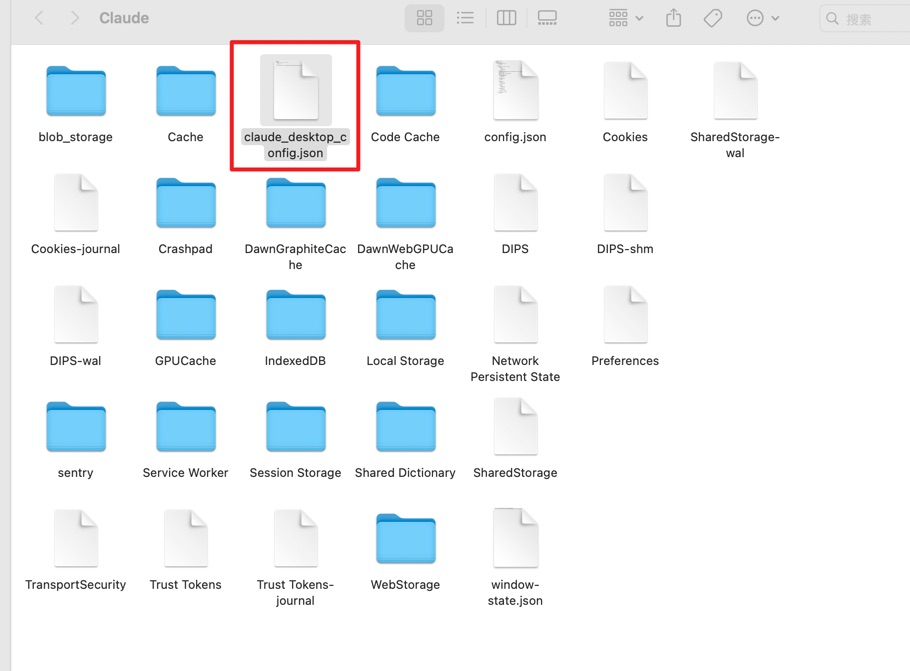
Step 1: find your config file You can find your config file at:
- macOS:
~/Library/Application Support/Claude/claude_desktop_config.json - Windows:
%APPDATA%\Claude\claude_desktop_config.json
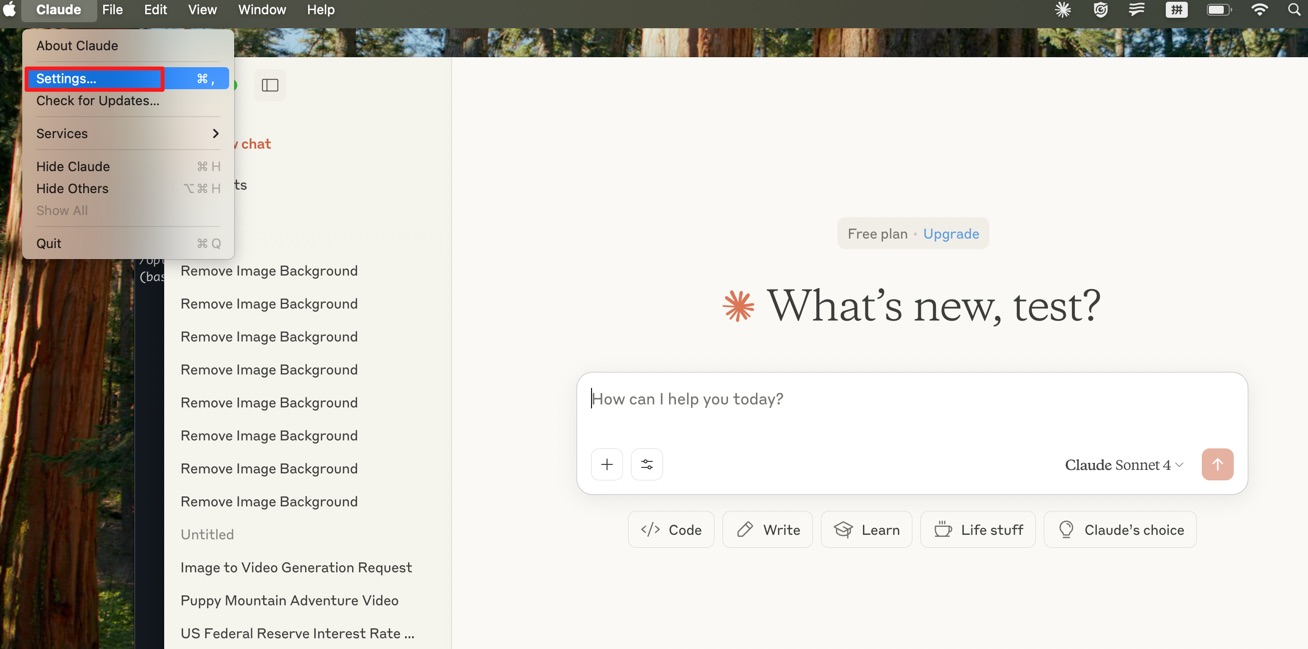
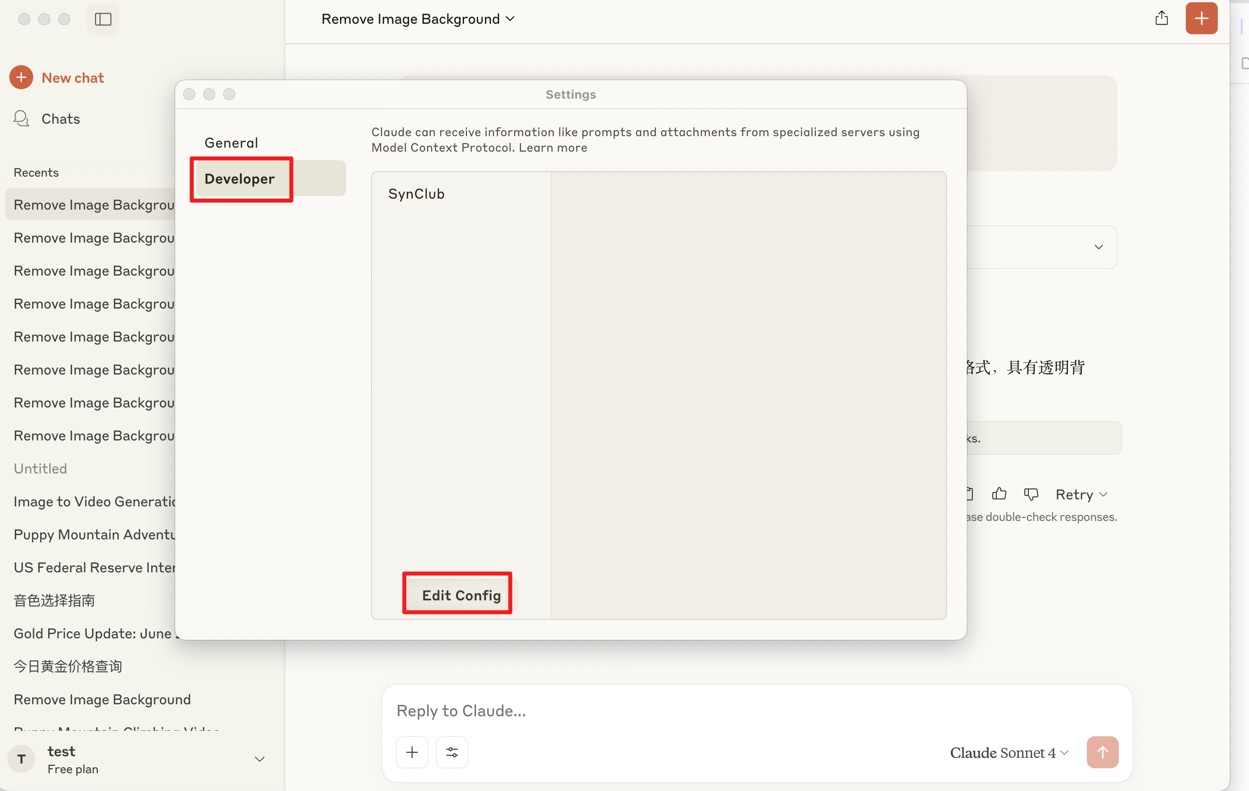
Or you can find your config file in claude setting:
Click claude setting:
Edit config file:
Open config file:
Step 2: append this config to your own file
{
  "mcpServers": {
    "SynClub": {
      "command": "uvx",
      "args": [
          "synclub-mcp"
      ],
      "env": {
          "SYNCLUB_MCP_API": "your api key"
      }
    }
  }
}
If you have any problem with the command uvx, try to use the command which uvx to find the absolute path of uvx and replace the command in the config file.
step 3:save and restart your claude application
- important:make sure to restart claude that your config file will update and check the connection in claude developer
Available Tools
| Tool Name | Description |
|---|---|
minimax_text_to_audio | Convert text to speech with customizable voice settings |
minimax_generate_video | Minimax generate videos |
minimax_voice_clone | Clone voices from audio files |
minimax_text_to_image | Generate images from text prompts |
kling_generate_text_to_video | Start generate videos from text descriptions using Kling models |
kling_query_ttv_task | Get the generate result from generate_text_to_video tool |
kling_generate_image_to_video | Start generate videos from images with text prompts using Kling models |
kling_query_gttv_task | Get the generate result from generate_image_to_video tool |
openai_image_recognition | Analyze and recognize image content |
openai_edit_image | Edit images based on a text prompt |
remove_bg | Automatically remove image backgrounds |
hd_restore | Enhance image quality and resolution |
openai_generate_image | Generate images using alternative models |
ai_search | Perform AI-powered search queries |
japanese_tts | Japanese text-to-speech conversion |
generate_comic_story | Generate a comic story based on input story theme |
generate_comic_chapters | Generate comic story chapters based on novel input, character info and chapter number |
generate_comic_image_prompts | Generate image prompts based on comic story chapter and character info |
edit_comic_story | Edit comic story based on edit prompt and input story. |
edit_comic_chapters | Edit comic chapters based on edit prompt and input chapters. |
ugc_tti | Generate a anime character based on a text prompt |
anime_pose_align | Generate a pose align image based on an anime character image |
anime_comic_image | Generate a comic image based on prompt |
flux_edit_image | edit image based on image url and image prompts |
google_nano_tti | generate image based on text prompt using google nano model |
google_nano_edit_image | Edit and modify existing images based on text prompts using Google Nano banana model |
google_nano_edit_image_highlight_feature | Generate specialized images based on text prompts using Google Nano model for 4 specific highlight features |
sora_generate_text_to_video_ | Generate video based on text prompt using sora-2 api |
veo_generate_text_to_video | Generate video based on text prompt using google veo api |
sora_generate_text_to_video_ | Generate video based on text prompt using google veo api |
flux_pro_tti | Generate image based on text prompt using flux pro model |
flux_pro_edit_image | Generate image based on text prompt and image using flux pro model |
google_nano_banana_pro_generate_image | Generate image based on text prompt and image using Google Nano banana pro model |
Environment Variables
SYNCLUB_MCP_API: Your API key (required)
License
This project is licensed under the MIT License - see the LICENSE file for details.
From
Related Servers
commercetools MCP Essentials
An MCP server and toolkit for integrating with the commercetools platform APIs.
UCM (Universal Commerce Marketplace)
API marketplace giving AI agents instant access to 100 services (web search, image gen, code sandbox, TTS, NASA, recipes, Pokemon, and 90+ more) through a single MCP server. One API key, $1.00 free credits, 87 free services.
Modal MCP Server
Interact with Modal volumes and deploy Modal applications from within Cursor.
MCP Prometheus
Access Prometheus metrics and queries through standardized MCP interfaces.
Shopify
Integrates with the Shopify API to retrieve and manipulate product information.
KiotViet SDK
Access the KiotViet API, a popular sales and inventory management platform. Manage products, categories, customers, and orders with automatic authentication.
Datadog MCP Server
An MCP server for the Datadog API, allowing you to search logs and traces.
LlamaCloud
Connect to and manage data indexes on the LlamaCloud platform.
DMARC MCP Server
DMARC MCP Server provides programmatic read only access to DNS and email authentication data so developers and AI agents can validate DMARC, SPF, and DKIM configurations directly inside MCP compatible tools.
MCP Spotify AI Assistant
An AI assistant that controls Spotify features like playback, playlists, and search using the Model Context Protocol (MCP).